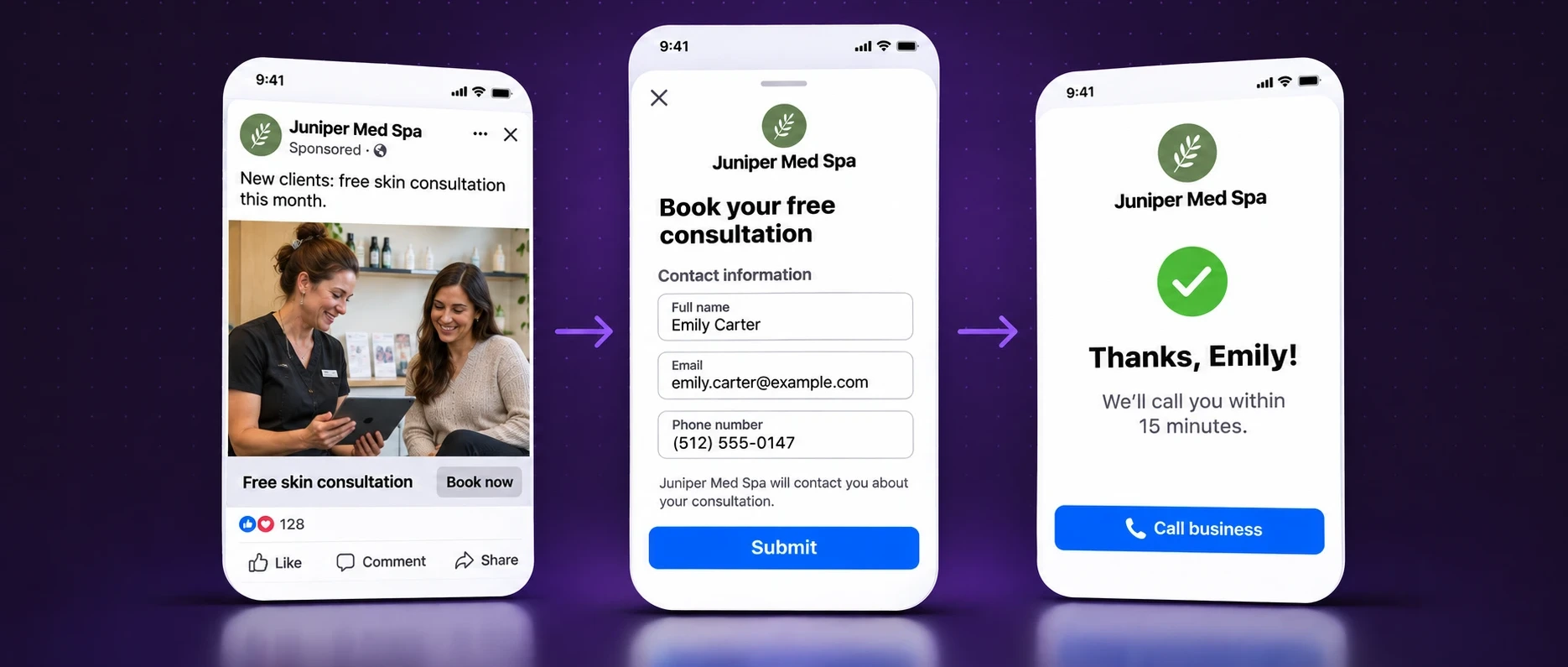












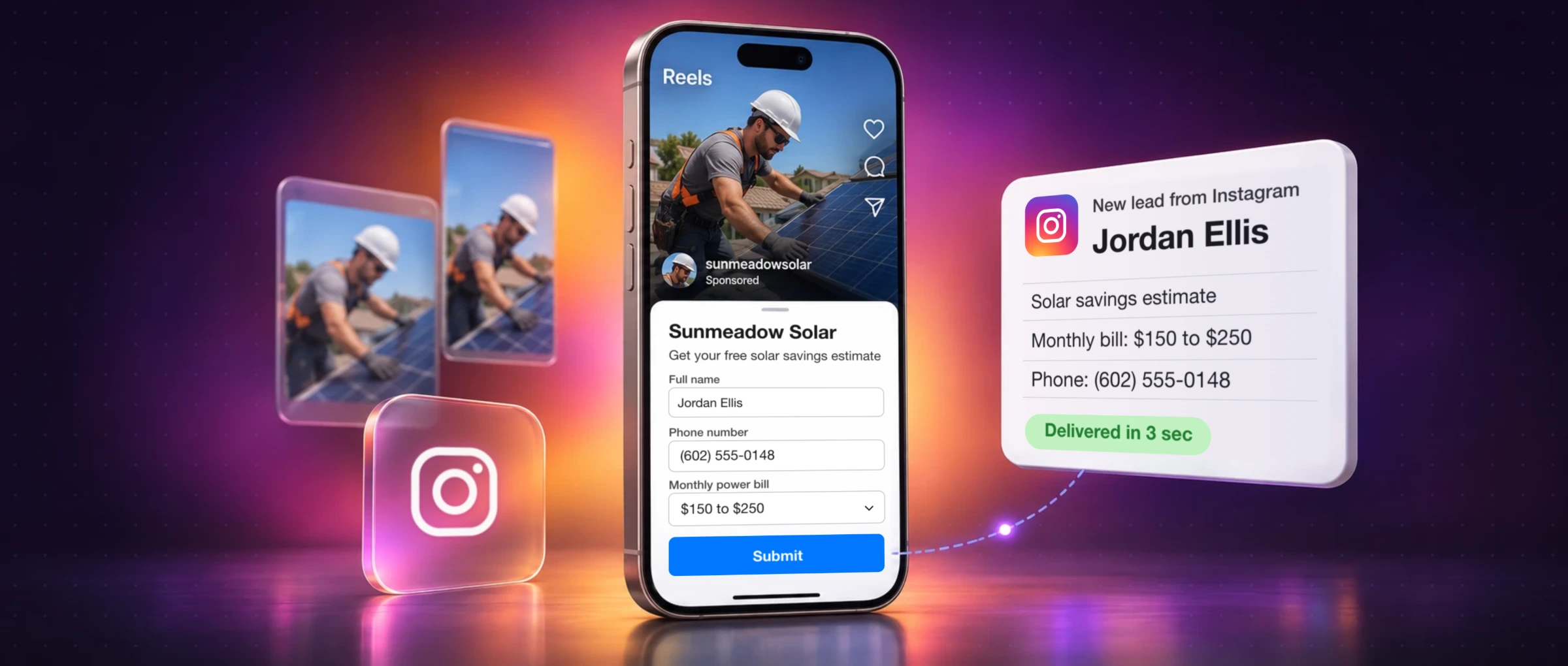
Instagram lead ads let someone send you their name, email and phone number without leaving the app. They tap the button, a short form opens with their details already filled in, and two taps later you have a lead. No website, no landing page, no login.
The catch most advertisers find out too late: Instagram never tells you about it. The lead is saved on your Facebook Page, and it sits there until someone goes looking. This guide covers both halves: how to build an Instagram lead ad that people finish, and how to get each lead to someone who calls back.
To run Instagram lead ads, open Meta Ads Manager, create a campaign with the Leads objective, choose Instant forms as the conversion location, keep Instagram in your placements and pick your Instagram account at the ad level. Build the form, send a test lead and publish. Every lead is stored on the Facebook Page that owns the form, so connect that Page to your CRM, email or phone alerts before you spend.
How Instagram lead ads work
An Instagram lead ad is an ordinary Feed, Stories or Reels ad with one difference: the button opens an instant form inside Instagram instead of a website. It's the same form Facebook uses, built once in Ads Manager, and it can run on both apps at the same time.
 Your Facebook PageThe lead is saved here, in Leads Center, for 90 days of downloads
 Delivered in seconds




Four things Meta's own help pages confirm, and that catch people out:
- The lead belongs to your Facebook Page. Meta's lead ads documentation says so in as many words, even when the ad only ran on Instagram.
- Mobile app only. Lead ads don't appear on the desktop version of Instagram.
- Two question types are skipped. Instagram doesn't show the store locator or appointment request questions. The ad still runs without them.
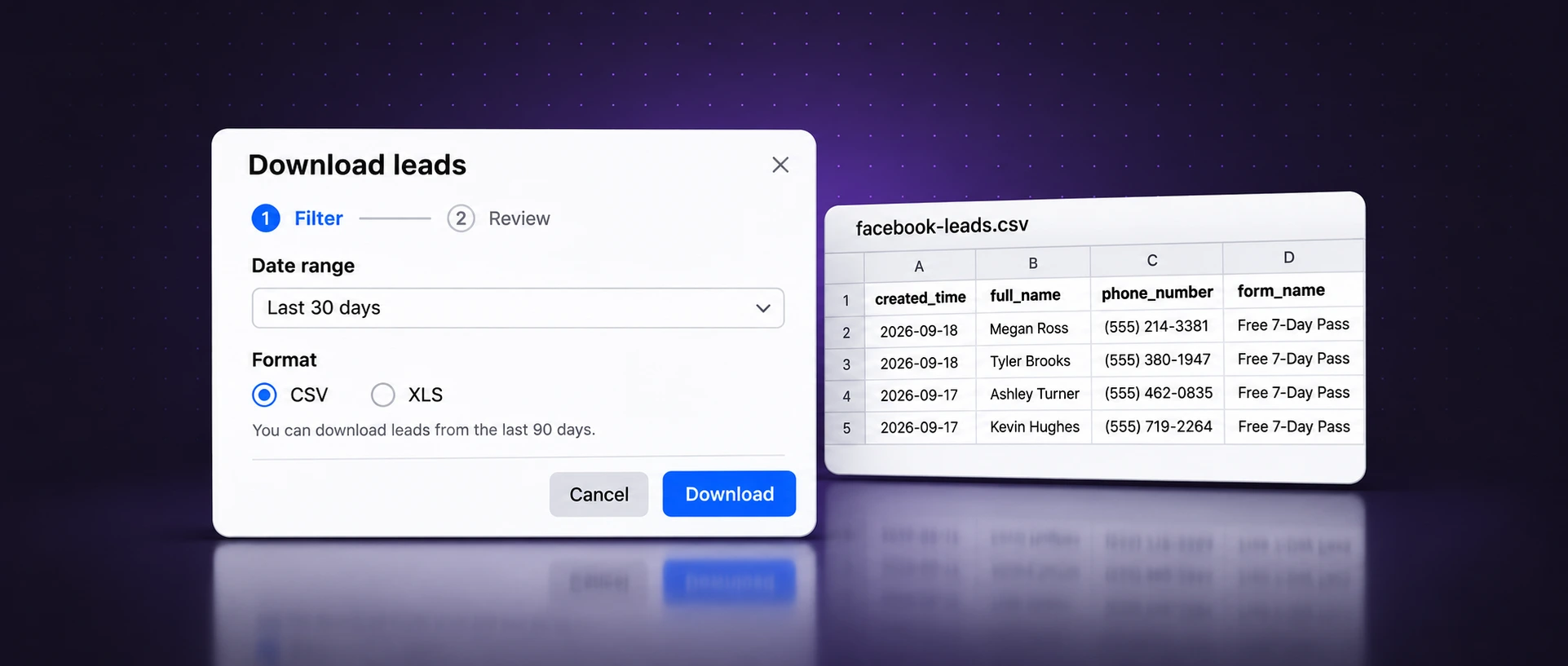
- Downloads expire. Meta only lets you download leads from the last 90 days, even if your results column shows more.
Preview your Instagram ad in Feed, Stories and Reels
Type your primary text, pick a button, and see where Instagram cuts it off and what the buttons cover. Add your own photo to check the crop. It's the same check Ads Manager's preview gives you, before you're in Ads Manager. For a downloadable mockup that also shows the Facebook Feed version, use our free Facebook and Instagram ad mockup generator.
 Your story
 luma.skin
 bluepipeplumb
 harbordental
 truetemp.hvac

The first 125 or so characters show before Instagram adds “more”. Put the offer and who it's for up front.
- Instagram Feed
- 1440 × 1800 px (4:5). Primary text 125 characters. Safe zones: None published; keep the subject central.
- Instagram Stories
- 1440 × 2560 px (9:16). Primary text 125 characters. Safe zones: 14% top, 35% bottom, 6% each side.
- Instagram Reels
- 1440 × 2560 px (9:16). Primary text 44 characters. Safe zones: 14% top, 35% bottom, 6% each side.
| Placement | Shape and size | Primary text | Keep clear |
|---|---|---|---|
| Instagram Feed | 4:5, 1440 × 1800 px | 125 characters | Not published |
| Instagram Stories | 9:16, 1440 × 2560 px | 125 characters | 14% top, 35% bottom, 6% sides |
| Instagram Reels | 9:16, 1440 × 2560 px | 44 characters | 14% top, 35% bottom, 6% sides |
Source: Meta Ads Guide for Instagram Feed, Stories and Reels, checked on 2 November 2026. Images up to 30 MB, video up to 4 GB. For Facebook placements and every other shape, see our Facebook ad sizes guide.
What you need before you run Instagram lead ads
- A Facebook Page for the business. The form and its leads live here.
- An Instagram professional account connected to that Page, so the ad can run as your Instagram account.
- An ad account in Meta Business Suite with a working payment method. Our Meta Business Suite guide walks through the setup.
- A privacy policy URL. Every instant form must link to one.
- Somewhere for leads to go: a CRM, an inbox or a phone, connected and tested before launch.
Boost an Instagram post or use Ads Manager?
The Boost button in the Instagram app is the fastest way to put money behind a post, and it's fine for reach, profile visits or messages. It doesn't build an instant form. For lead ads you need Ads Manager.
| Boost in the Instagram app | Meta Ads Manager | |
|---|---|---|
| Setup time | A minute or two | 15 to 30 minutes the first time |
| Instant forms | No | Yes, with the Leads objective |
| Placements | Chosen for you | Instagram Feed, Stories and Reels, or all of Meta |
| Test several ads | One post at a time | Several ads per ad set |
| Lead delivery to a CRM | Not applicable | Yes, through the Page's leads |
| Best for | Putting a post you already have in front of more people | Consultations, quotes, bookings and sign-ups |
How to create an Instagram lead ad, step by step
These are real Ads Manager screens. Ads run on Facebook and Instagram by default; steps 4 and 5 are where you make this one an Instagram ad.
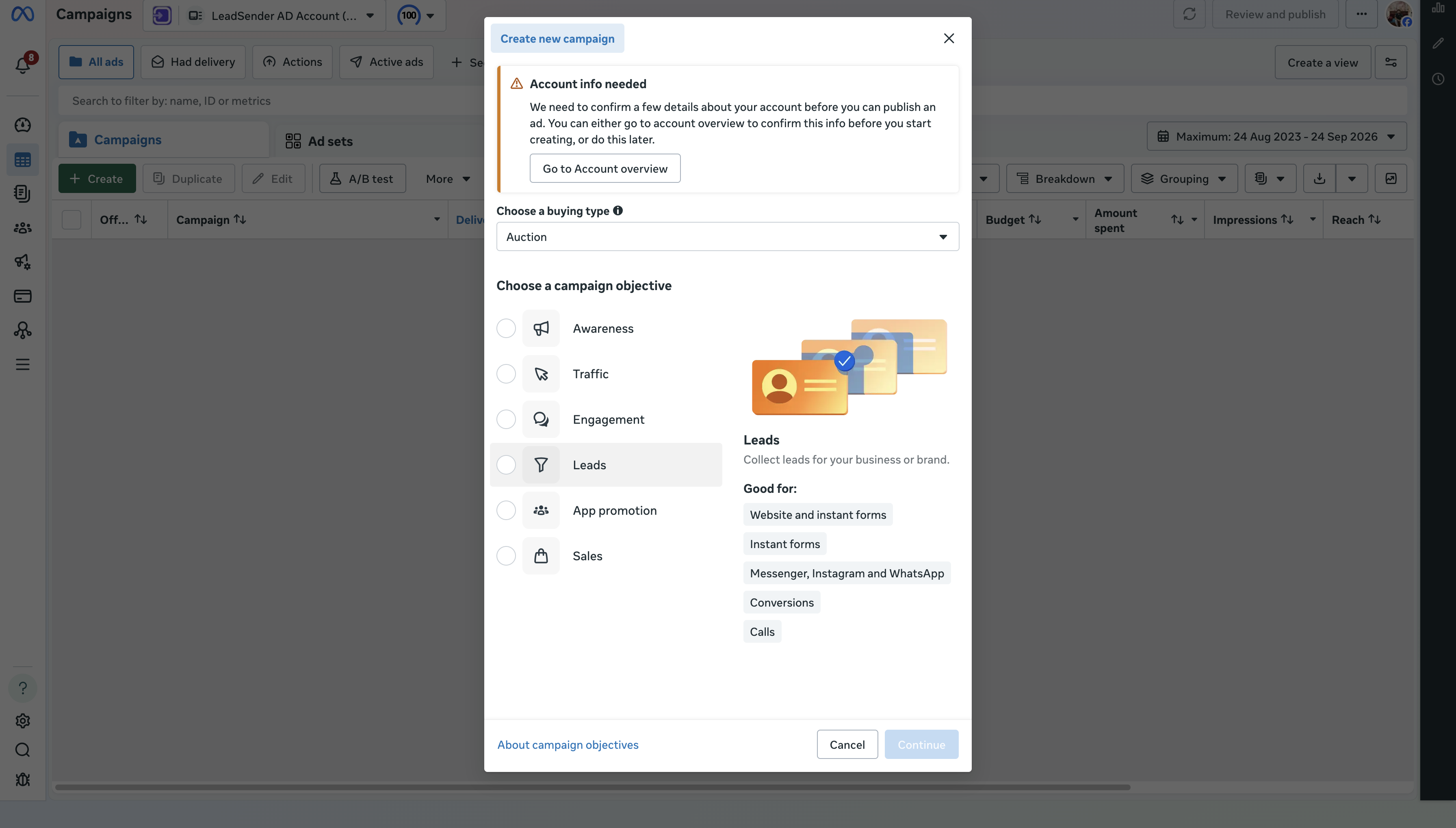
Step 1: Create a campaign with the Leads objective
In Ads Manager, pick the right ad account, click Create and choose Leads.
 ☝ Click here
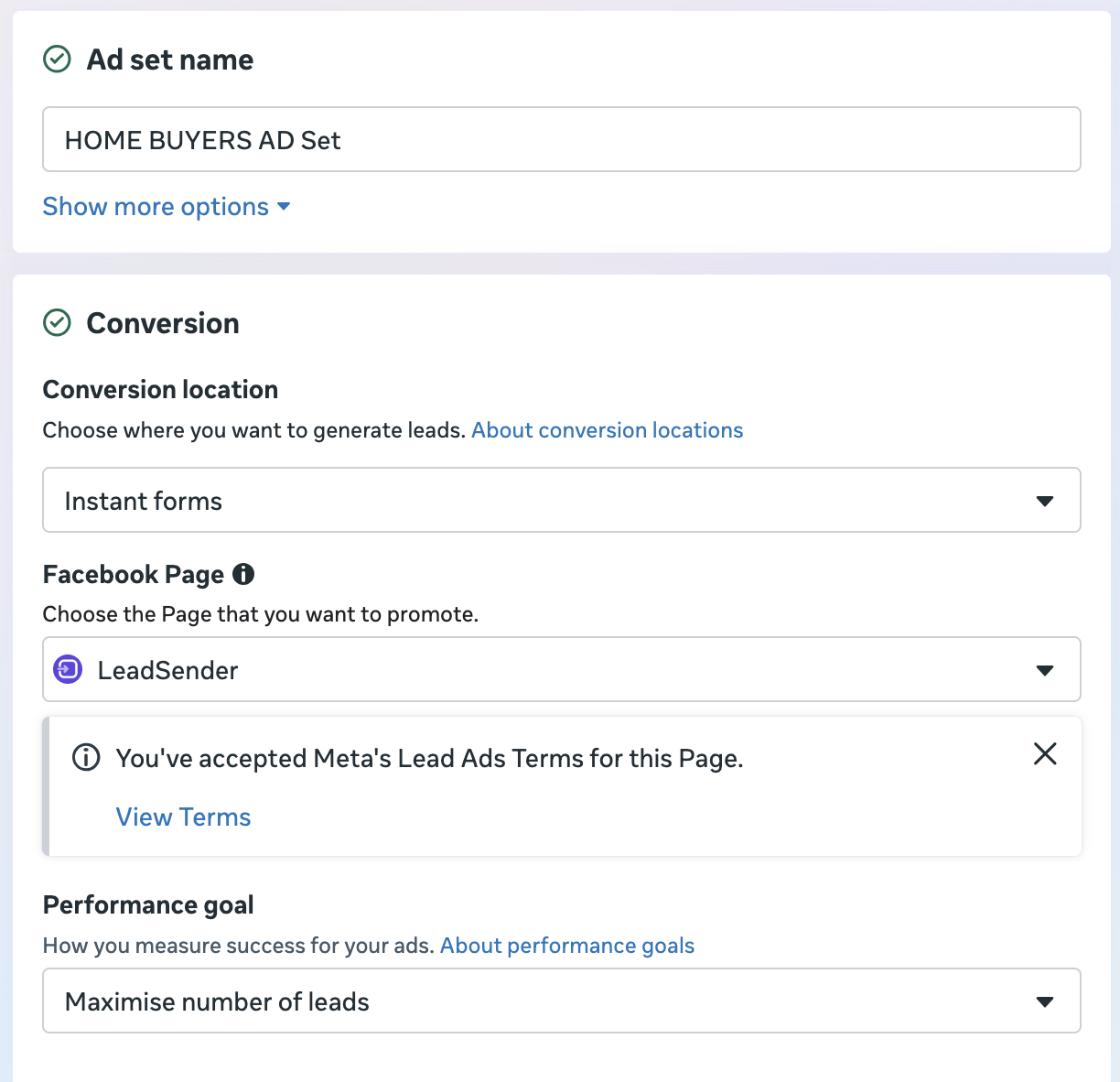
Step 2: Choose Instant forms as the conversion location
At the ad set, set the conversion location to Instant forms and keep the performance goal on the number of leads. If your ads are about housing, jobs or credit, declare the Special Ad Category on the campaign first.
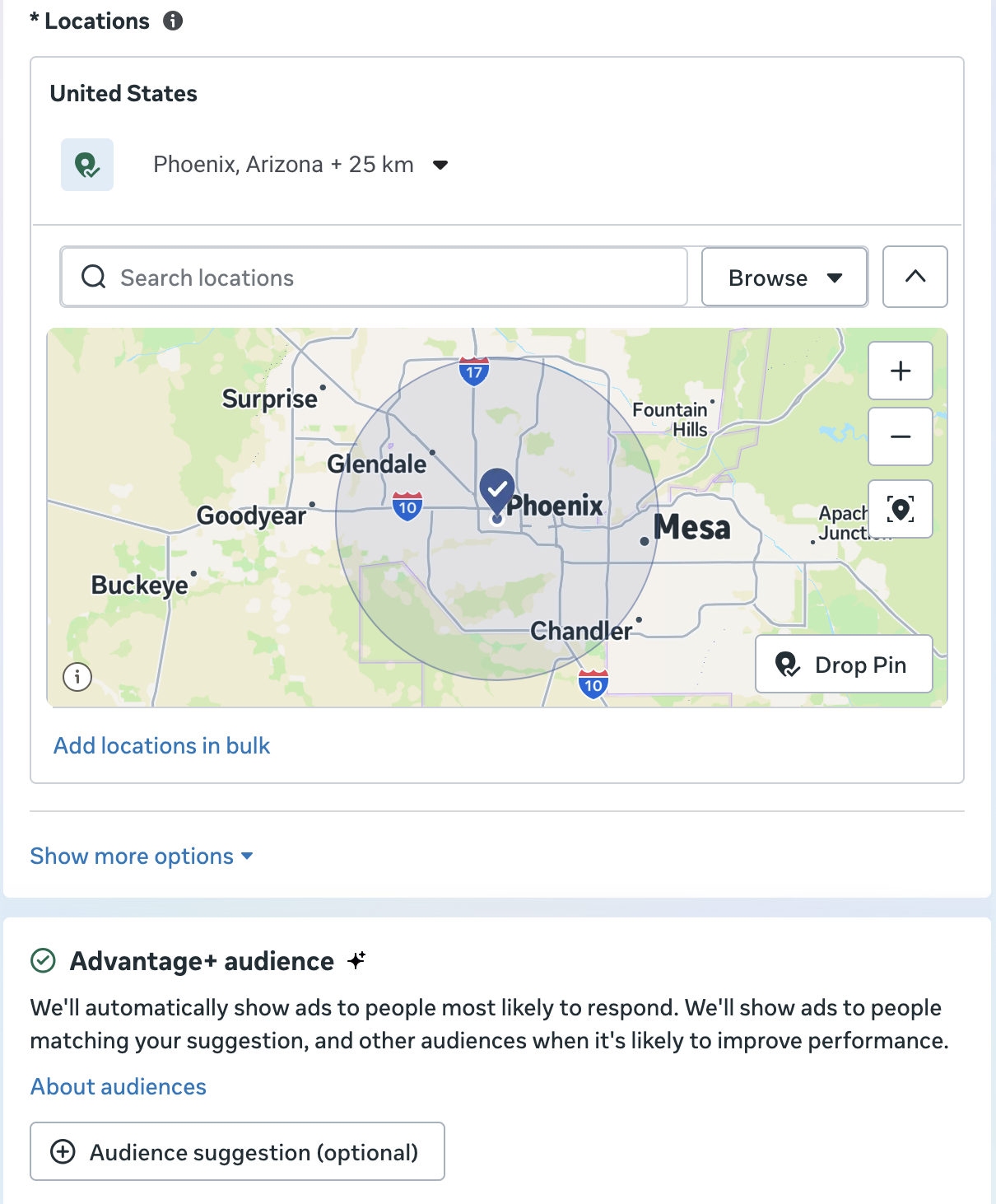
Step 3: Set your audience and budget
Start with your real service area and let Advantage+ audience find people inside it. Pick a daily budget you can leave alone for a week; changing it every day restarts Meta's learning.
Step 4: Show the ad on Instagram only
Ads Manager runs ads on Facebook and Instagram by default. To keep this one on Instagram, open Placements at the ad set, choose Manual placements, and under Platforms untick Facebook and Audience Network so only Instagram is left.
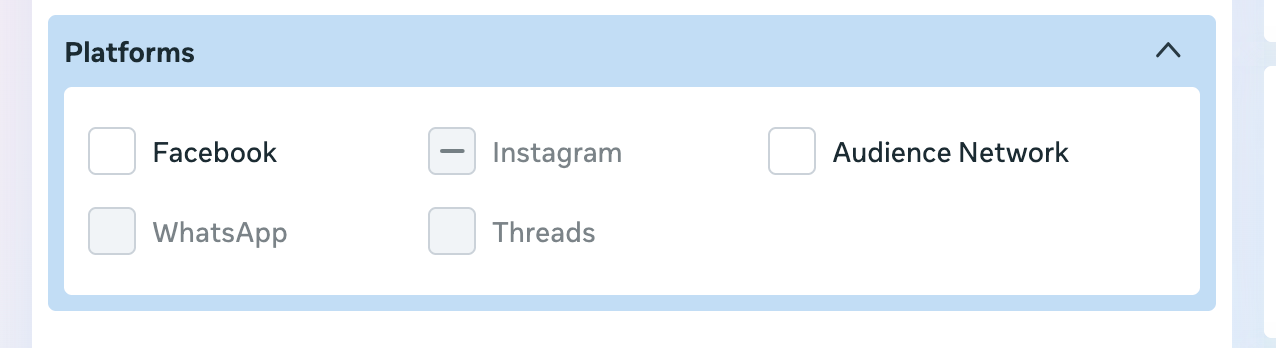
Then check the placement groups. With only Instagram selected, Feeds and Stories, Status, Reels stay on and show a dash, because only their Instagram parts are included. Open each arrow to see the exact Instagram placements you're running in.
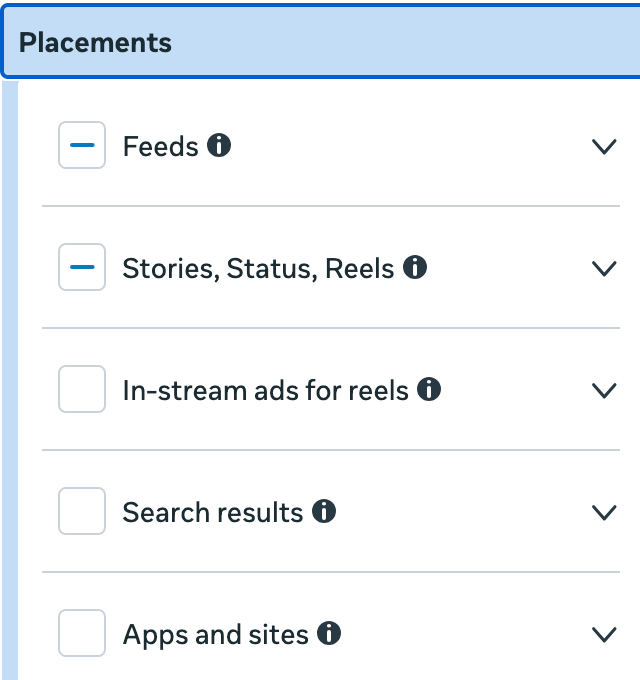
Under the placements list there's a checkbox that lets Meta spend a small part of your budget on the placements you just switched off. If you want Instagram only, untick it.
Step 5: Build the ad as your Instagram account
At the ad level, choose your Facebook Page and then your Instagram account as the identity, otherwise the ad shows your Page name on Instagram. Upload a 4:5 version for Feed and a 9:16 version for Stories and Reels, then check the Instagram previews. Notice how Stories shows only two short lines of your text before “more”.
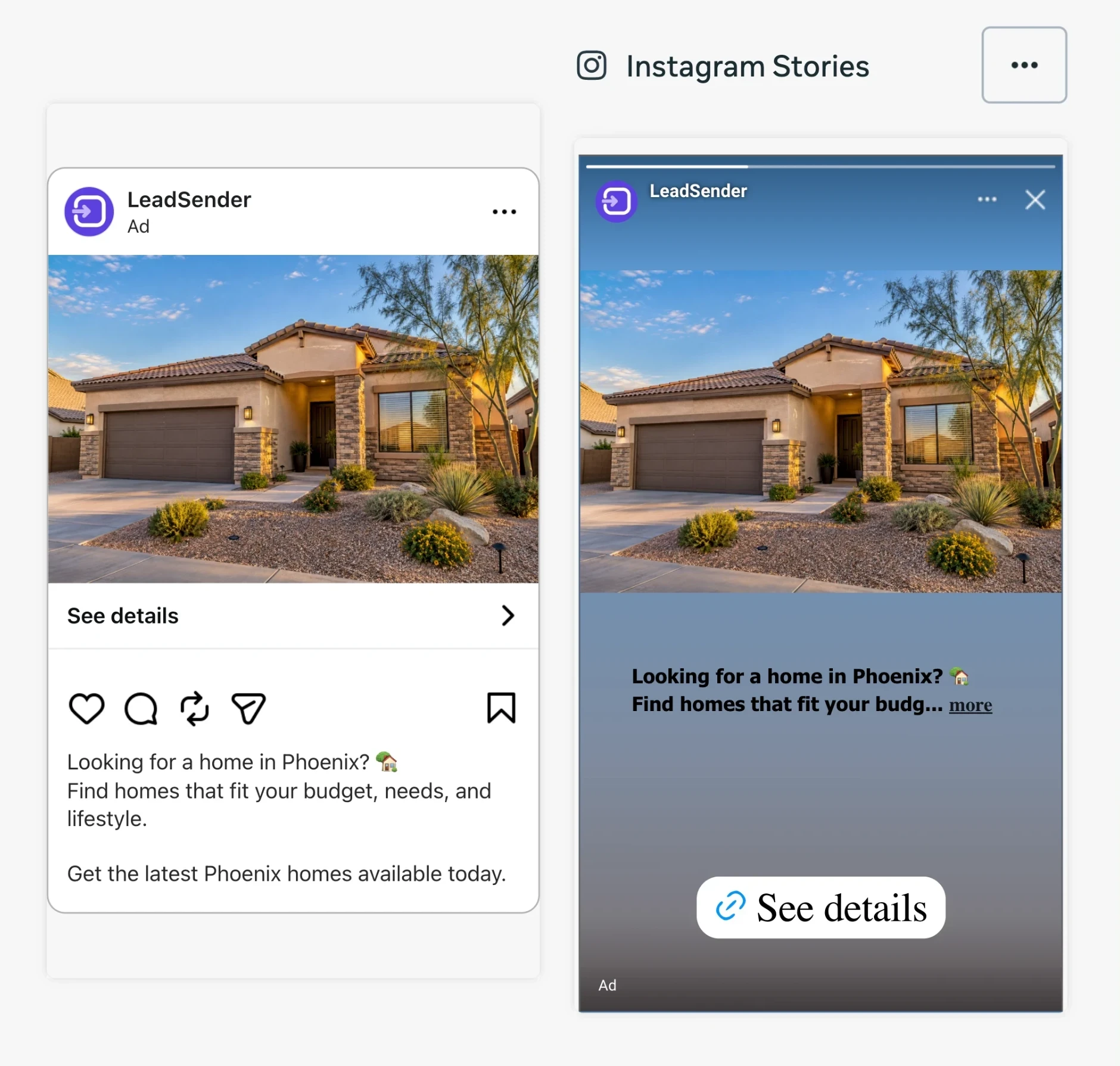
Meta notes that the button can be missing from Instagram previews in Ads Manager even though people see it.
Step 6: Create the instant form
Click Create form. There's nothing Instagram-specific to build: the same form opens on both apps. Use the Instagram tab in the preview to check each screen. The next section covers what to put in it.
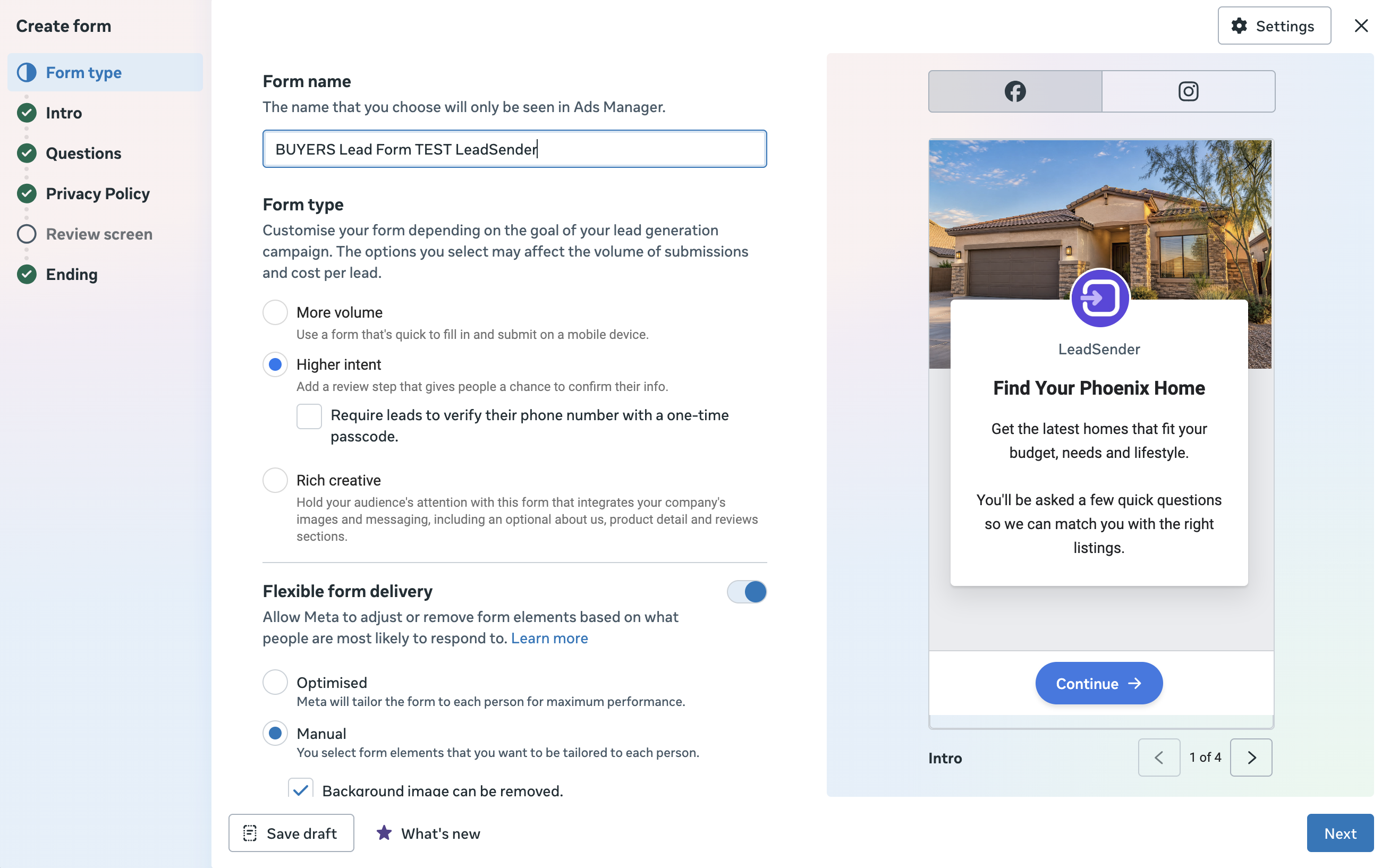 ☜ Higher intent☝ Instagram preview
Step 7: Connect your leads, send a test, publish
Before you publish, connect the Page to wherever leads should go, then send a test lead with Meta's Lead Ads Testing Tool. Check the name, phone, email and every answer arrive in the right fields. Then publish and watch the first real lead come through.
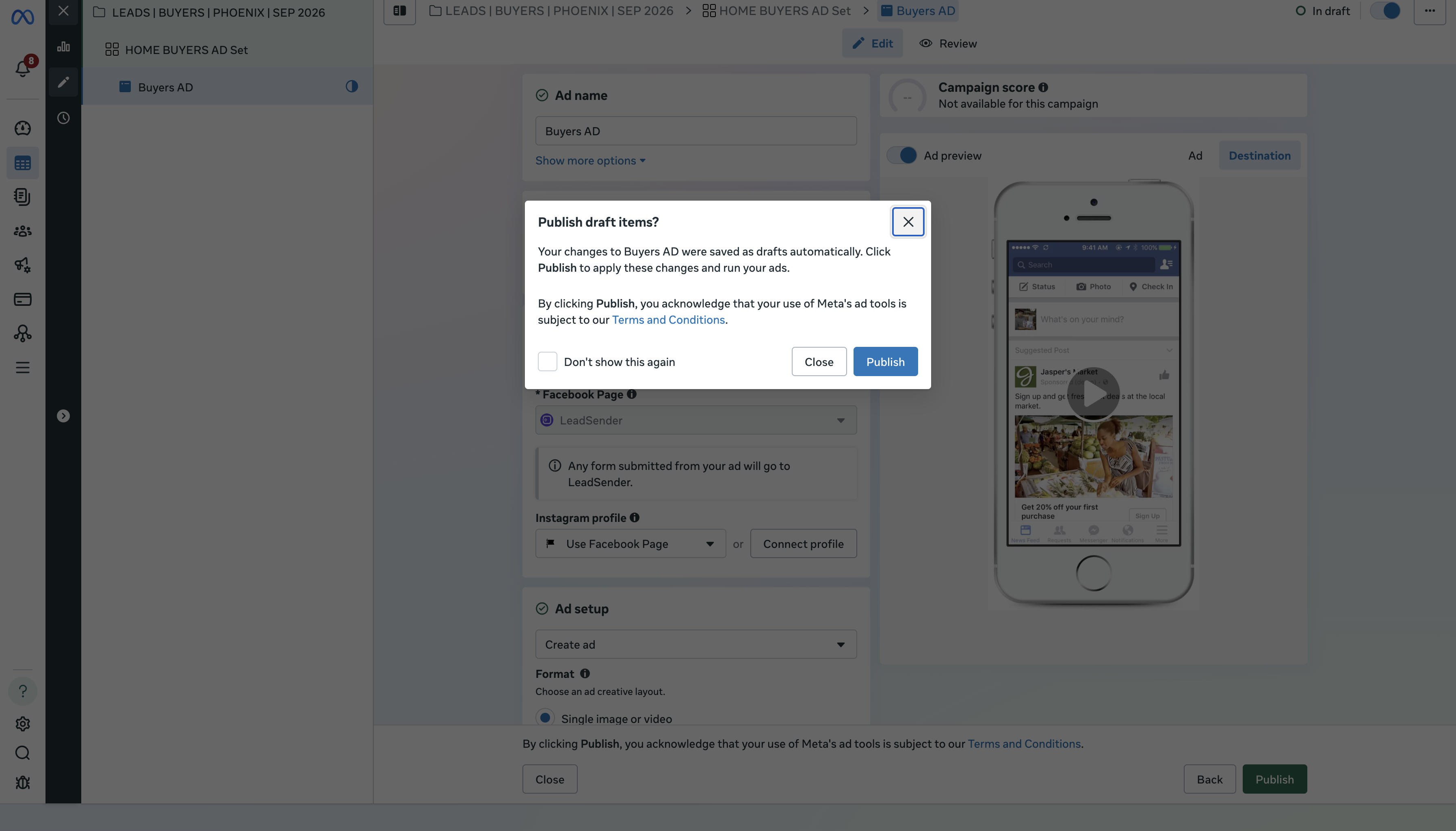
Want every screen in more detail, including the privacy policy and ending steps? Our full lead ads walkthrough covers all of them.
Build an Instagram lead form people actually finish
The form is where Instagram lead ads are won or lost. People are in the middle of scrolling, so every screen has to feel quick and every question has to be worth it.
More volume or Higher intent?
| Form type | What it adds | Use it when |
|---|---|---|
| More volume (default) | Nothing: the quickest form to submit | You call every lead within minutes and want as many as possible |
| Higher intent | A note under the contact fields that you'll follow up, and a review screen to confirm details | You're getting accidental, fake or unreachable leads. Runs in feeds only |
| Rich creative | Your brand colors, images and extra text on the form | The offer needs explaining before people commit |
Source: Meta, About instant form types and supported features by platform. All three run on Instagram.
Meta only delivers Higher intent forms to Facebook Feed and Instagram feed on mobile. If your Story or Reel ad gets no delivery, this is often why. Run Stories and Reels with More volume, or keep Higher intent for a Feed-only ad set.
Ask for less, ask better
Meta prefills contact fields from what it already knows, so name, email and phone cost the person almost nothing. Every custom question costs you submissions. Add one or two multiple-choice questions that change how you follow up (timeline, area, service needed) and stop there.
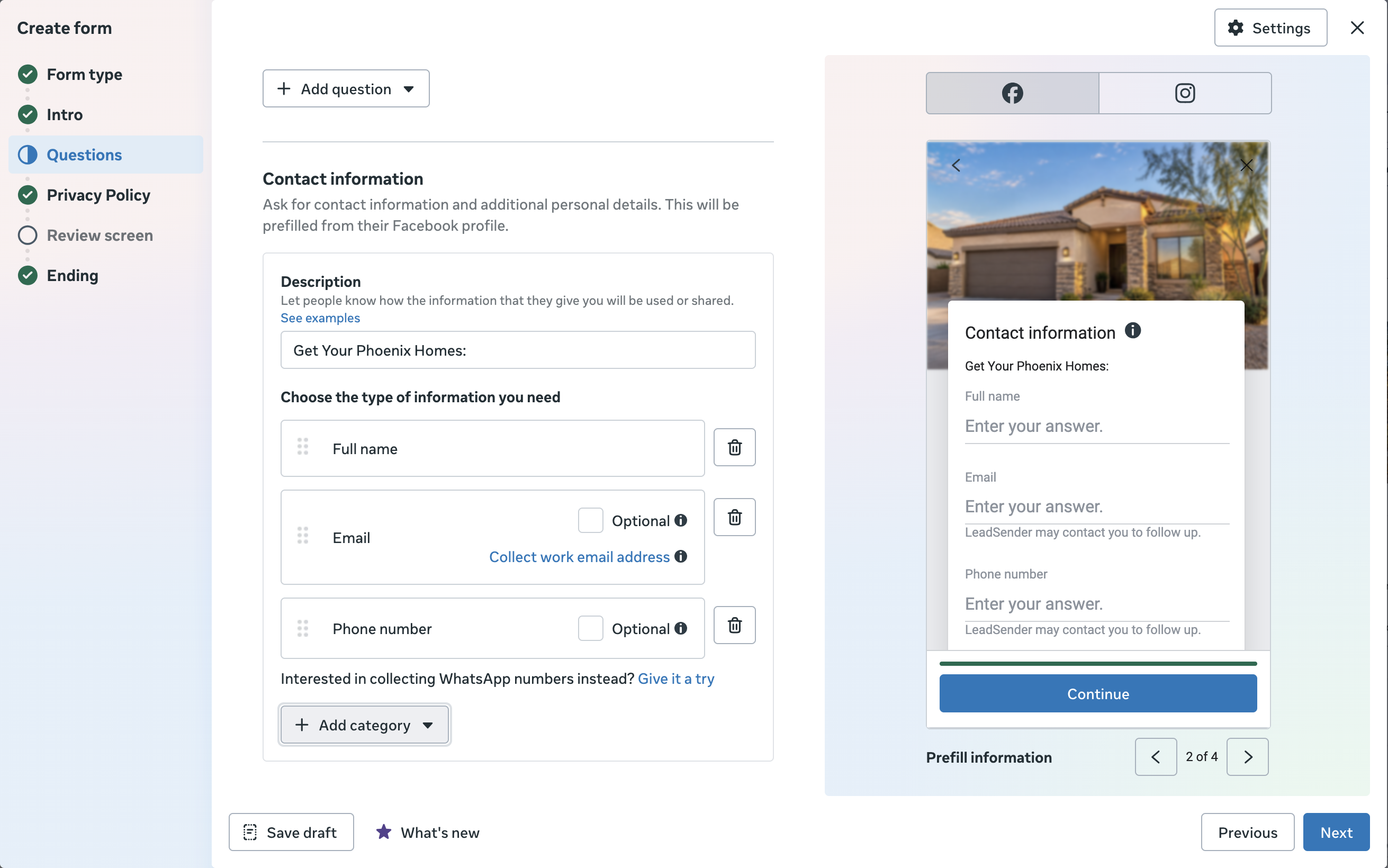
A complete Instagram lead form you can copy
Here's a full form for a real estate buyer ad. Swap the areas and the promise for your business.
Form type: Higher intent

Intro headline: Get your personal home list
Intro text: Tell us what matters most and a local agent will send homes that fit. Takes 30 seconds.

Contact fields (prefilled): Full name, Email, Phone number

Question 1 (multiple choice): Which area are you considering?
  Mesa / Gilbert / Chandler / Somewhere else

Question 2 (multiple choice): When are you hoping to move?
  In the next 3 months / 3 to 6 months / Just looking

Privacy policy: https://your-site.com/privacy

Ending headline: Thanks, we've got it
Ending text: A local agent will text you within the hour with homes that match.
Button: Visit website
“A local agent will text you within the hour” only works if one actually does. Write the ending screen to match how fast you really follow up, then make that true with instant lead alerts.
Instant form, website or Instagram DMs?
The Leads objective can send people to three places. Pick the one that matches how you sell.
| Destination | Strength | Trade-off | Best for |
|---|---|---|---|
| Instant form | Fewest taps, details prefilled | Some low-intent submissions | Quotes, consultations, callbacks |
| Website form | Your page, your tracking, room to explain | Slower to load, more people drop off | Complex offers, long buying cycles |
| Instagram Direct | A conversation starts straight away | Needs someone replying fast | Bookings and questions you answer in chat |
6 Instagram lead ad examples
Six concepts for businesses that run lead ads, one per niche and across all three placements. Each shows the ad, the offer, and the form questions behind it. These are examples to adapt, not real campaigns.
1. Real estate buyers: Desert Key Realty
- Offer
- A short list of homes that match the buyer's price range.
- Primary text
Buying in Mesa or Gilbert this spring? Tell us your price range and timeline, and a local agent will send you a short list of homes that fit.
- Button
- Learn more
- Form questions
- Which area are you considering? When are you hoping to move? Are you pre-approved?
- Why it works
- A list of homes is something a buyer wants today. “Contact an agent” isn't. Housing ads need the Special Ad Category.
2. Roofing inspections: Tallgrass Roofing Co.

- Offer
- A free inspection after a storm, booked from the Reel.
- Primary text
Storm last week? Book a free roof inspection.
- Button
- Book now
- Form questions
- Your ZIP code. What did you notice? (Missing shingles / Leak inside / Not sure). Best time to call?
- Why it works
- A 15-second walk across a real roof shows the problem. The caption fits Reels' 44 characters, so nothing gets cut.
3. Med spa consultations: Sable & Sage Aesthetics

- Offer
- A free 20-minute consultation with a licensed provider.
- Primary text
Not sure which treatment is right for you? Book a free 20-minute consult with a licensed provider.
- Button
- Book now
- Form questions
- Which treatment are you interested in? Is this your first visit? Which days work best?
- Why it works
- A consultation is low pressure and easy to say yes to. Use a More volume form here: Higher intent doesn't run in Stories.
4. Software demo: Crewlog
- Offer
- A 20-minute live demo on the reader's own schedule.
- Primary text
Stop rebuilding the schedule every morning. See how a 12-person crew plans the whole week in Crewlog, in a 20-minute demo.
- Button
- Book now
- Form questions
- Work email. How big is your crew? (1-5 / 6-20 / 21+). What do you schedule with today?
- Why it works
- Showing the product doing one job beats a vague promise. The team size question routes small and large crews to different reps.
5. Workshop registration: Ledgerly Bookkeeping
- Offer
- A free 45-minute live workshop on year-end taxes.
- Primary text
Year-end is coming. Join our free 45-minute live workshop and get your books tax-ready.
- Button
- Sign up
- Form questions
- Name and email. What type of business do you run? Which session suits you?
- Why it works
- A defined event with a clear topic is an easy reason to register. All the text sits inside the Stories safe zone.
6. Free guide download: Oak & Iron Remodeling
- Offer
- A free PDF cost guide, delivered on the form's ending screen.
- Primary text
What does a kitchen remodel really cost? Our free guide breaks down price ranges by kitchen size, plus the questions to ask before you hire anyone.
- Button
- Download
- Form questions
- Email. Your ZIP code. When are you planning to start? (0-3 months / 3-6 months / Just researching)
- Why it works
- Instagram supports gated content, so the guide unlocks after the form. The timeline question sorts buyers from browsers.
Use your own real photos and offers, keep claims you can prove, and choose the Special Ad Category for housing, jobs or credit. Meta reviews every ad, and a rejected ad stops your leads until it's fixed.
Where do Instagram leads go?
Not to Instagram. Every submission is saved on the Facebook Page that owns the form, whichever app it came from. There are three ways to get them out.
| Where | How | The catch |
|---|---|---|
| Leads Center | Meta Business Suite, All tools, Leads Center | You have to go and check it |
| CSV download | Ads Manager or Leads Center | Only the last 90 days, and only when you remember |
| Automatic delivery | A CRM integration or a tool like LeadSender | Needs a one-time connection and a test lead |
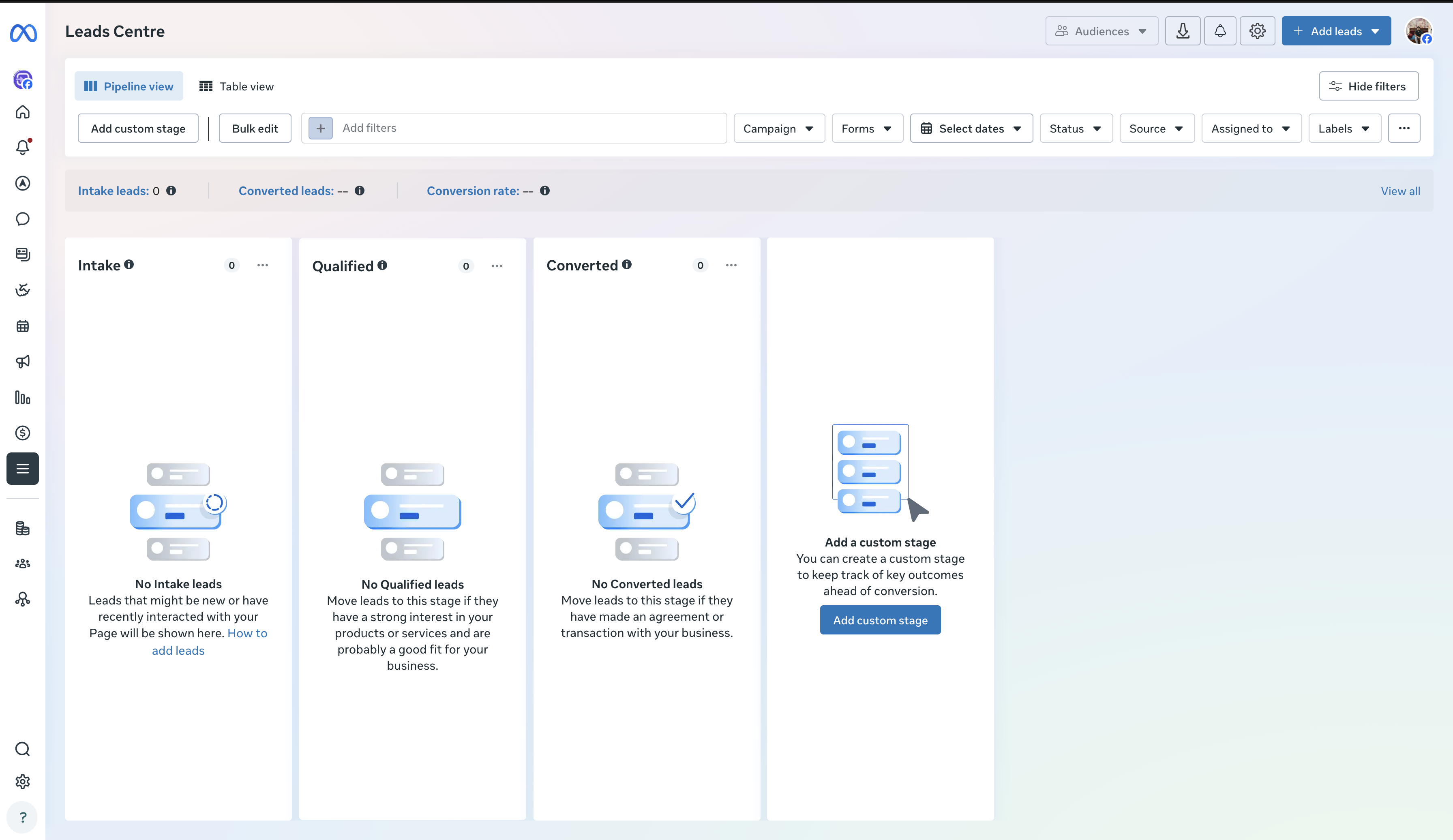
Leads Center is useful for sorting, but it's a place you visit. If you check it at 5 p.m., a lead from 9 a.m. has waited eight hours. The fix is an instant lead alert, covered below. Our guides also cover downloading leads and what to do when leads aren't coming through.
How much do Instagram lead ads cost?
Meta doesn't sell Instagram ads at a set price. You set a budget, and Instagram and Facebook placements compete in the same auction for it. What you pay per lead depends on your area, your offer, the season and how good the ad is.
The number that matters is your own, and Ads Manager already has it. Open the campaign, click Breakdown, then By delivery and Platform, and you'll see cost per lead for Instagram and Facebook side by side.
| Metric | How to work it out | What it tells you |
|---|---|---|
| Cost per lead | Spend ÷ leads | What a form submission costs |
| Cost per qualified lead | Spend ÷ leads that fit | What a usable lead costs |
| Cost per appointment | Spend ÷ booked calls or visits | How close the ad gets to revenue |
| Cost per customer | Spend ÷ new customers | Whether the ads pay for themselves |
For benchmarks by industry and a budget calculator, see how much Facebook ads cost in 2027. The same auction sets Instagram prices, so it's the closest published guide.
How to get better Instagram leads, not just more
The most common complaint about Instagram lead ads is junk leads. Usually the ad isn't the problem, the chain around it is. Work through these in order:
- Make the offer specific. “Free roof inspection this week” attracts different people than “Contact us”.
- Match the ad and the form word for word. If the ad says consultation, the form says consultation.
- Add one qualifying question. Timeline or budget, multiple choice.
- Switch to Higher intent if people submit without remembering it.
- Reply in minutes, not hours. Someone who filled in a form mid-scroll forgets about it fast.
- Track what happens next. Compare campaigns on appointments and customers, not on the cheapest lead.
Instagram lead ad mistakes that waste budget
- Boosting a post when you wanted leads: boosts don't collect them.
- Using one square image everywhere and letting Stories and Reels crop it.
- Putting the offer in the bottom third of a Story, under the button.
- A 120-character caption on Reels, where only about 44 show.
- Asking six questions to fix a vague offer.
- Launching without a connected destination, so leads pile up in Leads Center.
- Skipping the test lead, then finding a field mapped wrong a week later.
- Running housing, job or credit ads without the Special Ad Category.
How to get instant alerts for Instagram leads
The faster you call, the more likely the person still remembers your ad. Instagram itself won't alert you, so pick one of these, from free to fully automatic:
| Option | How to set it up | Good for | Watch out for |
|---|---|---|---|
| Meta Business Suite app | Install the app, sign in with an account that has lead access to the Page, and allow notifications | One owner who handles every lead | Alerts can arrive late or get buried among other notifications |
| Your CRM's Meta connection | If your CRM has a built-in lead ads integration, connect the Page in its settings and turn on its new-contact alerts | Teams already living in that CRM | Only some CRMs have one, and the alert comes from the CRM, not your phone |
| A lead delivery tool | Connect the Page once and choose where each lead goes: email, text, WhatsApp, Slack or a CRM | Getting the lead to the person who calls, wherever they are | A monthly cost, and a test lead to check it works |
Whichever you choose, send a test lead with Meta's Lead Ads Testing Tool and time how long it takes to reach you. If it's more than a minute, keep looking.
Instant Instagram lead alerts with LeadSender
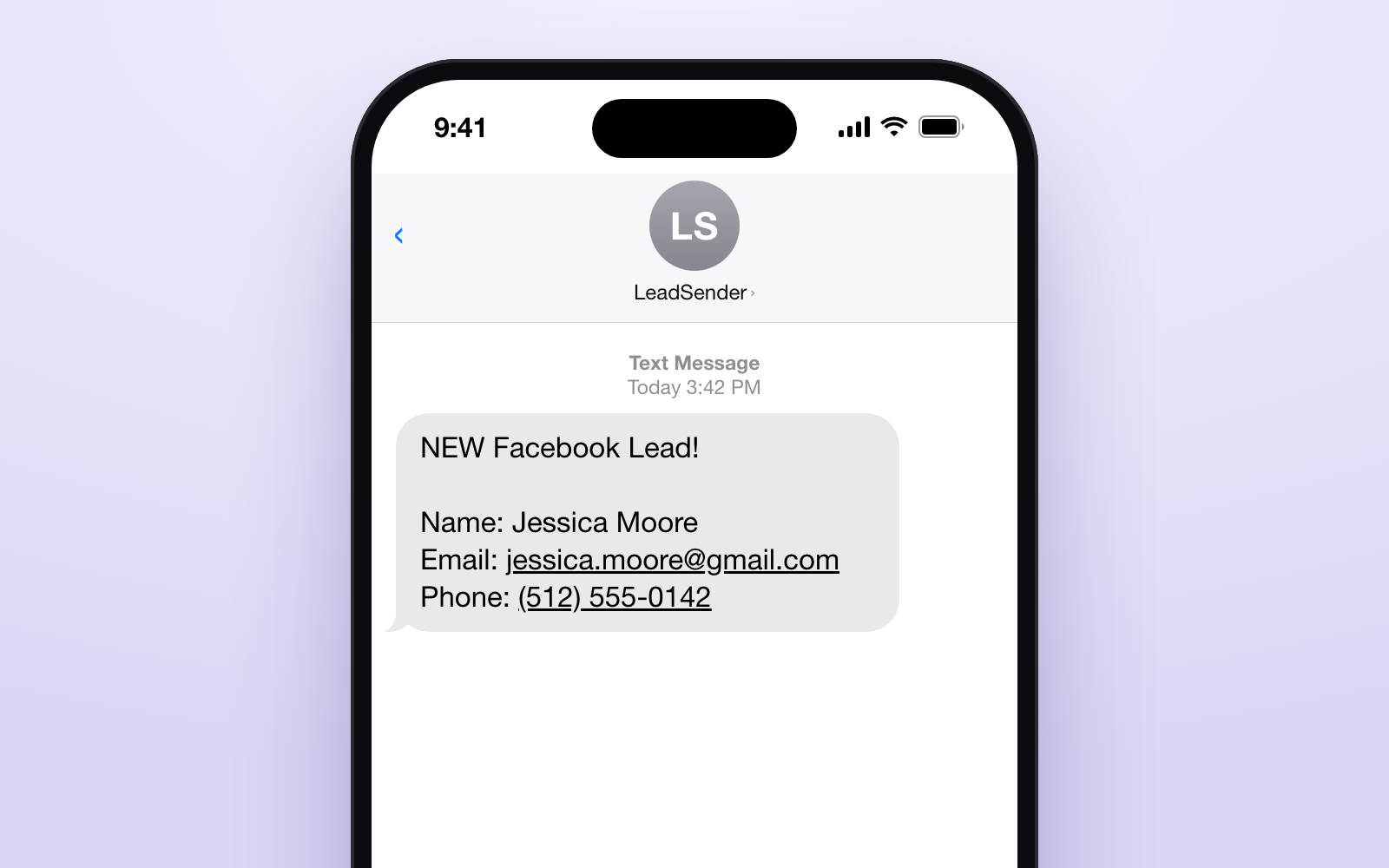
That's the job we built LeadSender for. Connect your Facebook Page once, and every new Instagram and Facebook lead arrives as a text, an email, a WhatsApp message or a new contact in your CRM within seconds, with every form answer. Instagram leads come through your Page, so they arrive exactly like this:
- Set up in about 3 minutes. No Zapier, no code.
- Goes where your team works: email, SMS, WhatsApp, Google Sheets, HubSpot, GoHighLevel and more.
- Every answer included, so whoever calls knows the area, timeline or budget before they dial.
Connect your Page, send a test lead and watch it land on your phone. No card needed. Start your free trial.
Instagram lead ads FAQs
What are Instagram lead ads?
Ads on Instagram that open an instant form inside the app when someone taps the button. The person's name, email and phone can be prefilled, so they can send you their details in a few taps without visiting a website.
How do I create a lead ad on Instagram?
In Meta Ads Manager: create a campaign with the Leads objective, choose Instant forms as the conversion location, keep Instagram in the placements (Advantage+ placements includes it), choose your Instagram account at the ad level and build the form. Instagram's own Boost button doesn't build instant forms.
Do I need a Facebook Page to run Instagram lead ads?
Yes. Meta's lead ads documentation lists a Facebook Page as the first requirement and says every lead belongs to the Page. You also need an Instagram account connected to it so the ad can run on Instagram.
Where do Instagram leads go?
To the Facebook Page the form belongs to, not to the Instagram app. You can see them in Meta Business Suite's Leads Center, download them from Ads Manager for 90 days, or have them sent to your CRM, email or phone the moment they arrive.
Can I see Instagram leads in the Instagram app?
No. Instagram shows the ad and the form, but the submissions are stored against the Facebook Page. Use Leads Center, an Ads Manager download, or a connected CRM or alert.
Do Instagram lead ads work on desktop?
No. Meta says lead ads are only available in the Instagram mobile app and won't appear on the desktop version of Instagram.
Can I run lead ads only on Instagram?
Yes. At the ad set, choose Manual placements, untick Facebook and Audience Network under Platforms so only Instagram is left, and untick Allow limited spending to excluded placements so no budget goes elsewhere.
What is the best instant form type for Instagram?
Start with More volume if you want the most submissions and call every lead quickly. Switch to Higher intent if you're getting accidental or junk leads: it adds a review screen and a note that you'll follow up. Higher intent only runs in Facebook and Instagram feeds on mobile, not Stories or Reels.
What size should Instagram lead ads be?
Meta recommends 1440 × 1800 px (4:5) for Instagram Feed and 1440 × 2560 px (9:16) for Stories and Reels. On 9:16, keep text and logos out of the top 14%, bottom 35% and 6% on each side.
How much do Instagram lead ads cost?
There's no fixed price. Instagram runs in the same auction and budget as Facebook, so you set a budget and Meta charges for delivery. Your real cost per lead by platform is in Ads Manager under Breakdown, By delivery, Platform.
How many questions should an Instagram lead form have?
Name, email and phone, which Meta can prefill, plus one or two multiple-choice questions that change how you follow up, such as timeline or service needed. Every extra question costs submissions.
Why am I getting fake or low-quality Instagram leads?
Usually a vague offer, a form so easy people submit by accident, or slow follow-up. Make the offer specific, add one qualifying question, try Higher intent, and call new leads while they still remember the ad.
Are Instagram lead ads better than DM ads?
They do different jobs. Instant forms collect contact details you can call or email. Click-to-Instagram Direct ads start a conversation, which only works if someone replies quickly. Test the one that matches how you sell.
How do I send Instagram leads to my CRM automatically?
Connect the Facebook Page that owns the form to your CRM through Meta's integrations or a tool like LeadSender, map the form fields, then send a test lead with Meta's Lead Ads Testing Tool and confirm it arrives.
Can I use Instagram lead ads for real estate?
Yes, but housing ads must use Meta's Special Ad Category, which limits targeting by age, gender and detailed interests. Follow the restrictions Ads Manager shows and fair housing law.
Final takeaway
Instagram lead ads are built in Ads Manager, not the Instagram app: Leads objective, instant form, Instagram in the placements and your Instagram account on the ad. Keep the form short, make the offer specific, and size the creative for 4:5 and 9:16. Then make sure the lead, which lands on your Facebook Page, reaches a person within minutes.
Sources
Checked on 2 November 2026. Meta changes Ads Manager often; if a screen looks different, trust Ads Manager.
- Meta Business Help Center: How to create a lead ad for Instagram
- Meta Business Help Center: About instant form types
- Meta Business Help Center: Supported features of lead ads across platforms and devices
- Meta Business Help Center: About expired leads
- Meta for Developers: Lead ads
- Meta Ads Guide: Instagram Feed, Instagram Stories, Instagram Reels