

















Someone fills in your Facebook lead form. They are interested right now, with their phone in their hand. Then nothing happens, because Facebook does not tell you in any way you will notice. The lead waits in Leads Center until someone remembers to check, and by then the person has filled in a competitor's form too.
SMS lead alerts fix the part that is actually broken: knowing a lead has arrived. Your phone buzzes with the person's name and number seconds after they submit, wherever you are. This guide shows you how to set up Facebook lead ads SMS notifications step by step in about five minutes, what each text costs, what to put in it, and what to check if a text ever does not arrive.
Facebook does not text you new leads. To get every lead by SMS, connect your Page to a lead delivery tool. In LeadSender: connect Facebook, choose Facebook Leads to SMS, pick your Page and form, add SMS credits, add the mobile numbers to alert, choose what the text says, send a free test and turn it on. Each new lead is then texted to you within seconds, for 8 cents a text.
How to set up SMS alerts for Facebook leads
You do not need a Twilio account, a phone number of your own or any code. Everything happens in one builder, and you can see the exact text before a single real lead goes out.
Start a free trial and connect Facebook
Start a free trial and connect your Facebook account. This subscribes your Page to Meta's real-time lead webhook, which is what makes the alert instant instead of arriving on a schedule.
Choose Facebook Leads to SMS and pick your form
In Integrations, choose Facebook Leads to SMS. Then select the Facebook account, the Page and the lead form. Running several forms on one Page? Pick All forms and one alert covers all of them.
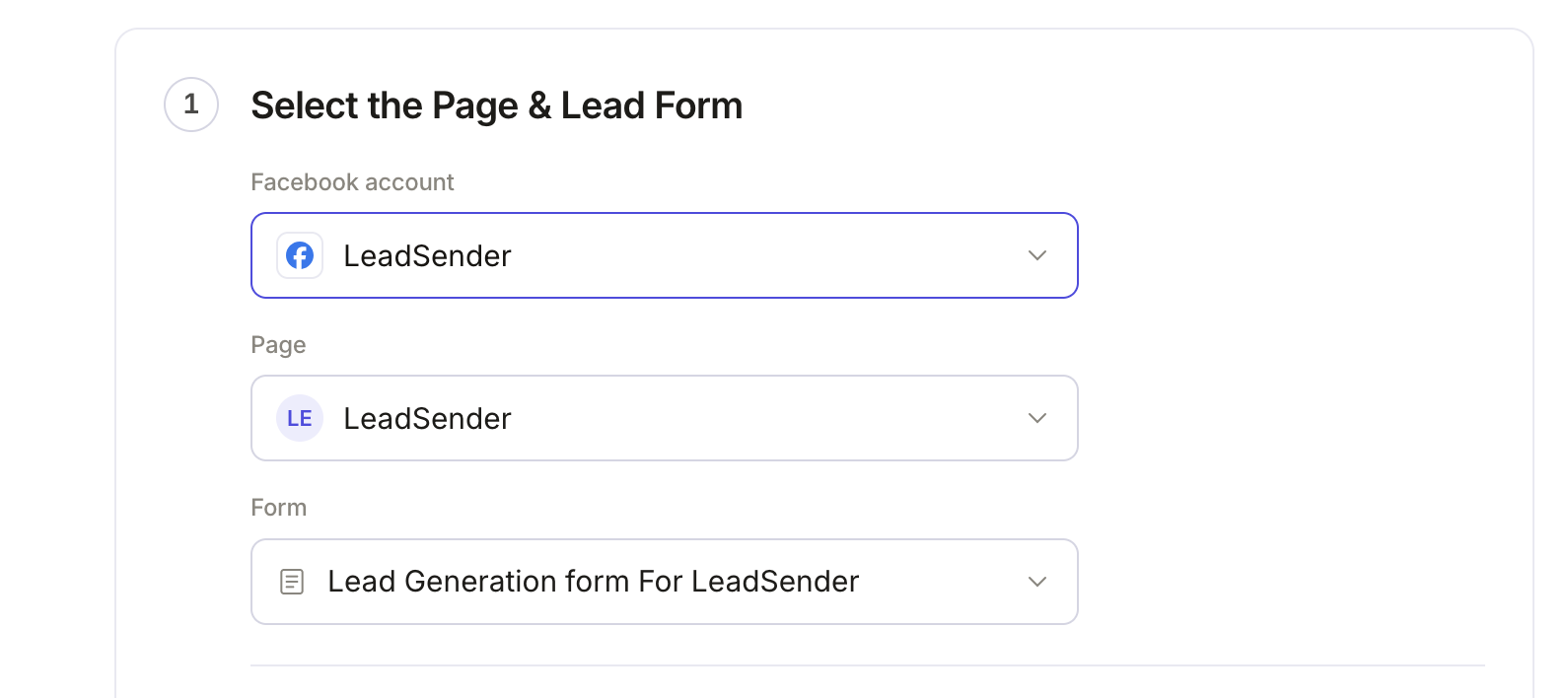 Select your Page
and lead form
Add SMS credits
Texts are paid for with SMS credits, separate from your plan, so you only pay for texts that are actually sent. The builder shows your balance at the top. New accounts start at zero, so click Buy 100 credits for $8. Each text to each number uses one credit.
Add the numbers to text
In To, type a mobile number with its country code, for example +1 512 555 0142, and press Enter. It turns into a chip. Add one for everyone who should be alerted: you, a business partner, the agent on call.
Choose what the text says
The Body starts with a first line you can change (“NEW Facebook Lead!”), then the lead's Name, Email and Phone. Use Add a field to bring in one or two answers from your form, such as budget or timeline. Hover any label or text to edit it, and click the × to remove a row.
Above the box is a live count, such as “92 characters · 1 SMS credit.” Keep it under 160 characters so the alert arrives as one text.
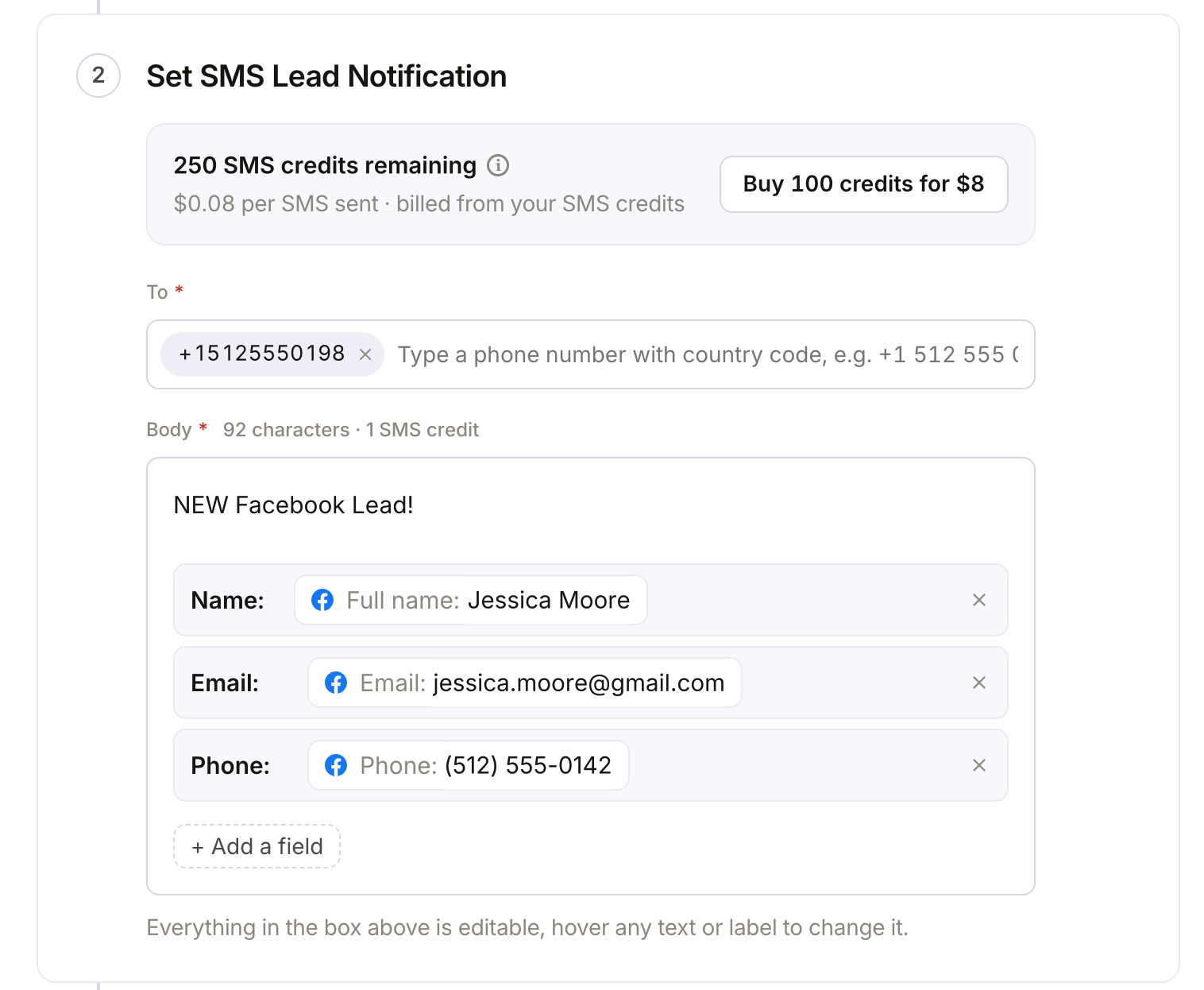 Who gets the textLive character countAdd your form's answers
Send a test lead
Click Send a test lead. A test text goes to every number in To, so you can check that it arrives and reads well on a lock screen. Test texts are free and do not use your credits.
Turn it on
Click Turn on. Every new lead from that form, on Facebook or Instagram, is now texted to your numbers within seconds, and each delivery is recorded in the integration's history.
What the text looks like
A short, plain text you can act on from the lock screen. The phone number is tappable, so calling the lead back is one tap away.
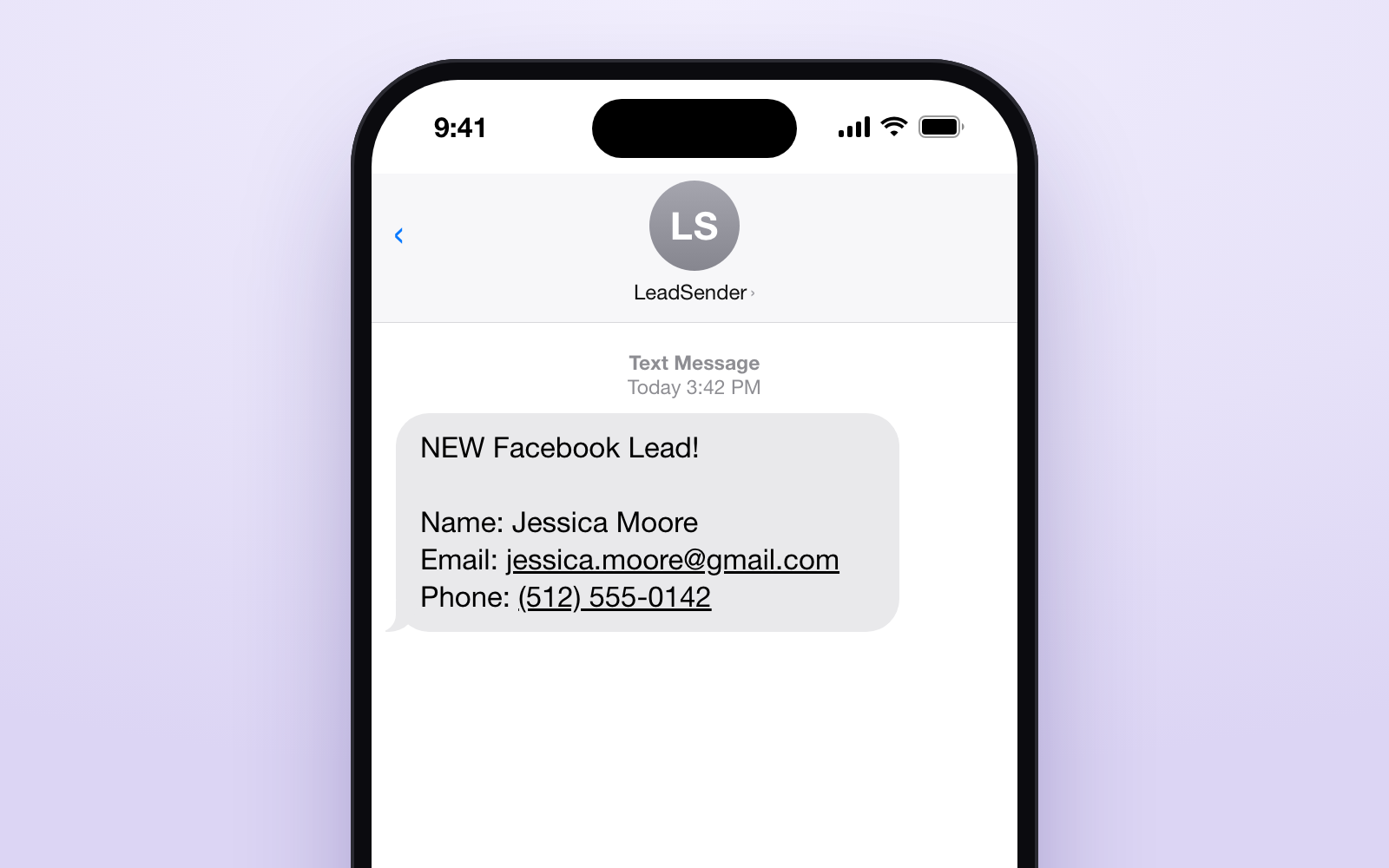 Tap to call back
In most countries the text shows LeadSender as the sender. US and Canadian carriers do not allow named senders, so there it comes from a phone number. When your test text arrives, save that number as a contact called “New Facebook lead” so every alert is instantly recognisable and never mistaken for spam.
Does Facebook send SMS notifications for new leads?
No. Meta collects your leads in Leads Center and can send a push notification through the Meta Business Suite app, but there is no setting in Ads Manager, Page settings or Business Suite that texts you a new lead with their details. That push notification is easy to miss among everything else the app sends, and it still makes you open the app and find the lead before you can call.
So the only way to get Facebook leads to SMS is to connect your Page to a tool that receives each lead from Meta and sends the text. That is what the setup above does.
Why a text beats checking Leads Center
Lead ads are an impulse format. Someone taps your ad, the form is pre-filled, they submit in ten seconds and go back to scrolling. Their interest is at its highest the moment they submit, and it fades fast.
That is not just a feeling. A widely cited Harvard Business Review study of online sales leads found that companies contacting a lead within an hour were nearly seven times as likely to qualify it as those that waited even one hour longer (HBR, The Short Life of Online Sales Leads). Checking Leads Center a few times a day guarantees you are often hours late. A text does not.
The reason SMS works where other alerts do not is attention. A text is short, it arrives on a device you carry everywhere, and it does not get sorted into a Promotions tab. For anyone who works away from a desk, such as real estate agents, contractors, clinic owners and sales teams in the field, it is the alert that actually gets seen.
SMS, Email or both?
Each one does a different job, and the two work best together.
| SMS alert | Email notification | |
|---|---|---|
| Best for | Knowing a lead arrived, right now | Keeping the full lead on record |
| Seen | Usually within minutes | Whenever the inbox is next checked |
| How much fits | Name, number and one or two answers | Every answer on the form |
| Easy to forward and search | Not really | Yes |
| Cost with LeadSender | 8 cents a text, per number | Included in your plan |
A common setup: text the person who calls leads back, and email the full submission to a shared inbox. Both go out at the same moment, and the lead counts once against your plan. See how to send Facebook leads to Email to add the second half.
What to put in the text
A text alert has one job: get someone to call. Everything in it should help them decide to call and know who they are calling. A good alert has four parts:
- A first line that says what it is. “NEW Facebook Lead!” works. If you run ads for several brands or locations, name it: “New lead: Austin listing.”
- The name, so the call opens with “Hi Sarah” and not “Hi, who is this?”
- The phone number, which becomes a tap-to-call link on the phone.
- One qualifying answer, the one that tells you how urgent this lead is: timeline, budget, service needed or location.
For example, a home buyer alert might read:
New lead: Austin buyers
Name: Sarah Mitchell
Phone: (555) 014-2280
Timeline: Within 90 days
That is under 100 characters, one credit, and enough to make a good first call. Leave the long answers to the email.
Texting a whole team
Add each person's number in To and they all get the same text at the same moment. A few setups that work well:
- Owner plus closer: the person who calls, and the owner who wants to know the ads are working.
- One alert per location or campaign: make a separate SMS integration for each form and text only the team that serves it.
- The person on call: one number for whoever is covering evenings or weekends, changed when the rota changes.
Agree who calls first. Three people all receiving the same text and each assuming someone else called is the same problem as nobody getting it.
What SMS lead alerts cost
SMS credits cost $8 for 100, which is 8 cents per text. Each text to each number uses one credit, so the monthly cost is simply leads × numbers × $0.08:
| Leads per month | 1 number | 2 numbers | 3 numbers |
|---|---|---|---|
| 50 | $4 | $8 | $12 |
| 100 | $8 | $16 | $24 |
| 250 | $20 | $40 | $60 |
| 500 | $40 | $80 | $120 |
Credits are bought in packs of 100, so you top up as you go. Your LeadSender plan is billed separately.
Put that next to what a lead costs you. If you pay $20 to $40 for a Facebook lead, 8 cents to make sure someone calls it within minutes is the cheapest part of the whole funnel. Our Facebook ads cost guide has cost-per-lead benchmarks by industry if you want to run your own numbers.
Keeping credits topped up
The one way SMS alerts stop is running out of credits, so LeadSender gives you two warnings:
- Low balance: turn on Low SMS credit balance in Settings › Notifications and you are emailed when you drop below 20 credits.
- Out of credits: if the balance reaches zero, text alerts pause and you get an email saying so. Every other integration, such as Email, Google Sheets or your CRM, keeps delivering as normal.
You can buy more from the SMS builder or from Settings › Billing. If a text fails to send, its credit is given back, so you only pay for texts that went out.
Running an Email notification alongside your SMS alert means that even on the day credits run out, every lead still lands somewhere you will see it. Email notifications are included in every plan.
Alerts for you vs automatic texts to the lead
Two different things get called “Facebook lead SMS”, and it is worth being clear about which one this is.
- An alert to you (what this guide sets up): your phone gets a text so you can call the lead. LeadSender does this.
- An automatic text to the lead, such as “Thanks Sarah, we will call you in 10 minutes”: this needs a CRM with texting built in, because it involves consent, opt-outs and two-way replies. LeadSender does not text your leads. It can put each lead into a CRM such as GoHighLevel in seconds, and that CRM's workflow sends the reply.
Many teams run both: the CRM replies to the lead instantly, and the SMS alert tells a person to pick up the phone.
When a text does not arrive
Work down this list. The integration's history tells you which one it is.
- Out of SMS credits. The most common cause. Check the balance at the top of the SMS builder.
- The integration is off, or set to a different form from the one your ad uses. Open it and check the Page, the form and that it is turned on.
- The number is missing its country code. Every number needs the plus sign and country code, such as +1 for the US and Canada or +44 for the UK.
- The text was filtered. Some phones send messages from unknown numbers to a separate “Unknown senders” or spam folder. Saving the sender as a contact fixes it.
- Facebook access changed. If the person who connected Facebook lost access to the Page, leads stop reaching LeadSender at all. Reconnect from Sources.
- You want to test the whole path. Meta's free testing tool submits a real test lead through your form. Our guide to the Facebook lead ads testing tool walks you through it.
Facebook lead SMS notification FAQs
Can Facebook send me a text message when I get a new lead?
No. Meta can send a push notification through the Meta Business Suite app and it stores leads in Leads Center, but there is no setting that texts you a new lead's name and phone number. To get leads by SMS you connect your Page to a lead delivery tool such as LeadSender, which receives each lead from Meta's webhook and texts it to the numbers you choose.
How fast does the text arrive?
Usually within seconds of the form being submitted. LeadSender is subscribed to Meta's real-time lead webhook, so Facebook pushes each lead the moment it is created and the text is sent straight away. Carrier delivery adds a few seconds on top.
How much does each SMS lead alert cost?
8 cents. SMS credits cost $8 for 100, and each text to each number uses one credit. One number and 100 leads a month is $8. Two numbers and 100 leads is $16. Credits are separate from your LeadSender plan, so you only pay for texts you actually send.
Are SMS credits included in the free trial?
No. New accounts start with zero credits, so you buy credits before live alerts can go out. Sending a test lead from the builder is free and does not use credits, so you can see exactly what the text looks like before you buy any.
Can more than one person get the text?
Yes. Add as many mobile numbers as you like in To. Everyone gets the same text at the same moment. Each number uses one credit per lead.
Does it work for Instagram lead ads?
Yes. Instagram lead forms belong to the same Facebook Page and run on the same lead ads system, so a lead from Instagram is texted exactly like a lead from Facebook with no extra setup.
Which countries can receive SMS lead alerts?
Any mobile number entered in full international format, with the plus sign and country code. In most countries the text shows LeadSender as the sender. In the United States and Canada carriers do not allow named senders, so the text comes from a phone number instead.
Will it text the lead for me?
No. LeadSender texts you and your team so you can call the lead quickly. It does not send messages to the person who filled in your form. If you want an automatic text to the lead, send your Facebook leads to a CRM such as GoHighLevel and let its workflow send that reply.
What happens if I run out of SMS credits?
Text alerts pause and you get an email saying so. Every other integration, such as Email, Google Sheets or your CRM, keeps delivering as normal. You can also get a warning before that happens: turn on Low SMS credit balance in Settings, Notifications, and you are told when you drop below 20 credits.
Can I get SMS alerts for all my lead forms at once?
Yes. Choose All forms when you pick the form. Each text then only includes the answers that exist on the form the lead came from, so you do not get empty lines for questions that belong to other forms.
Why does my text say it will use 2 SMS credits?
The builder warns you when the message is longer than 160 characters, because a long text is split into several parts by the phone network. Keep the message short: a first line, the name, the phone number and one qualifying answer is usually all a text needs. The full lead can go to Email at the same time.
The fastest lead is the one you hear about first
You already paid for the lead. The only question left is how quickly someone calls. An SMS alert turns that from “whenever someone next checks Leads Center” into “seconds,” for 8 cents. It takes five minutes to set up and you can test it for free before you spend a cent on credits. See the Facebook Leads to SMS integration for the details, or start a free trial and set it up now.
