











GoHighLevel is where agencies and local businesses actually work their leads: the pipeline, the text that goes out in the first minute, the follow-up workflow, the booking. Facebook is where those leads come from. Getting Facebook leads to GoHighLevel quickly and completely is the difference between a lead that gets a text in seconds and one that goes cold in Leads Center.
This guide walks you through sending Facebook leads to GHL step by step, in about three minutes, with every answer in the right field. It works the same for all your Meta leads to GoHighLevel, from Facebook and Instagram alike. After that it covers GoHighLevel's own Facebook integration, Zapier, and the agency setup, so you can pick what fits.
To send Facebook leads to GoHighLevel automatically, connect your Facebook Page to your GHL sub-account with a lead delivery tool. In LeadSender: connect Facebook, choose Facebook Leads to GoHighLevel, pick your Page and form, connect LeadConnector and choose the sub-account, match the fields (custom fields too), send a test lead and turn it on. Every new lead then arrives as a GHL contact within seconds. GoHighLevel also has its own Facebook integration, which works if the right admin connects it and the connection doesn't expire.
How to send Facebook leads to GoHighLevel with LeadSender
This is the setup most teams want: a real GHL contact within seconds, every answer in its own field, tags your workflows can use, and an email if anything ever goes wrong. It takes about three minutes.
Start a free trial and connect Facebook
Start your 7-day free trial (no card needed) and sign in with the Facebook account that manages your Page. This is what lets LeadSender hear about each new lead the moment it's submitted.
Choose the GoHighLevel template
From Integrations, pick the Facebook Leads to LeadConnector template (search for “GoHighLevel” and it appears). Then select your Facebook Page and the lead form you want to send. The builder previews your most recent real lead from that form, so you can see real answers while you set up.
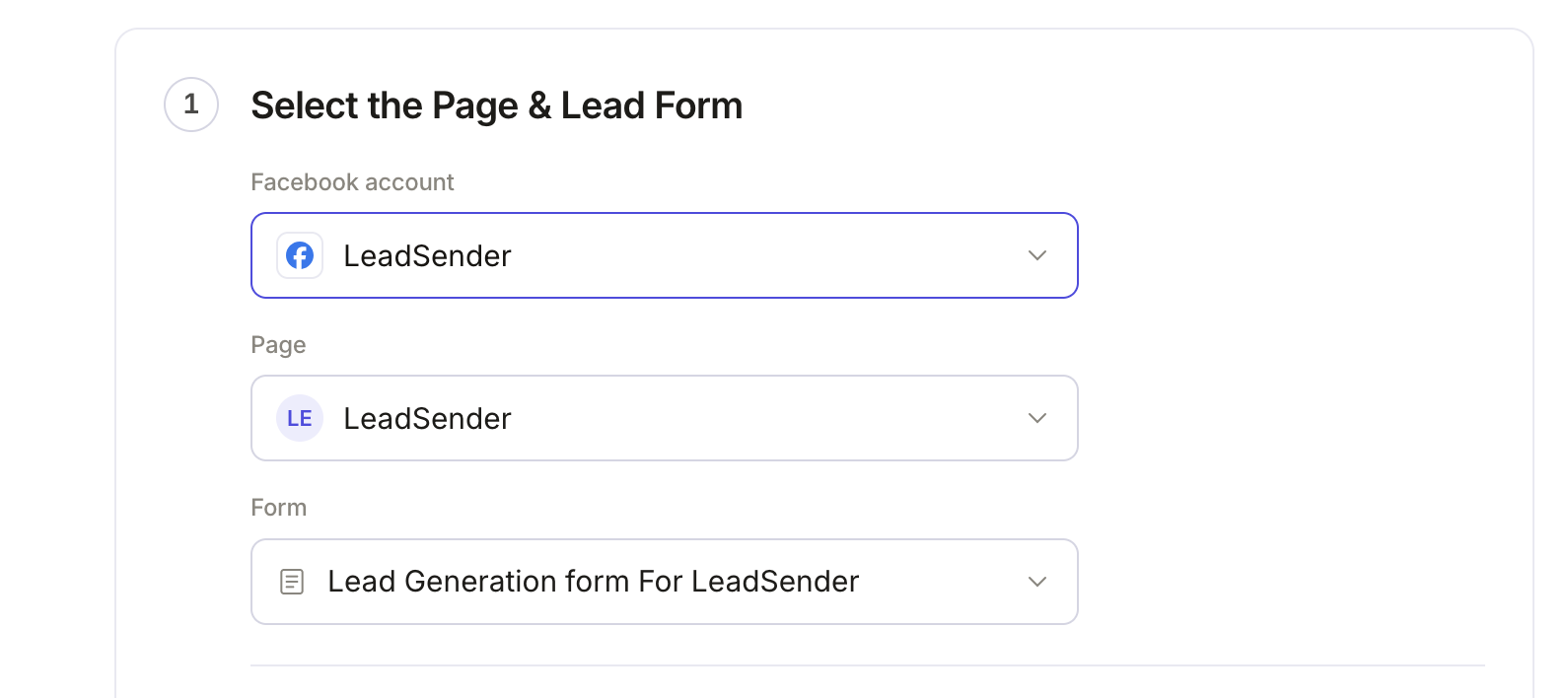 Select your Page
and lead form
Connect LeadConnector and pick your sub-account
Click Connect. A LeadConnector window opens (LeadConnector is GoHighLevel's app platform), where you approve access and choose the sub-account. Back in LeadSender, Send leads to shows that sub-account. Manage several? Use Change account to connect or switch to another one.
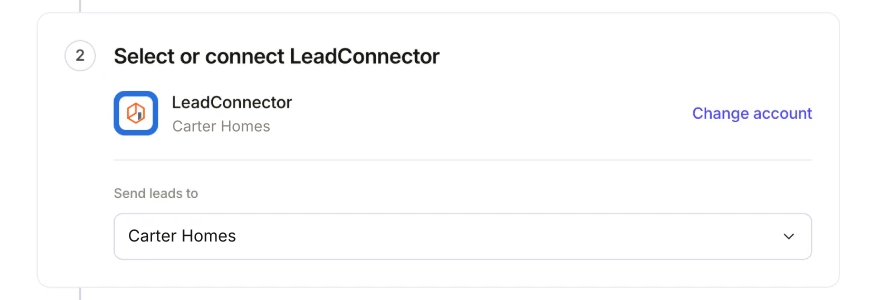 Your GoHighLevel sub-account
Match your fields
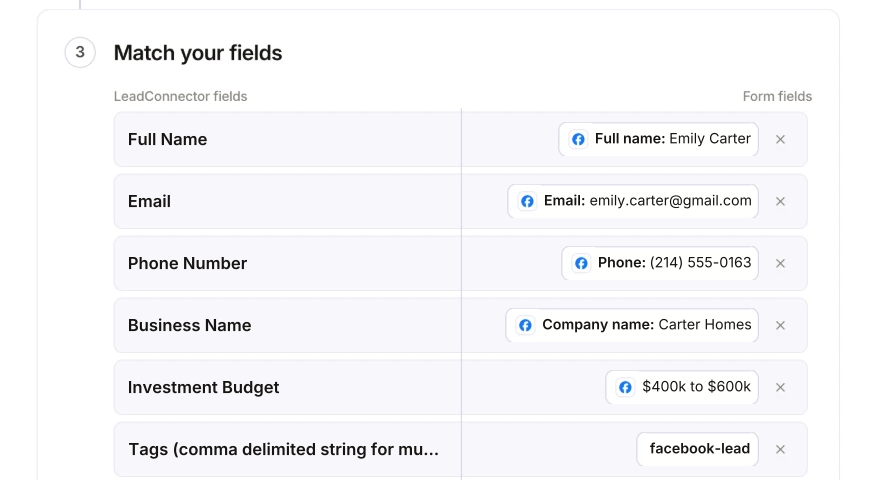
Name, email and phone are matched for you, based on the questions your form really asks. Then match each custom question (budget, timeline, property type) to a GoHighLevel field. Your sub-account's own custom fields are listed next to the standard ones: First Name, Last Name, Full Name, Email, Phone, Address, City, State, Postal Code, Business Name, Website, Country, Source and Tags.
Want every lead tagged? Set Tags to a fixed value like facebook-lead. Added a custom field in GHL a minute ago? Click Refresh fields.
 Your own custom fieldFixed tag
Send a test lead
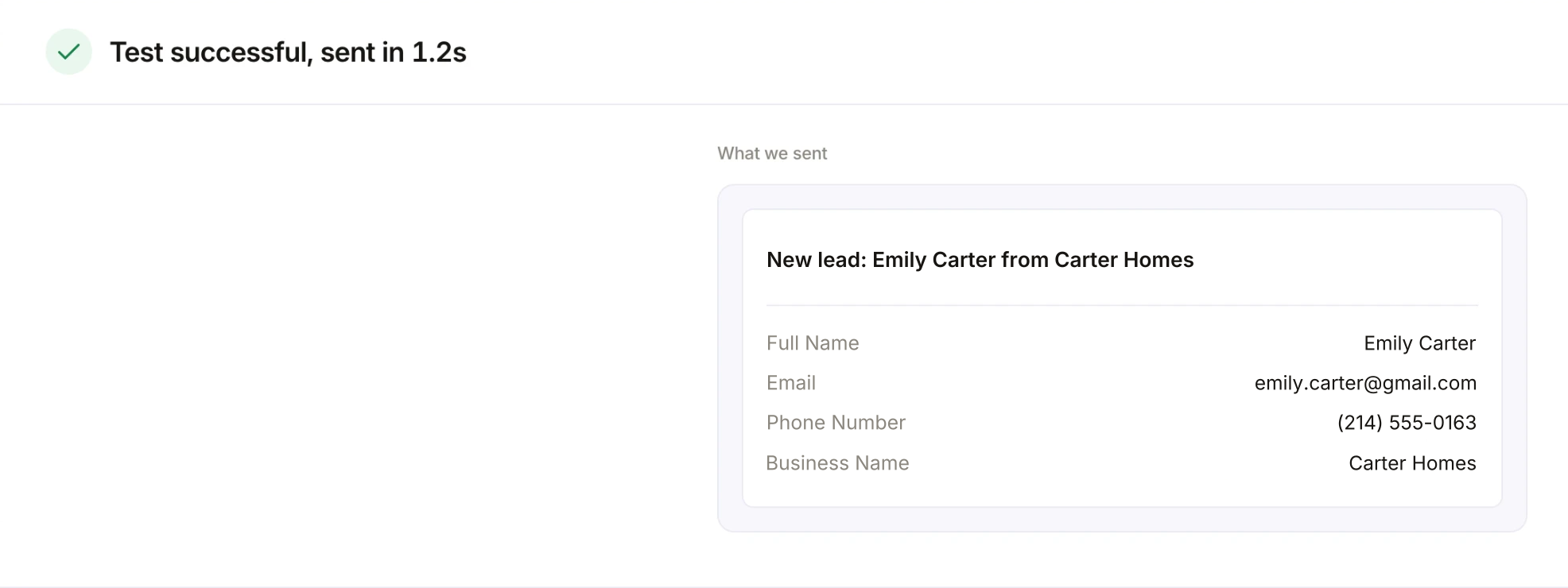
Click Send a test lead. LeadSender sends your latest real lead to GoHighLevel through your mapping and shows exactly what was sent. Open Contacts in GHL and check the new contact. Want a brand new lead instead? Use our free Meta Lead Ads Testing Tool.
 Exactly what was sent to GHL
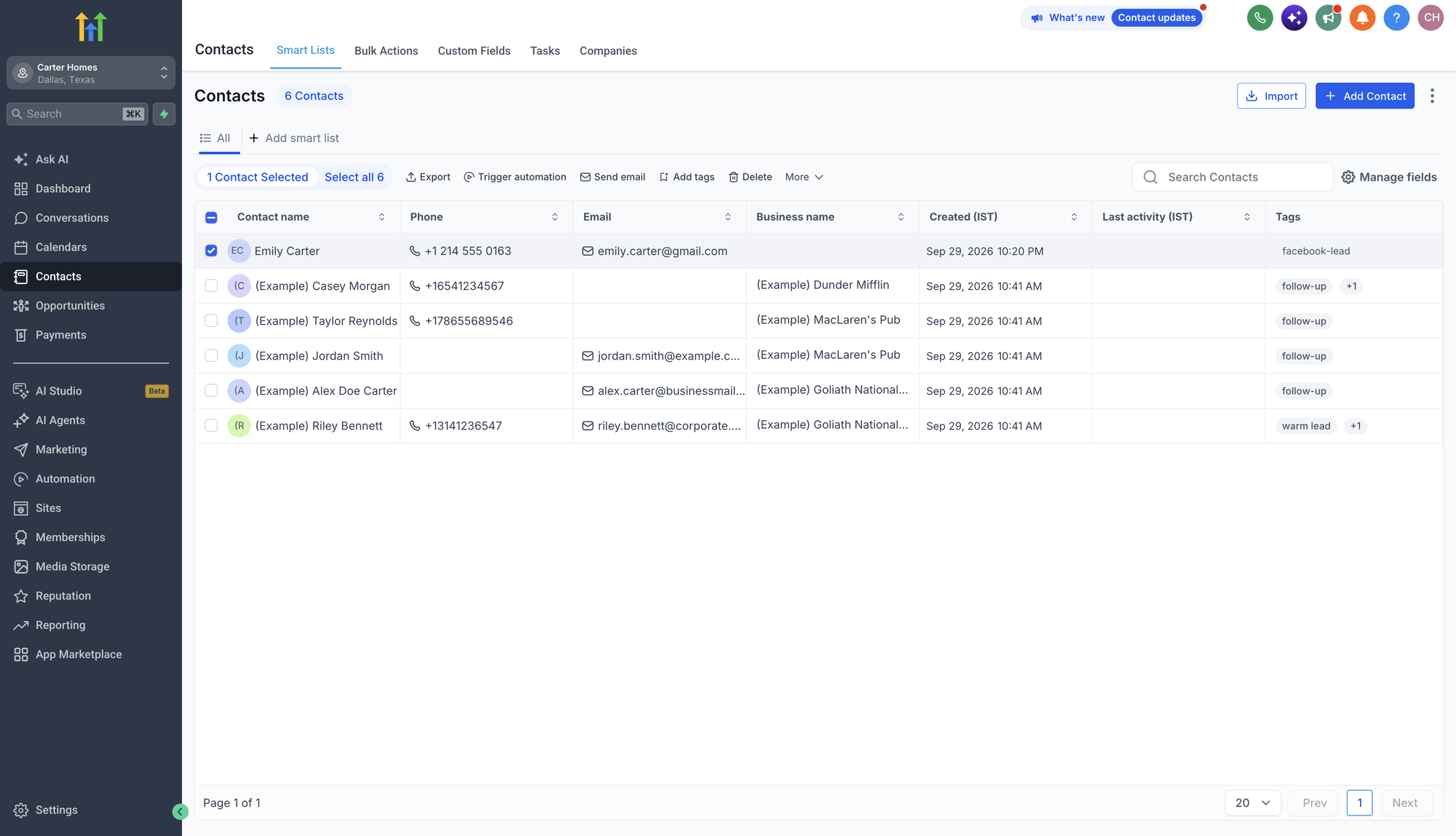
“What we sent” lists every field you matched, with the answer from the lead. Then open Contacts in GoHighLevel. The lead is already there, with its name, phone, email, business and tag.
 Your new Facebook lead
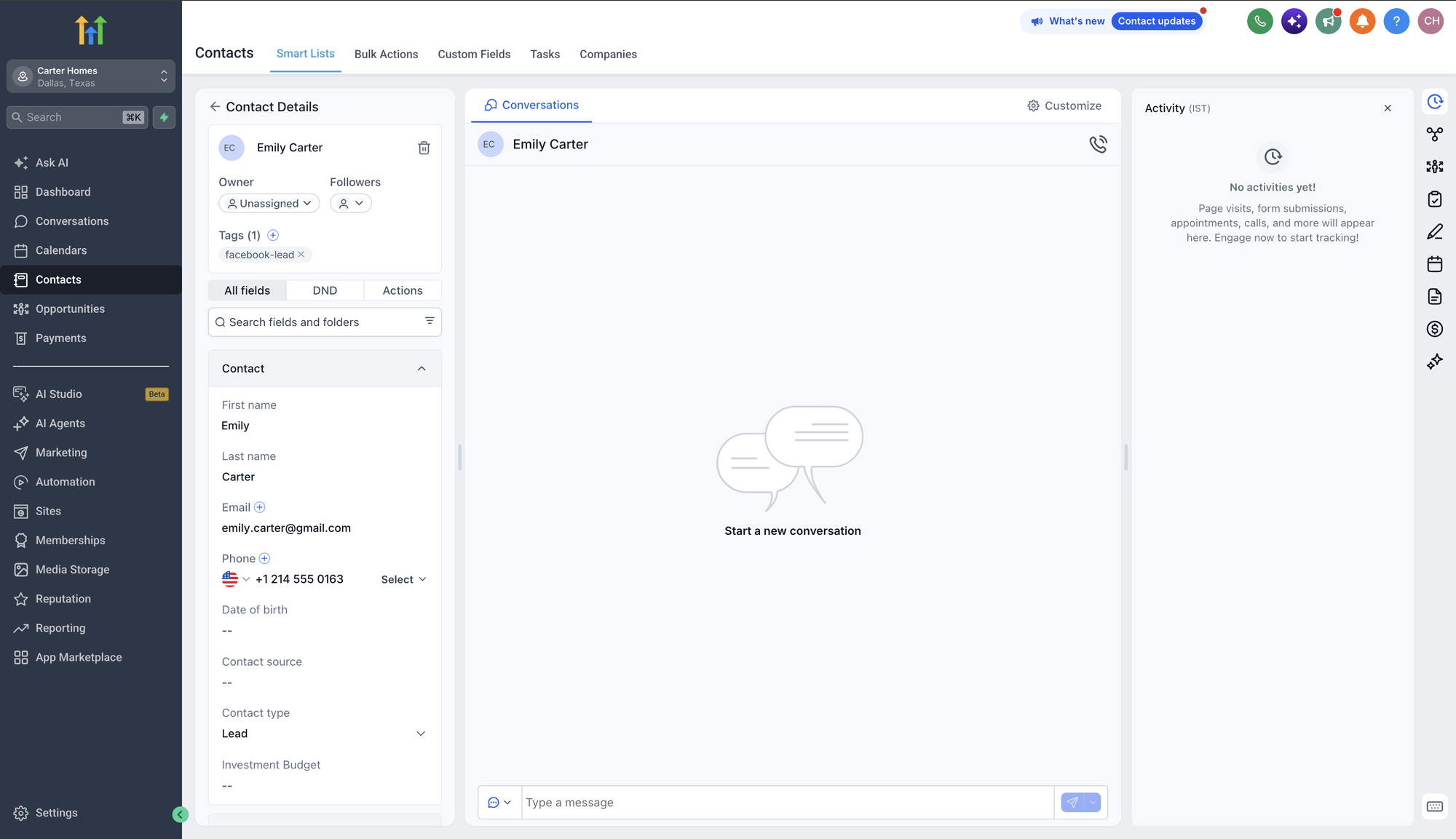
Click the contact to see everything that came across: first and last name, email, phone, and the tag, plus any custom fields you matched.
Turn it on
Click Turn on. From now on, every new lead from that form, on Facebook or Instagram, arrives in GoHighLevel as a contact within seconds. If the same person submits again, their contact is updated, not duplicated.
Start GoHighLevel workflows from new Facebook leads
The reason to get leads into GHL fast is what happens next: an instant text, a task for the right rep, a new opportunity in your pipeline. Leads from LeadSender arrive as contacts, so start your workflow with one of these triggers:
- Contact Tag, with the tag you set in step 4 (for example
facebook-lead). This is the most precise: only Facebook leads start the workflow. - Contact Created, if every new contact in this sub-account should get the same follow-up.
Don't use Facebook Lead Form Submitted: that trigger only fires for GoHighLevel's own Facebook integration. A good first workflow: send an SMS within a minute, create an opportunity in your pipeline at “New Lead”, and notify the assigned user.
Want your team to hear about a lead even before the workflow runs? Add a second integration for the same form to Email or SMS, or keep a backup copy in Google Sheets.
Every Facebook lead in GoHighLevel, in seconds
Your own custom fields, tags your workflows can use, and an email alert if a lead ever fails to deliver. Set it up once for every client sub-account.
Why send Facebook leads to GoHighLevel?
- Speed to lead. Send a Facebook lead to High Level the moment it's submitted and a workflow can text them within a minute, while they still remember filling in the form.
- One place to work leads. Conversations, pipeline, calendar and notes live on the contact, so nobody hunts through Facebook's Leads Center.
- Leads stop disappearing. Meta keeps lead data for 90 days. In GoHighLevel it's yours for good.
- Automation that runs itself. Tags, custom fields and triggers mean every Facebook lead gets the same follow-up, every time.
- Agency reporting. Each client's leads land in their own sub-account, ready for their own pipeline and reports.
Every way to send Facebook leads to GoHighLevel, compared
There are four real options. Here's how they stack up:
| LeadSender | GHL's built-in integration | Zapier | CSV import | |
|---|---|---|---|---|
| Price | From $9.99/mo, 7-day free trial | Included with GHL | Paid plan needed | Free |
| Automatic | ✓ Yes | ✓ Yes | ✓ Yes | ✕ Manual |
| Speed | Seconds | Seconds | Depends on plan | Whenever you import |
| Your GHL custom fields | ✓ Yes | ✓ Mapped per form | ✓ Yes | ⚠ By hand |
| New forms | Pick the form, map, done | ⚠ Map each new or duplicated form | ⚠ A new Zap step | n/a |
| Who can connect | Anyone with Leads Access to the Page | ⚠ A Page admin who also owns the ad account and is in Business Manager | Anyone with Leads Access to the Page | n/a |
| Also send to Email, SMS or Sheets | ✓ Yes | ✕ GHL only | ✓ With more steps | ✕ No |
| Tells you when a lead fails | ✓ Email alert and Run history | ✕ Stops quietly when the token expires | ⚠ Zap errors | n/a |
Short version: if GoHighLevel's built-in integration works for you and the right admin keeps it connected, it's a fine choice. If you want alerts when something breaks, less re-mapping every time a form changes, and the same lead in GHL plus Email, SMS or Sheets, use LeadSender. Zapier works, but you pay per task.
GoHighLevel's built-in Facebook lead form integration
GoHighLevel can pull Facebook leads in by itself. If you want to connect Facebook lead ads to GoHighLevel without another tool, here's the GoHighLevel Facebook lead form integration in brief, per GHL's own help center:
- In the sub-account, go to Settings, then Integrations, and click Connect on the Facebook & Instagram card.
- Log in to Facebook with an account that's an admin of the Page and Business Manager, and allow access.
- Choose the Page and whether to sync all leads or new leads only.
- Map each form's fields to GoHighLevel fields, creating custom fields first for your custom questions.
- Build a workflow with the Facebook Lead Form Submitted trigger.
What GHL's own documentation says to watch for:
- Strict admin rules. The person connecting must be a Page admin, own the ad account, have Leads Access, and be in Business Manager. Only the user who integrated the Page sees it in the dropdown.
- It stops when the Facebook token does. A password change, logging out of Facebook, or Page roles changing can end the connection, and leads stop arriving until someone reconnects.
- Mapping is per form. New or duplicated forms need mapping (and their workflow trigger) updated, or answers go missing.
Using Zapier to send Facebook leads to GoHighLevel
Zapier connects Facebook Lead Ads to LeadConnector. Facebook Lead Ads is a premium app on Zapier, so you need a paid plan, and each lead uses tasks from your monthly allowance.
- Create a Zap with Facebook Lead Ads, New Lead as the trigger, and choose your Page and form.
- Add a LeadConnector action that creates or updates a contact, and connect your sub-account.
- Map each lead field to a GoHighLevel field, test the step, and publish the Zap.
That's the whole Zapier Facebook leads to GoHighLevel setup. If you already run a lot through Zapier, it's a reasonable choice. For Facebook leads into GHL, and maybe Email or SMS too, a dedicated tool is simpler and usually cheaper.
For agencies: Facebook leads to many GoHighLevel sub-accounts
Agencies running Facebook ads for clients usually need each client's leads in that client's own sub-account. With LeadSender:
- Connect every client sub-account once. Each appears by name in the account picker, so routing a form to the right client takes a click.
- One integration per form. Each client form goes to its own sub-account, with its own field mapping and tags.
- Install from the GoHighLevel App Marketplace. Search for LeadSender in the Marketplace, install it at agency level, and choose the sub-accounts to connect.
- Connect client Pages from any Facebook account. Pages from several Facebook logins can feed the same LeadSender account.
When Facebook leads don't reach GoHighLevel
| What you see | Likely cause | Fix |
|---|---|---|
| No new contacts at all | The integration is off, or Facebook access was lost | Check it's turned on, then send a test lead. Reconnect Facebook or LeadConnector if asked. |
| Test works, real leads don't | Your live ad uses a different form | Check the form in your ad matches the one in the integration. |
| Contact arrives, but a field is empty | That question isn't matched to a GHL field | Open the integration and match it. Click Refresh fields if it's a new custom field. |
| Contact arrives, workflow doesn't start | The workflow uses the Facebook Lead Form Submitted trigger | Switch to Contact Tag (with your tag) or Contact Created, and publish the workflow. |
| Leads show in Leads Center, not in GHL | Lead access was removed for the app | In Business Settings, Integrations, Leads Access, give access again. |
| A lead failed to deliver | GoHighLevel rejected it or was unreachable | Check the reason in Run history, fix it, then resend the lead from there. |
The fastest way to find where it breaks is a test lead. Our free Meta Lead Ads Testing Tool creates one on your real form, and this guide explains every error you might see.
Facebook Leads to GoHighLevel: FAQs
How do I send Facebook leads to GoHighLevel automatically?
Connect your Facebook Page to your GoHighLevel sub-account with a lead delivery tool or GHL's own Facebook integration. In LeadSender: connect Facebook, choose Facebook Leads to GoHighLevel, pick your Page and form, connect LeadConnector, choose the sub-account, match your fields, send a test lead and turn it on. It takes about three minutes.
Does GoHighLevel have its own Facebook lead ads integration?
Yes. In a sub-account go to Settings, Integrations, then Facebook and Instagram, connect your Facebook account, choose the Page and map the form fields. It's included with GoHighLevel. The person connecting must be a Page admin with access to the ad account, Leads Access and Business Manager, and syncing stops if their Facebook token expires.
Why are my Facebook leads not syncing to GoHighLevel?
The usual causes are an expired Facebook connection (a password change, logging out, or Page roles changing), missing Leads Access for the app in Business Settings, a new or duplicated form that was never mapped, or a workflow trigger pointed at the wrong form. Reconnect Facebook, check Leads Access, map the form, then send a test lead.
What is LeadConnector?
LeadConnector is GoHighLevel's app platform and the name its apps and API use. When you connect LeadSender to GoHighLevel you approve access in a LeadConnector window and pick the sub-account; it's the same GoHighLevel account.
Can I map Facebook answers to my GoHighLevel custom fields?
Yes. LeadSender reads the custom fields from your sub-account and lets you match each Facebook question to one. Standard fields like First Name, Email, Phone, Address, Business Name, Website and Country are there too. If you add a custom field in GoHighLevel, it shows up the next time you open LeadSender, or straight away with Refresh fields.
Which GoHighLevel workflow trigger should I use?
Leads sent by LeadSender arrive as new or updated contacts, so use the Contact Created trigger, or add a tag like facebook-lead and use the Contact Tag trigger. The Facebook Lead Form Submitted trigger only fires for GoHighLevel's own Facebook integration.
Will repeat leads create duplicate contacts?
No. LeadSender creates or updates the contact, so if the same person submits again, their existing contact is updated instead of a duplicate being created.
Can agencies send leads to many GoHighLevel sub-accounts?
Yes. One LeadSender account can connect as many sub-accounts as you manage, and each integration sends one form to one sub-account. You can also install LeadSender from the GoHighLevel App Marketplace at agency level and pick the sub-accounts.
How fast do Facebook leads reach GoHighLevel?
Within seconds. LeadSender is notified by Meta the moment the form is submitted, so the contact is created in GoHighLevel straight away and your workflow can text the lead while they're still on their phone.
Can I use Zapier to send Facebook leads to GoHighLevel?
Yes, with a Zap from Facebook Lead Ads to LeadConnector. Facebook Lead Ads is a premium app on Zapier, so you need a paid plan, and each lead uses tasks from your allowance.
Can I connect more than one Facebook lead form to HighLevel?
Yes. Create one integration per form, each pointing at the sub-account and fields you want. Several forms can go to the same sub-account, and different forms can go to different sub-accounts.
Does this work for Instagram lead ads?
Yes. Instagram lead ads use the same Instant Forms on your Facebook Page, so the same setup sends Instagram leads to GoHighLevel too.
What happens if a lead fails to reach GoHighLevel?
LeadSender emails you when a lead fails to deliver, shows the reason in Run history, and lets you resend it once it's fixed. GoHighLevel's own integration can stop quietly when the Facebook connection expires.
Getting started
If GoHighLevel's built-in integration is working for you, keep it. If you want alerts when something fails, less re-mapping, and the same lead in GHL plus Email, SMS or Sheets, set up Facebook Leads to GoHighLevel in LeadSender. The trial is long enough to watch real leads land in GHL before you decide.
