

















The lead who hears back first usually picks you. If your phone is always on WhatsApp, that's where a new lead gets seen fastest. Getting Facebook leads on WhatsApp means you can read every answer and message or call the lead in one tap, while they're still holding their phone.
This guide shows how to send Facebook lead ads to WhatsApp step by step, in about three minutes, with no WhatsApp Business API to set up. Then it covers what alerts cost and compares the Zapier route.
Facebook keeps instant-form leads in Leads Center, so you need a tool to send them to WhatsApp. In LeadSender: connect Facebook, choose Facebook Leads to WhatsApp Notification, pick your Page and form, add the WhatsApp numbers to alert, send a test lead and turn it on. Every new lead then arrives on WhatsApp within seconds, with buttons to chat with or call the lead.
How to get Facebook leads on WhatsApp with LeadSender
This is the quickest way to connect Facebook lead ads to WhatsApp: alerts come from LeadSender's own verified WhatsApp Business number, so there's no Meta app, phone number or template for you to register.
Start a free trial and connect Facebook
Start your 7-day free trial of LeadSender (no card needed) and sign in with the Facebook account that manages your Page. That lets LeadSender hear about each new lead the moment it's submitted.
Choose the WhatsApp template
From Integrations, pick Facebook Leads to WhatsApp Notification. Then select your Facebook Page and the lead form you want alerts for.
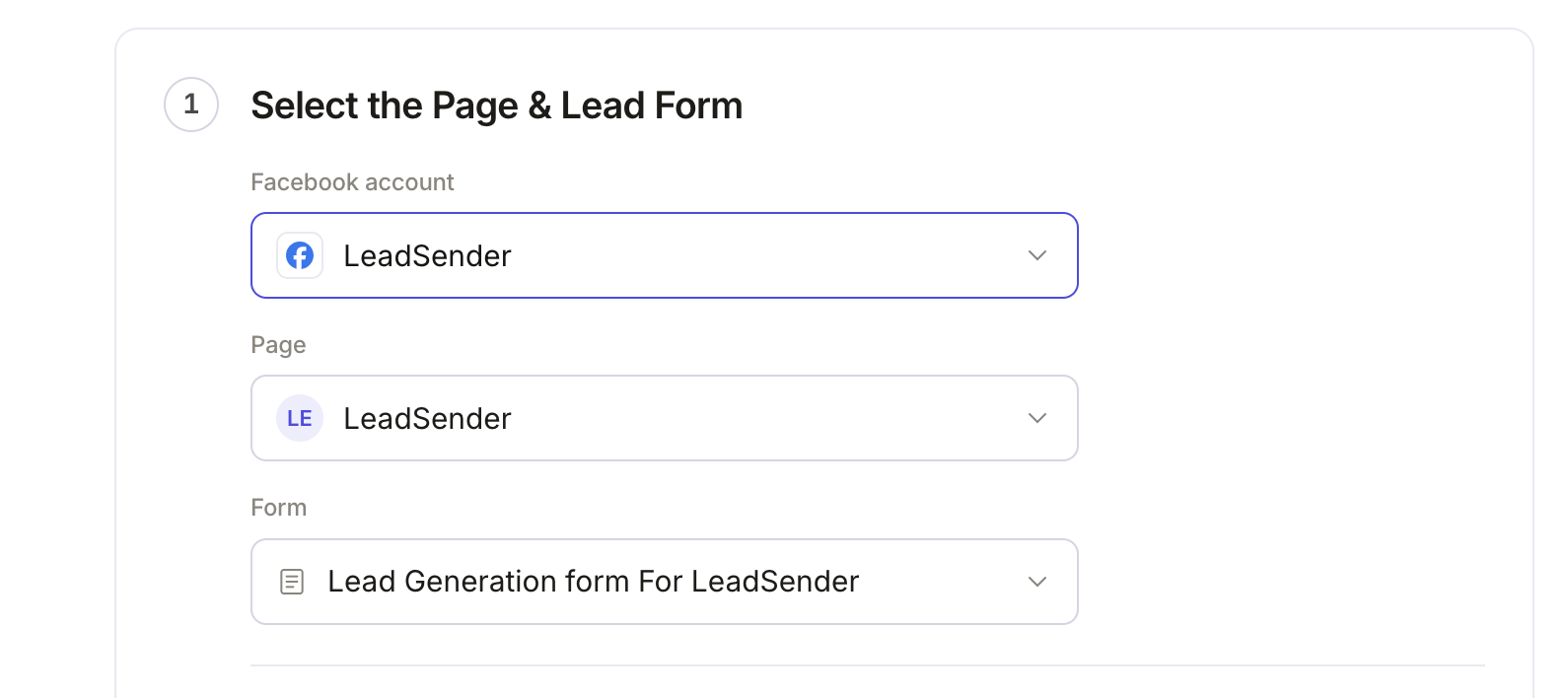 Select your Page
and lead form
Add the WhatsApp numbers
In Add WhatsApp numbers, type each number that should get alerts with its country code, like +1 512 555 0142, and press Enter. Add as many as you like. Then click Add 1,000 credits · $10 if your balance is empty; LeadSender shows how many leads your credits cover for these numbers.
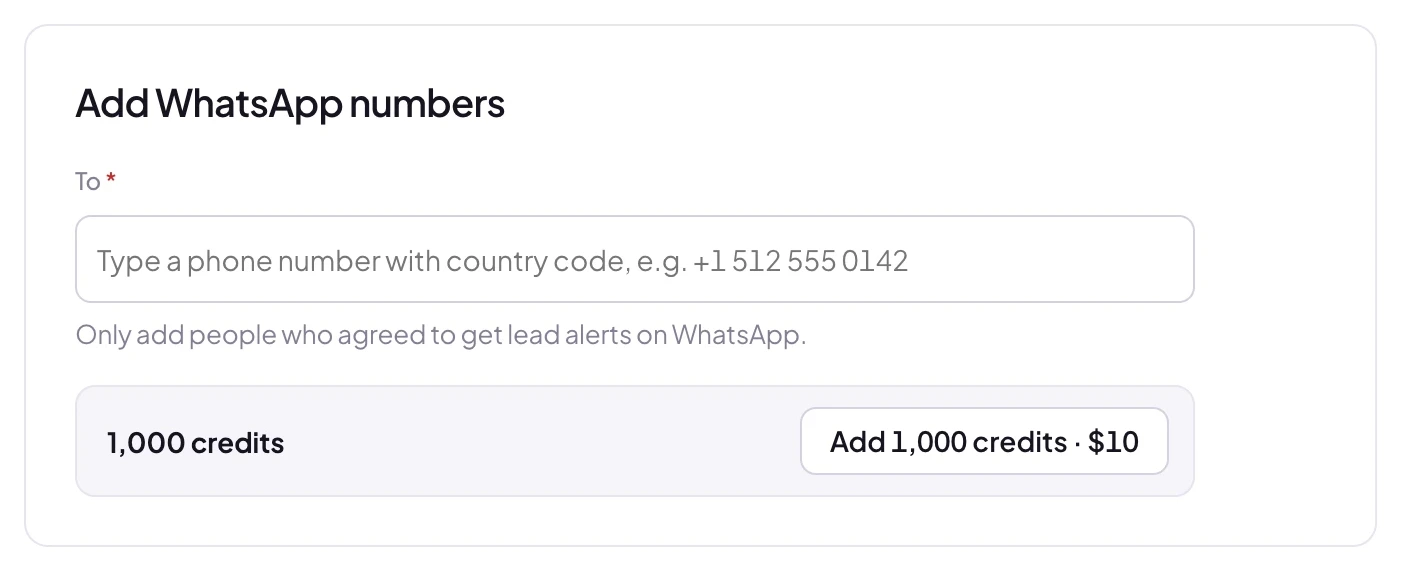 Add numbers with country codeBuy credits as you need them
Choose what each alert shows
In Set WhatsApp Lead Notification, name, email and phone are matched for you, and every question on your form is listed below. Remove any row with its ×, rename a label by hovering it, or add one with Add a field.
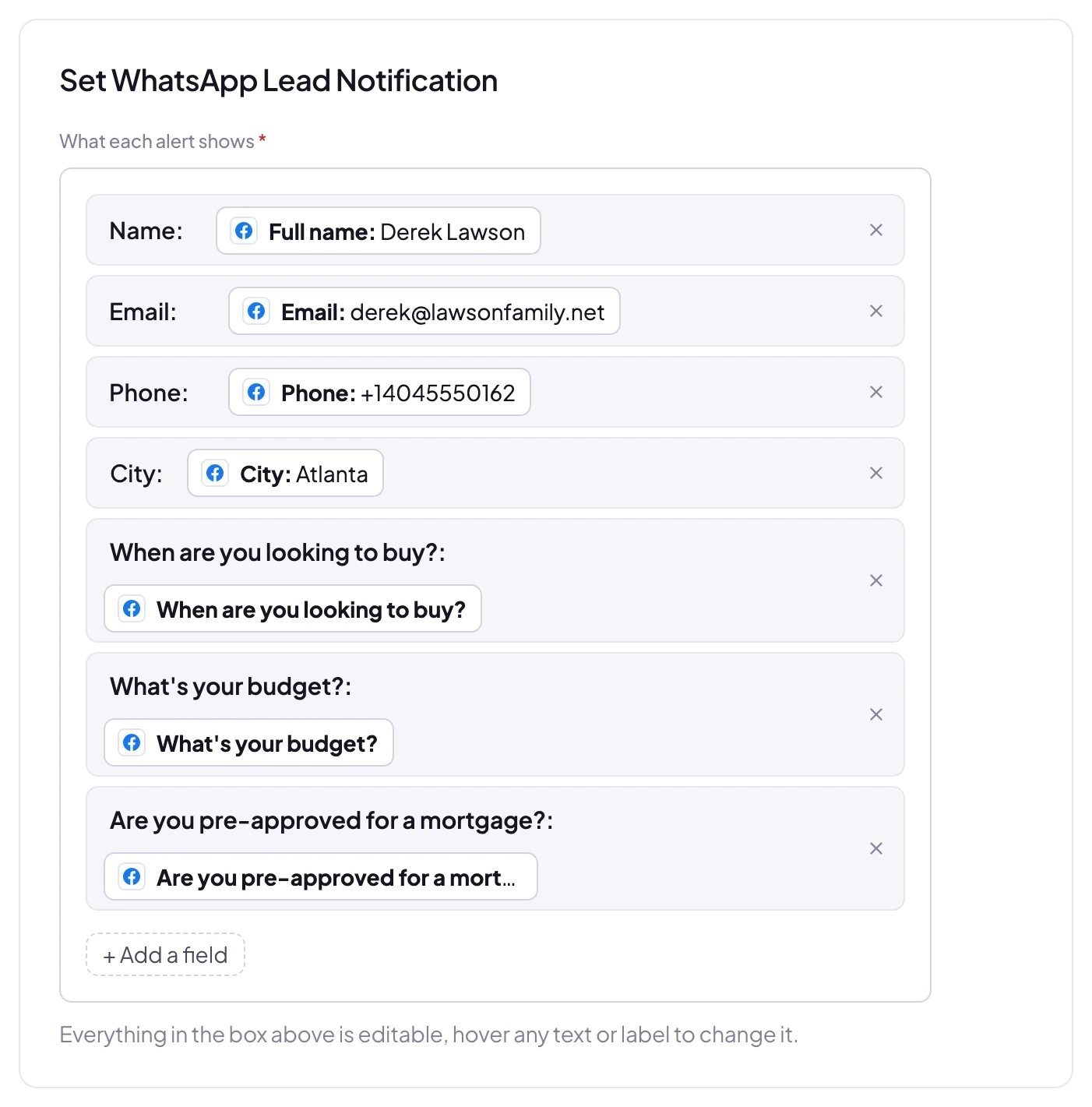 Add, remove or rename any field
Send a test lead and turn it on
Click Send a test lead. LeadSender sends your latest real lead to every number on the list and shows exactly what was sent. Want a brand new lead instead? Create one with our free Meta Lead Ads Testing Tool.
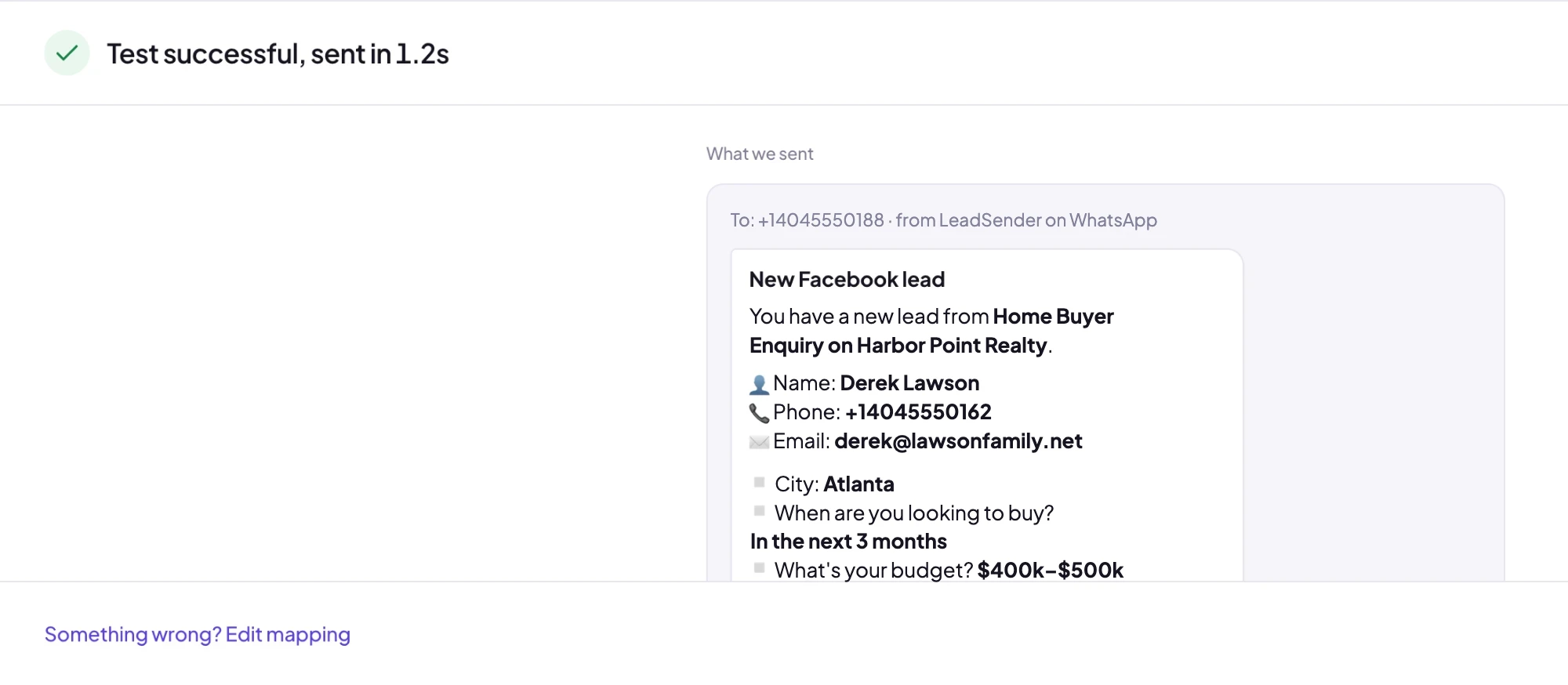 Exactly what was sent to WhatsApp
Check your phone: the alert is already there. When it looks right, click Turn on. From then on every new lead from that form, on Facebook or Instagram, arrives on WhatsApp within seconds.
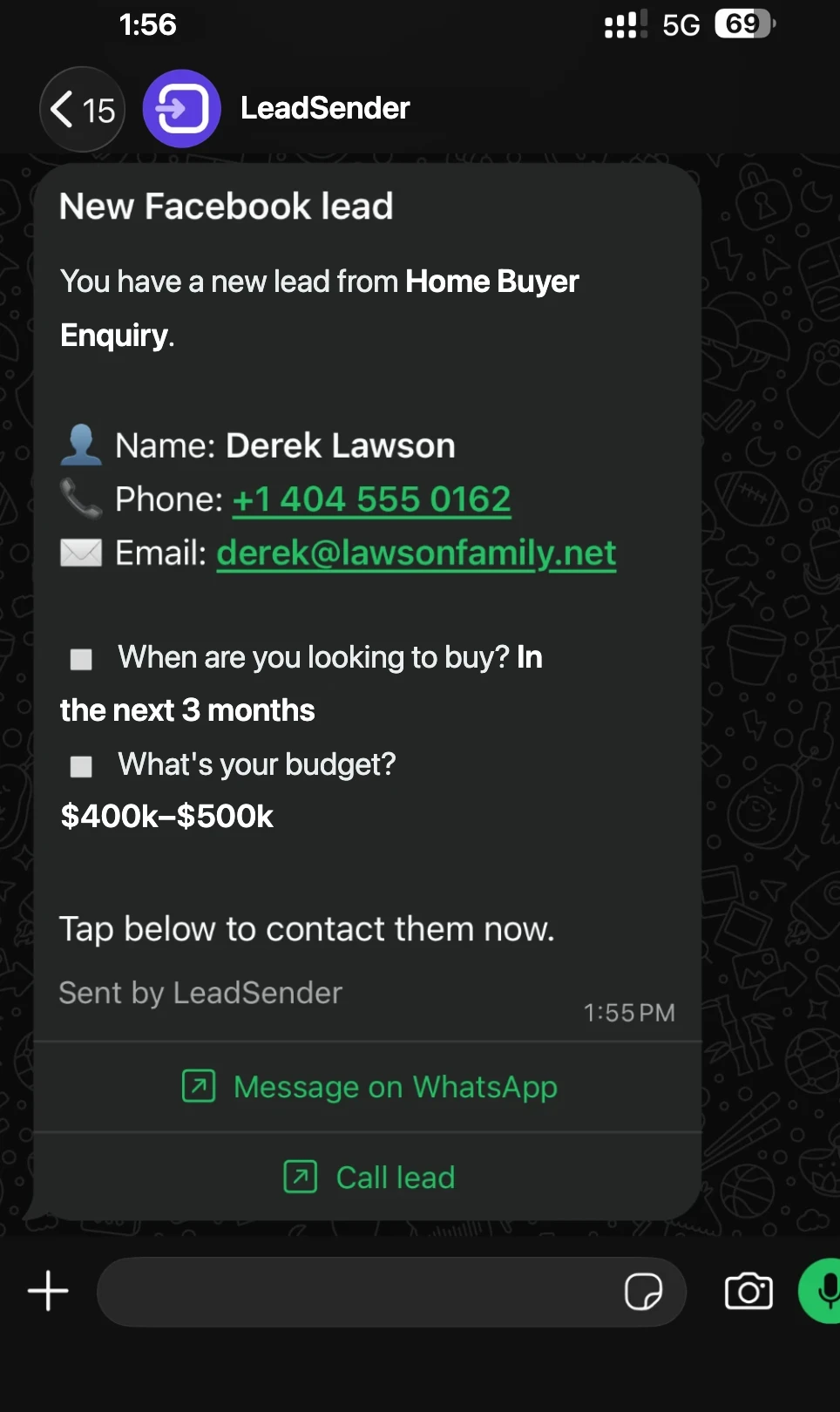 Chat or call
in one tap
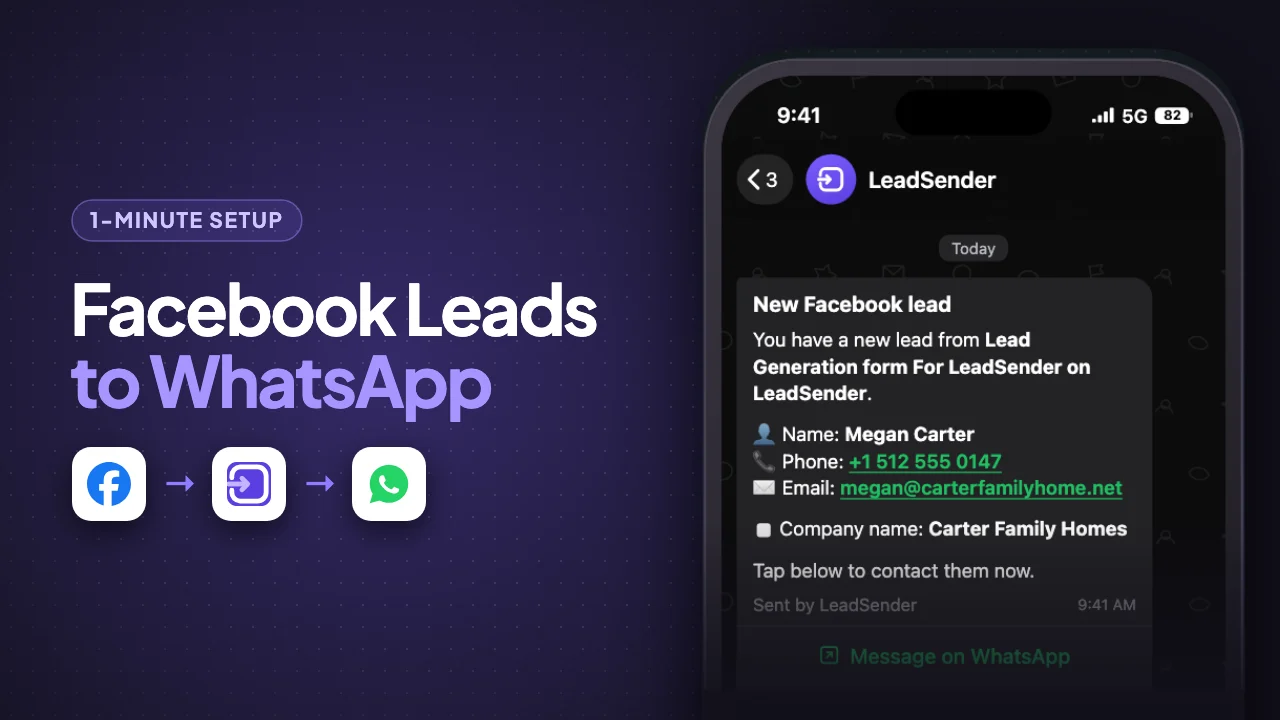
What each WhatsApp lead alert includes
Every alert is laid out the same way, so you can read it at a glance on a lock screen:
- New Facebook lead and the form it came from, so you know which ad it answered.
- Name, phone and email, with the phone number and email tappable.
- Every answer you kept, one per line, with the answer in bold.
- Message on WhatsApp, which opens a chat with the lead straight away.
- Call lead, which opens your phone's dialer with their number.
Many leads won't pick up a call from a number they don't know, but most will read a WhatsApp message. Tap Message on WhatsApp, say who you are and which ad they answered, then offer a call.
What WhatsApp lead alerts cost
WhatsApp alerts use credits, bought separately from your plan. 1,000 credits cost $10, and 1 credit is $0.01. What an alert costs depends on the country of the WhatsApp number receiving it (yours or your team's, not the lead's), because Meta charges a different rate in each country:
- 1 credit per alert (1,000 alerts per $10): Bangladesh, Colombia, Egypt, India, Nepal, US and Canada, Sri Lanka, Turkey, rest of Africa
- 2 credits per alert (500 alerts per $10): Brazil, Iraq, Israel, Nigeria, anywhere else
- 3 credits per alert (333 alerts per $10): Mexico, Qatar, Saudi Arabia, South Africa, rest of Asia Pacific (Australia, Japan, Philippines, Thailand and more), rest of Latin America and the Caribbean, rest of the Middle East (Jordan, Lebanon, Bahrain)
- 4 credits per alert (250 alerts per $10): Malaysia, Pakistan, Poland, Singapore, United Arab Emirates
- 5 credits per alert (200 alerts per $10): Chile, Kazakhstan, Spain, rest of Western Europe (Ireland, Sweden, Switzerland and more)
- 6 credits per alert (166 alerts per $10): Morocco, United Kingdom, rest of Central and Eastern Europe (Greece, Czechia, Bulgaria and more)
- 7 credits per alert (142 alerts per $10): Argentina, Hong Kong, Indonesia, Oman
- 8 credits per alert (125 alerts per $10): France, Italy, Peru, Romania, Ukraine
- 9 credits per alert (111 alerts per $10): Hungary
- 10 credits per alert (100 alerts per $10): Russia
- 11 credits per alert (90 alerts per $10): Kuwait
- 13 credits per alert (76 alerts per $10): Netherlands
- 14 credits per alert (71 alerts per $10): Germany
So a team in Texas gets 1,000 alerts from a $10 pack, and a team in Singapore gets 250. LeadSender also shows how many leads your balance covers for the numbers you've added. If WhatsApp can't deliver an alert, its credits go straight back to your balance.
LeadSender vs Zapier for Facebook leads to WhatsApp
Facebook doesn't send instant-form leads to WhatsApp for you, so the real choice is a dedicated tool or a general automation platform:
| LeadSender | Zapier | |
|---|---|---|
| Price | From $9.99/mo plus credits (1,000 for $10) | From $29.99/mo (Facebook Lead Ads is a premium app), plus WhatsApp fees |
| WhatsApp Business API | ✓ Not needed | ⚠ Your own account and approved templates |
| Speed | ✓ Seconds | Depends on plan |
| Setup | ✓ About 3 minutes, guided | ⚠ Build and test a Zap yourself |
| Chat and call buttons | ✓ Built in | ⚠ Only if your template has them |
| Failed alerts | ✓ Credits refunded, reason in Run history | Zap history |
Short version: Zapier can work if you already run your own WhatsApp Business API with approved templates. If you want WhatsApp lead alerts today without any of that, use LeadSender. More in LeadSender vs Zapier.
Using Zapier
With Zapier you create a Zap with Facebook Lead Ads (New Lead) as the trigger and a WhatsApp action. That needs a WhatsApp Business account connected to Zapier and a message template Meta has approved, on top of a paid Zapier plan, and every lead uses tasks from your allowance.
When a WhatsApp alert doesn't arrive
- Number missing the country code: remove it and add it again starting with
+and the country code. - Number not on WhatsApp: alerts only reach numbers with WhatsApp installed. Its credits are refunded.
- Credits at 0: the integration can't be turned on, and alerts pause until you add credits.
- Can't find the alert: search WhatsApp for “New Facebook lead”. A new business sender can land in your chat list below pinned chats.
- Nothing at all: check the integration is turned on, then send a test lead and read the result. Every attempt is listed in Run history with the reason.
Comparing options? See how Facebook lead ads integration works, with the 5 ways to send leads to Email, SMS or your CRM compared.