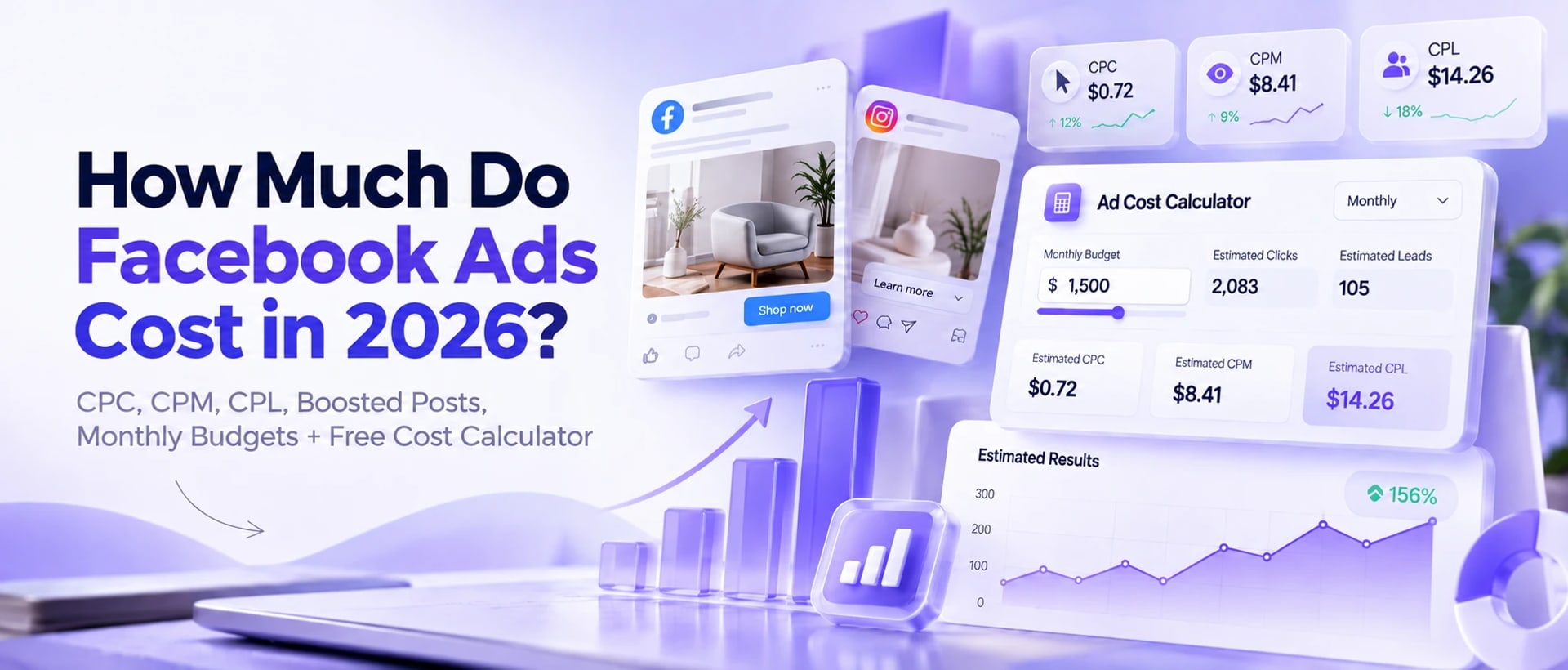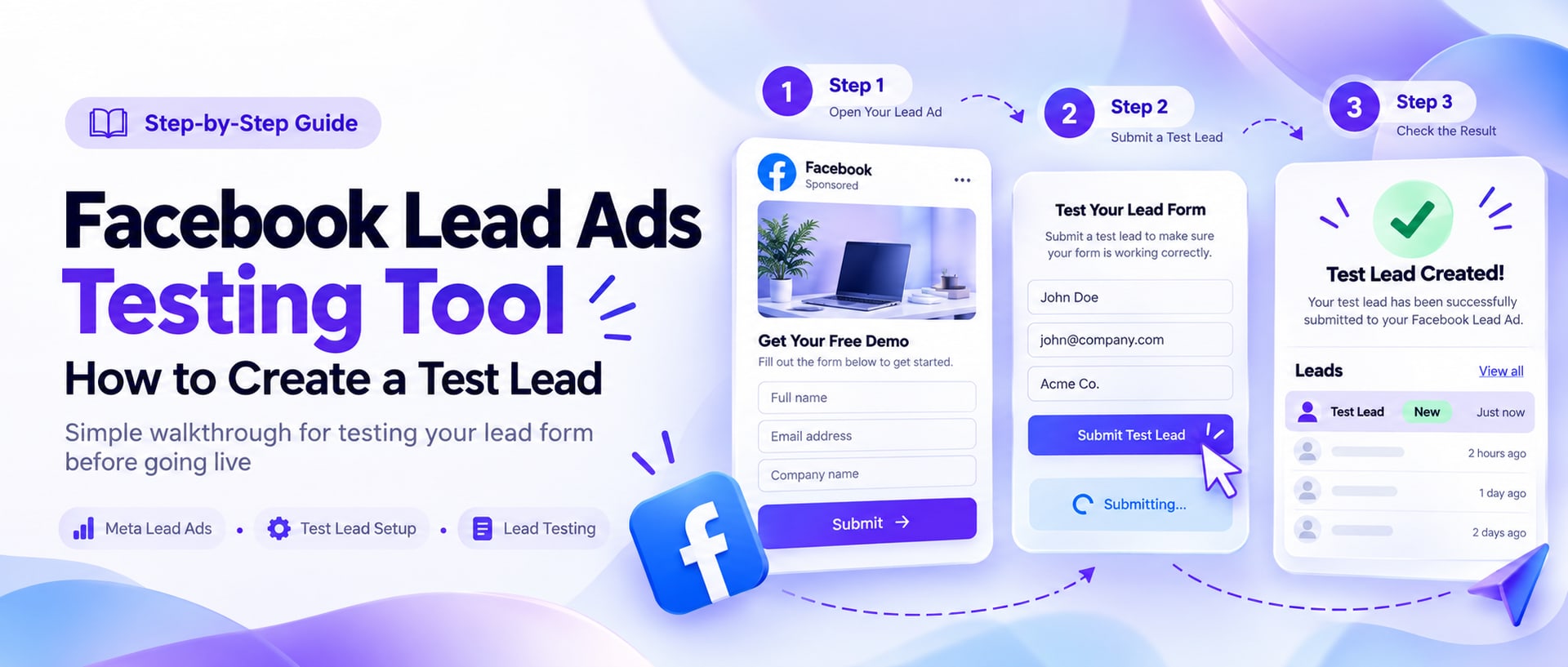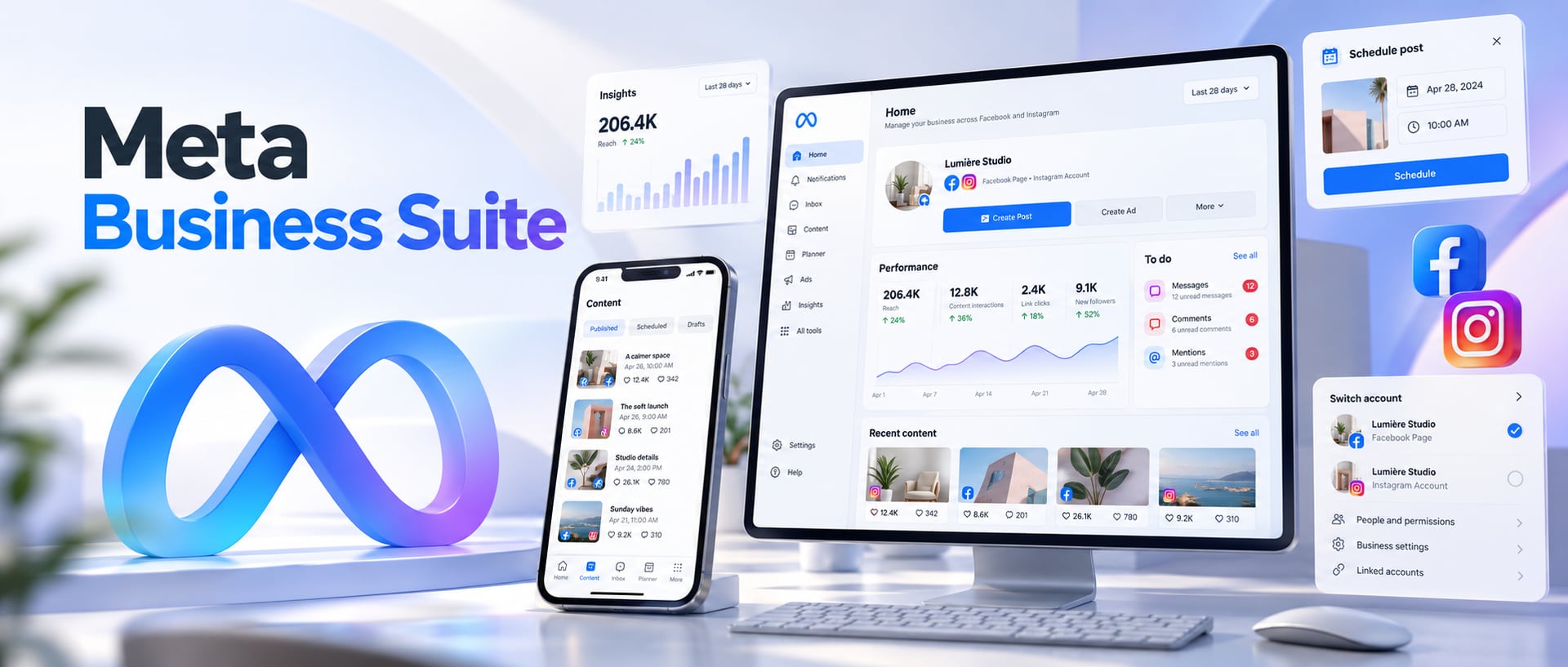














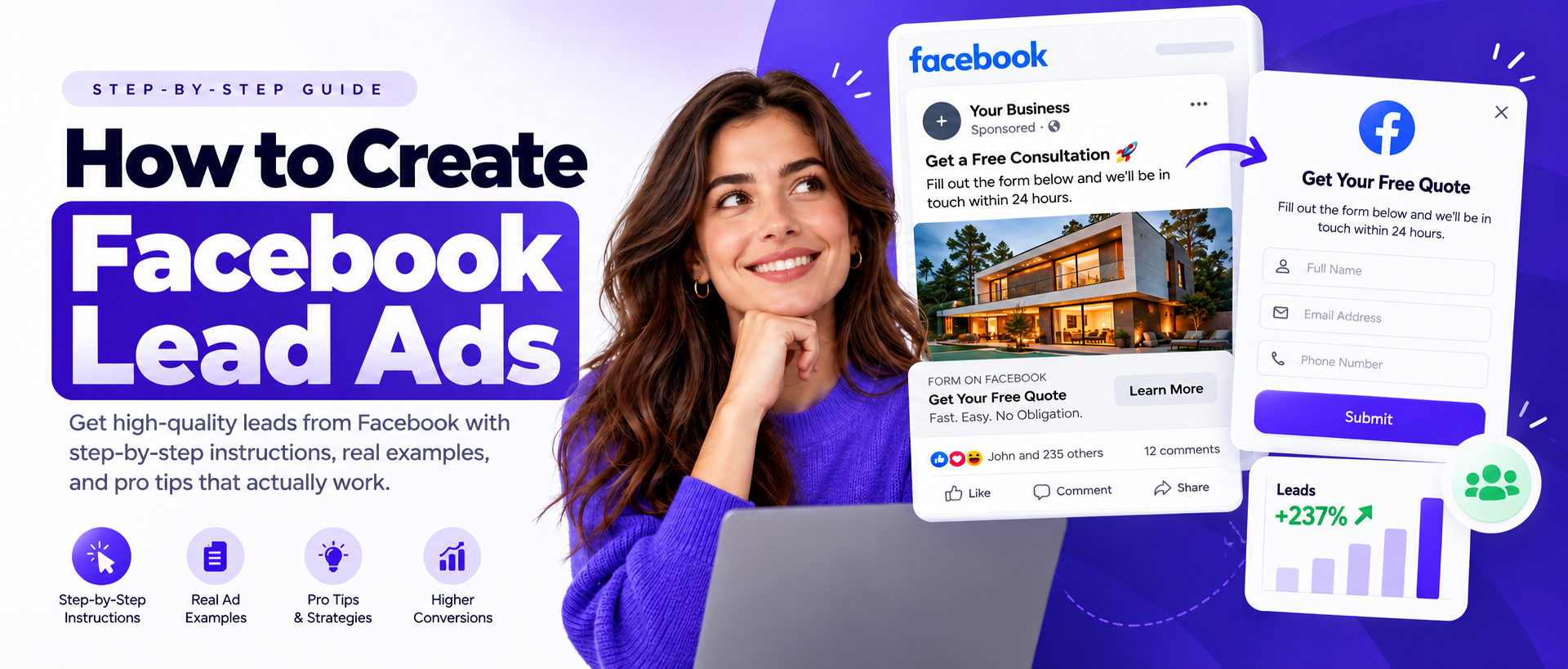
Want to generate leads directly from Facebook and Instagram without sending people to a separate landing page? Facebook Lead Ads make that possible by letting prospects submit their information through a native Instant Form inside Meta, without ever leaving the app.
This guide covers exactly how to create Facebook Lead Ads, how the whole system works end to end, how to build a lead form that produces useful leads instead of just cheap ones, what to ask, how to think about audience, how to connect leads to a CRM, and what to do when a campaign starts producing leads that never turn into customers.
Meta changes Ads Manager frequently. The exact labels and screens you see can vary by account, market, campaign type and rollout stage. This guide reflects the current 2026 workflow, but always follow the options actually shown in your own Ads Manager account rather than an exact match to what's pictured here.
Quick answer: how do you create a Facebook Lead Ad?
Meta Ads Manager → Create → Leads → choose your conversion location → configure the campaign and audience → create your ad → create or select an Instant Form → review → publish → connect and manage your leads.
In some accounts, you may first see a combined option such as Website and Instant Forms. For a pure Facebook Instant Form campaign, look for a Single conversion option and select Instant Forms where it's offered. Meta has been expanding multi-destination lead generation and, in some accounts, lets its own system optimize across destinations rather than locking you into one.
Creating the ad is only half the job. Your offer, creative, lead form, qualification questions, follow-up speed, CRM setup and ongoing optimization are what decide whether those leads become real business, and that's what the rest of this guide is actually about.
What are Facebook Lead Ads?
Facebook Lead Ads are ads built to collect contact information from potential customers directly on Facebook or Instagram. Instead of clicking an ad, leaving Facebook, waiting for a website to load and then filling out a form, a prospect taps the ad and a native lead form, commonly called an Instant Form, opens right there. The form can pull in information already on the person's Meta profile, which cuts down how much they have to type.
That makes Facebook Lead Ads useful for collecting:
- Names, email addresses and phone numbers
- Business information
- Product or service interests
- Qualification answers
- Appointment information
- Other permitted custom responses
Common use cases include:
Get a Quote → Book a Consultation → Download a Guide → Request Pricing → Register for an Event → Get Property Information → Request a Demo → Join a Waitlist
This is also why the same format shows up under several names: Facebook Lead Ads, Meta Lead Ads, Facebook Lead Generation Ads, FB Lead Ads, Lead Form Ads, Facebook Instant Forms, Meta Lead Gen Ads, and Facebook Lead Form Ads. They all describe the same underlying system.
How do Facebook Lead Ads work?
The customer journey is simple:
- Someone sees your Facebook or Instagram ad
- They tap the CTA
- An Instant Form opens
- Some information may already be pre-filled
- They review or answer your questions
- They submit the form
- The lead becomes available through Meta
- Your business sends it to a CRM, spreadsheet, email, sales system or follow-up workflow
That last step is where a lot of campaigns quietly fall apart. Getting a lead into Meta is not the same thing as getting that lead into your sales process. Current guidance from lead-generation platforms keeps landing on the same point: connect lead delivery and your CRM so new submissions get worked while they're still warm, instead of sitting inside Meta Business Suite until someone remembers to check.
Facebook Lead Ads examples
Before the step-by-step setup, here's what a real Facebook Lead Ad actually looks like once it's running, screenshotted from real, live campaigns across a few different industries. Business names are blurred out; everything else, hook, image, form headline and button, is exactly what ran.
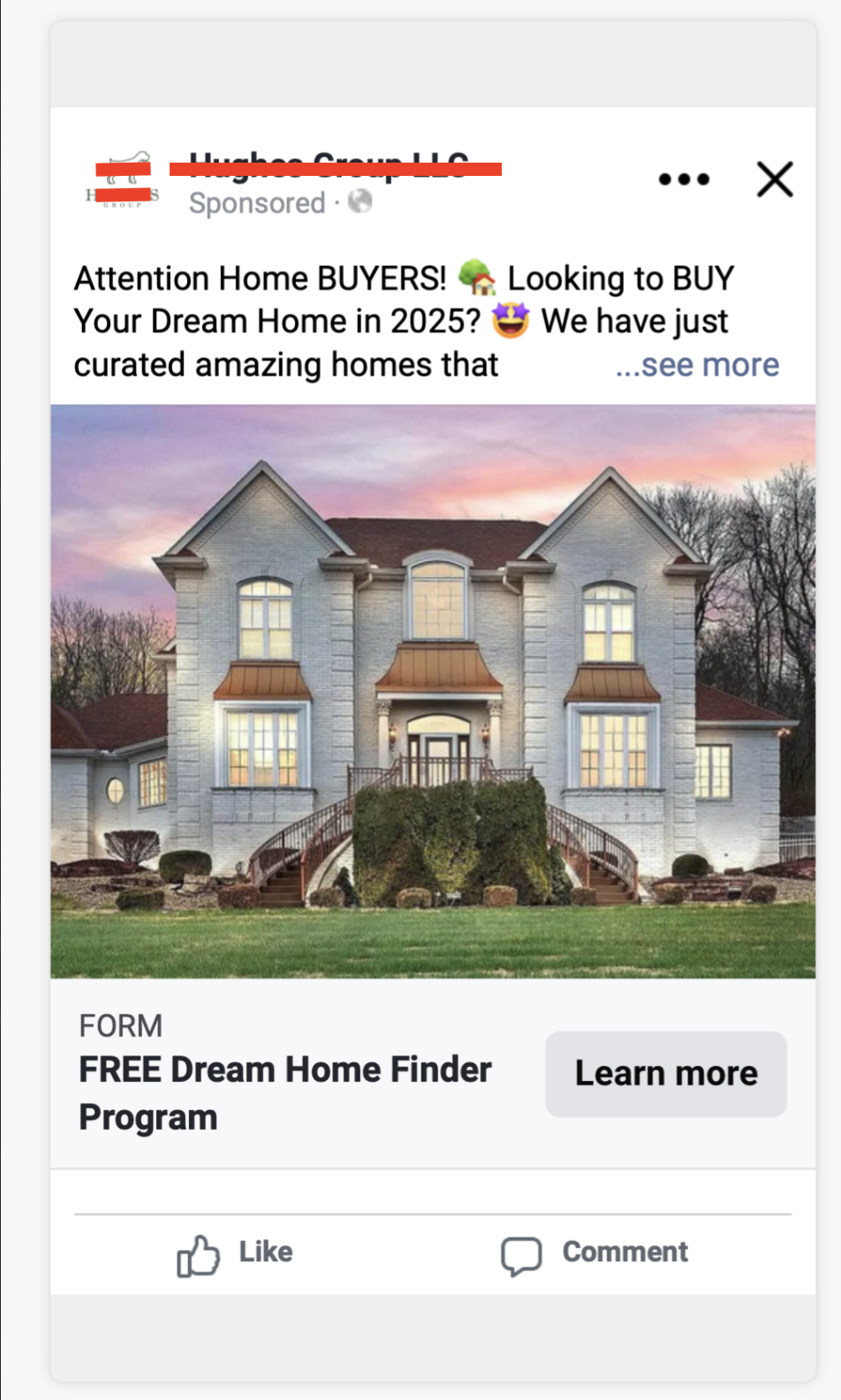
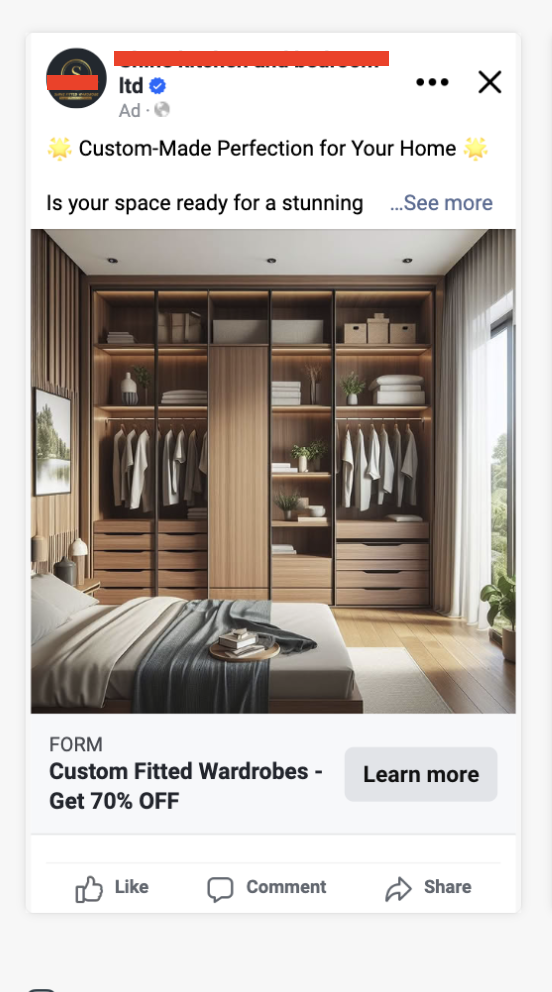
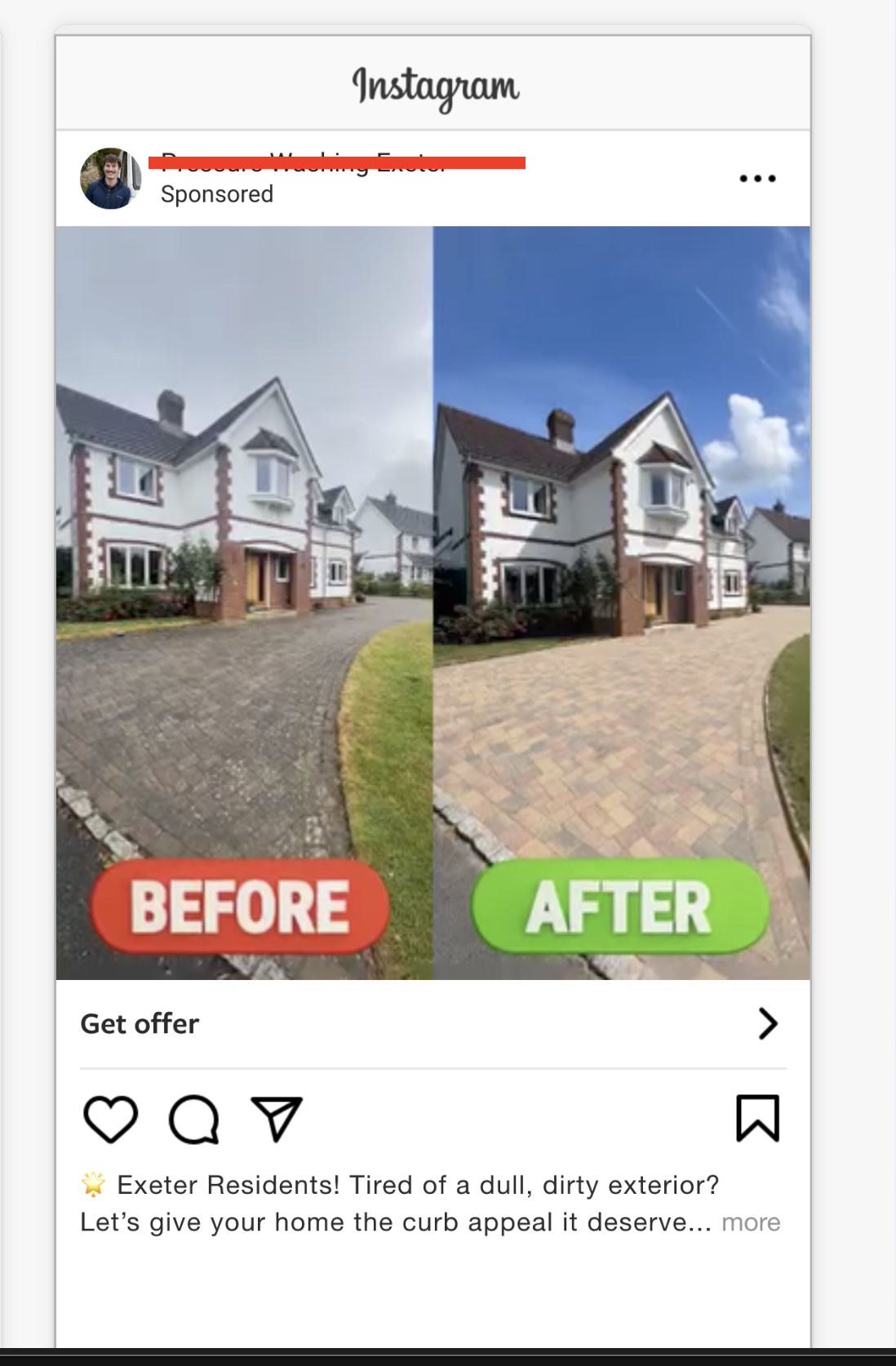

What you need before creating Facebook Lead Ads
Before you open Ads Manager, get these six things ready.
A Facebook Page
Your lead ad needs a Facebook Page to run under.
An active Meta ad account
Make sure the account is in good standing and able to run ads before you start building the campaign. If it has been restricted, see what to do when your Facebook ad account is disabled first.
A real lead offer
Don't start with the form. Start with the reason someone should hand over their information.
- Real estate: Free home valuation
- Roofing: Free roof inspection
- B2B: Book a demo
- Education: Free assessment
- Legal: Request a consultation
- Home services: Get a quote
- SaaS: Start a free trial
- Events: Reserve your seat
Your privacy policy
Your Instant Form needs the right privacy information and a working link to your privacy policy. Meta's own lead-generation documentation is specific about this: handle submitted data responsibly and disclose it clearly.
Your ad creative
Have at least one strong image or video ready before you start building the campaign around it.
A lead delivery plan
Decide where new leads will actually go: Meta Business Suite, Google Sheets, a CRM, email, SMS or straight to a sales team.
Manual exports can work for a small, one-off campaign. For anything you'll run regularly, automated delivery is much easier to keep up with.
Steps 1 to 6: Setting Up the Campaign
Step 1: Open Meta Ads Manager
Go to Meta Ads Manager, select the correct ad account, and click Create.
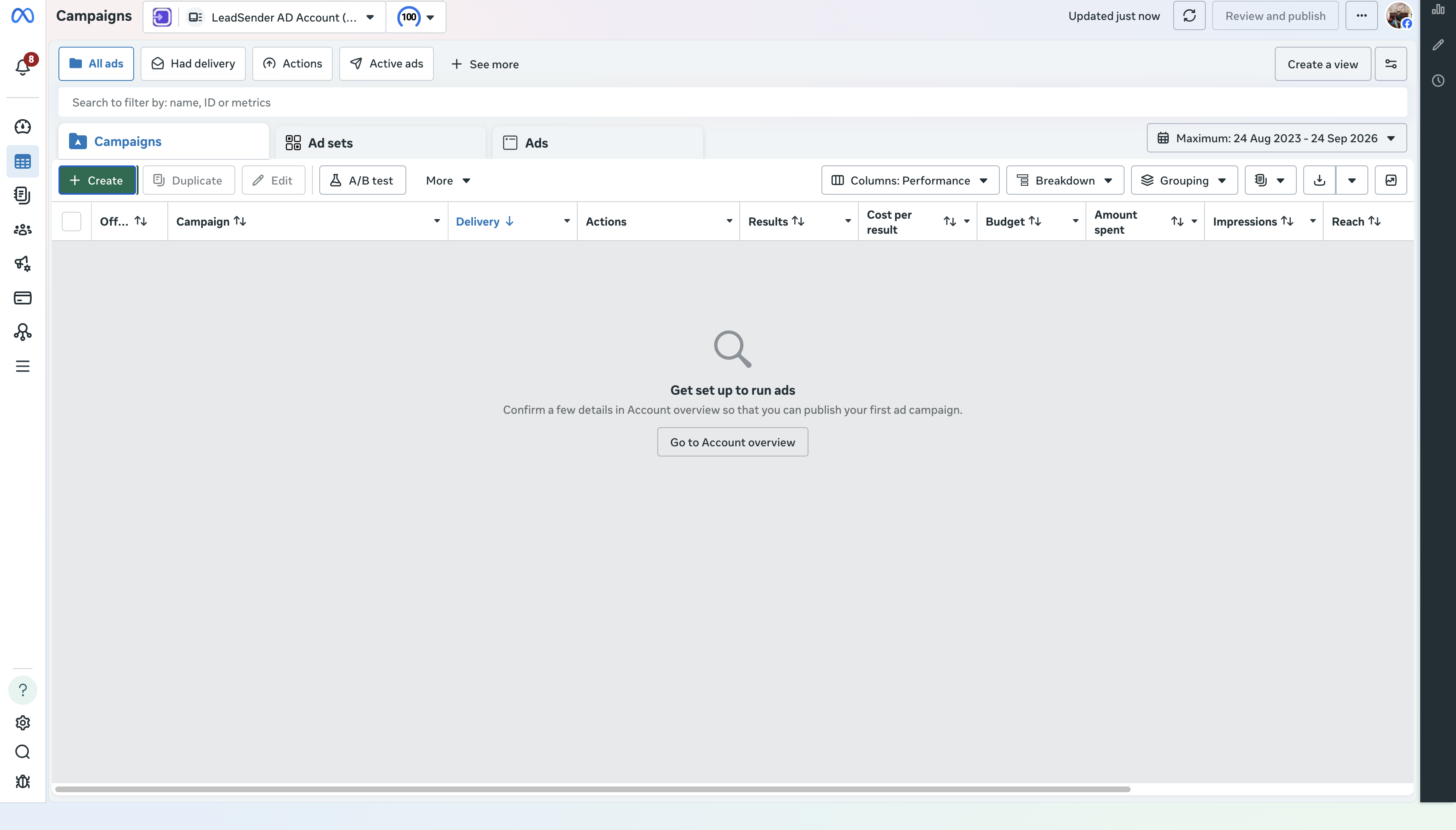 ☝ Click here
Step 2: Choose the Leads objective
When Meta asks what the campaign should achieve, select Leads. That tells Meta to optimize delivery for lead actions specifically, rather than traffic, engagement or reach. It's the starting point every current lead-generation guide uses for exactly this reason.
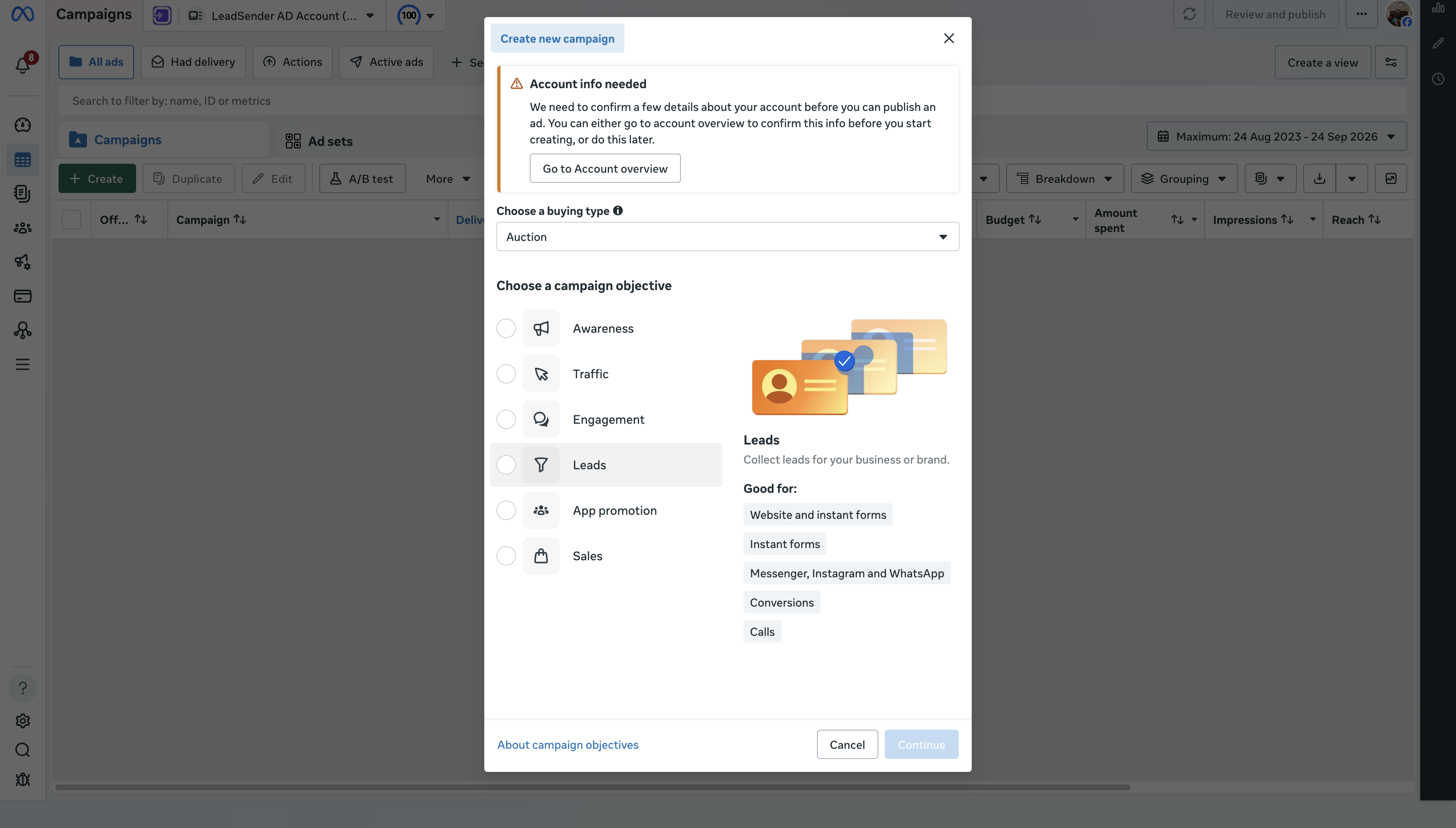 ☝ Click here
Step 3: Name your campaign
Give it a real naming structure instead of leaving the default.
Instead of Campaign 1, use something like:
LEADS | BUYERS | PHOENIX | SEP 2026
or
LEADGEN | HOME VALUATION | MIAMI | COLD
A consistent structure, such as Lead Type + Location + Offer + Audience + Date, becomes genuinely useful the moment you're running more than one Facebook lead campaign at a time.
We'll go with LEADS | BUYERS | PHOENIX | SEP 2026 and carry that same campaign through the rest of the walkthrough below.
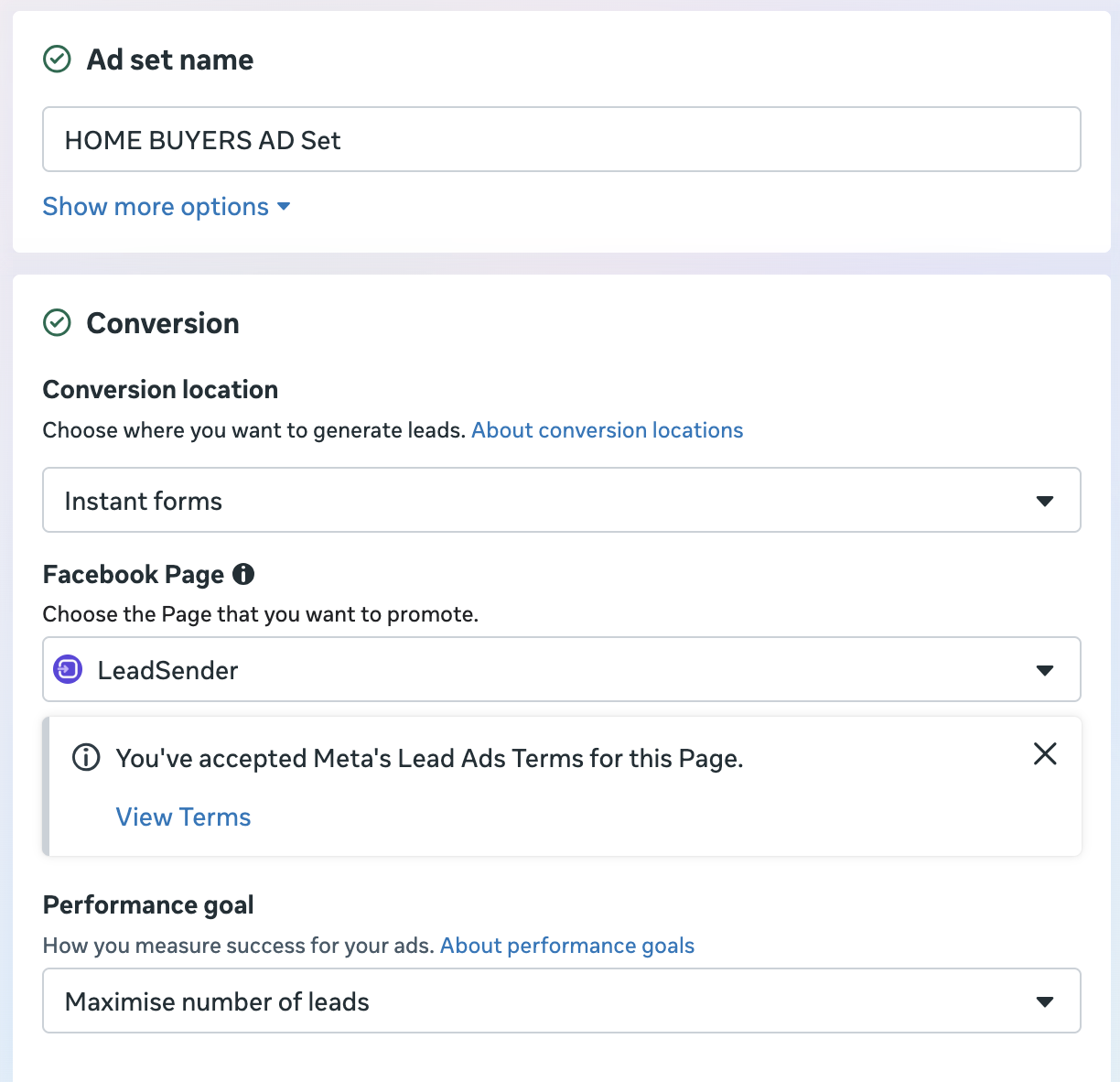
Step 4: Choose your conversion location
This is one of the most consequential choices in the whole setup, and the easiest one to get confused by, since Meta lists several options side by side.
Depending on your account, you may see:
- Website
- Instant Forms
- Messaging destinations
- Calls
- Other supported destinations, or a combination such as Website and Instant Forms
Choose Single as the conversion location, then select Instant Forms. That's the only choice that keeps the whole submission inside Facebook and Instagram, with no landing page needed, and it's what the rest of this guide builds around.
Meta has been expanding multi-destination lead generation, and some accounts default to a combined Website and Instant Forms option instead of a single clean choice. If you see that combined option and only want a native Instant Form, look for Single first, since that's usually what unlocks Instant Forms as its own separate choice rather than one folded into a website flow.
Website is a separate, valid path (a full landing page instead of a native form), but it's a different setup with different tradeoffs, not something to pick at the same time as Instant Forms.
Step 5: Choose your performance goal
Your exact options vary by account. For Instant Forms, Meta may offer a volume-focused goal designed to maximize submissions, alongside quality-focused goals where you're eligible for them. Common concepts:
Maximize number of leads and Maximize conversion leads
The difference matters. A campaign optimized purely for volume finds people most likely to submit a form. A quality-focused setup tries to use additional signals to find people more likely to actually progress past that first form. Recent guidance leans on CRM and Conversions API connections to make those quality signals possible, so availability depends on what your account and setup actually support, check what's offered before assuming it isn't there.
Step 6: Set up your audience
This is where Facebook lead campaigns have changed the most over the last few years. Meta leans heavily on automated systems and broader delivery now. Current guides report that Advantage+ audience may be the default experience for Leads campaigns, with your own inputs acting more like signals than strict boundaries.
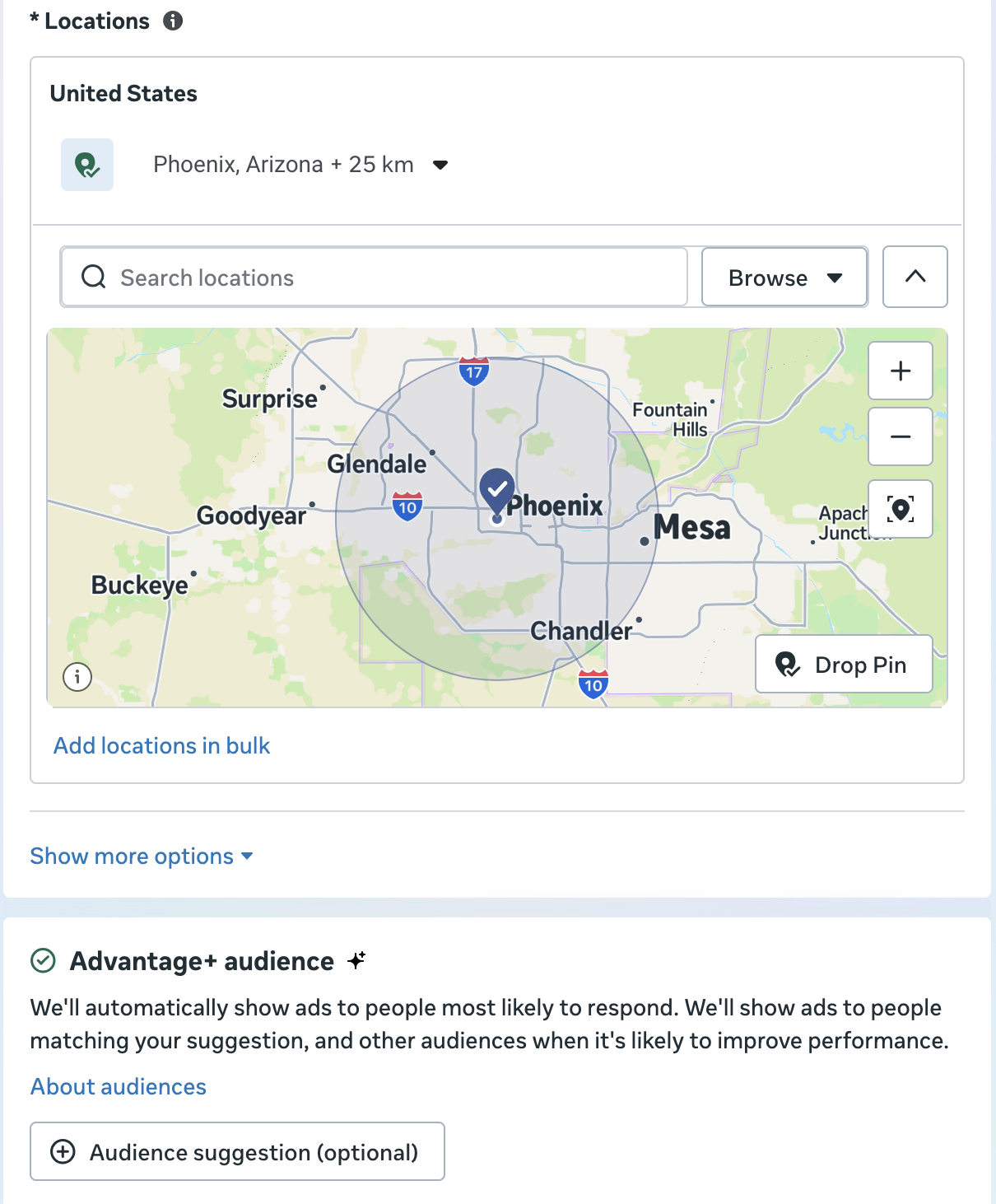
That means your strategy shouldn't rest entirely on finding the one perfect interest. Think about four things instead:
- Location: where do you actually sell or provide the service?
- Offer: who is genuinely likely to care about it?
- Creative: does the ad name the problem, the audience or the outcome clearly?
- Qualification: can the form itself separate serious prospects from casual clicks?
Your creative and offer are doing more of the targeting work than they used to.
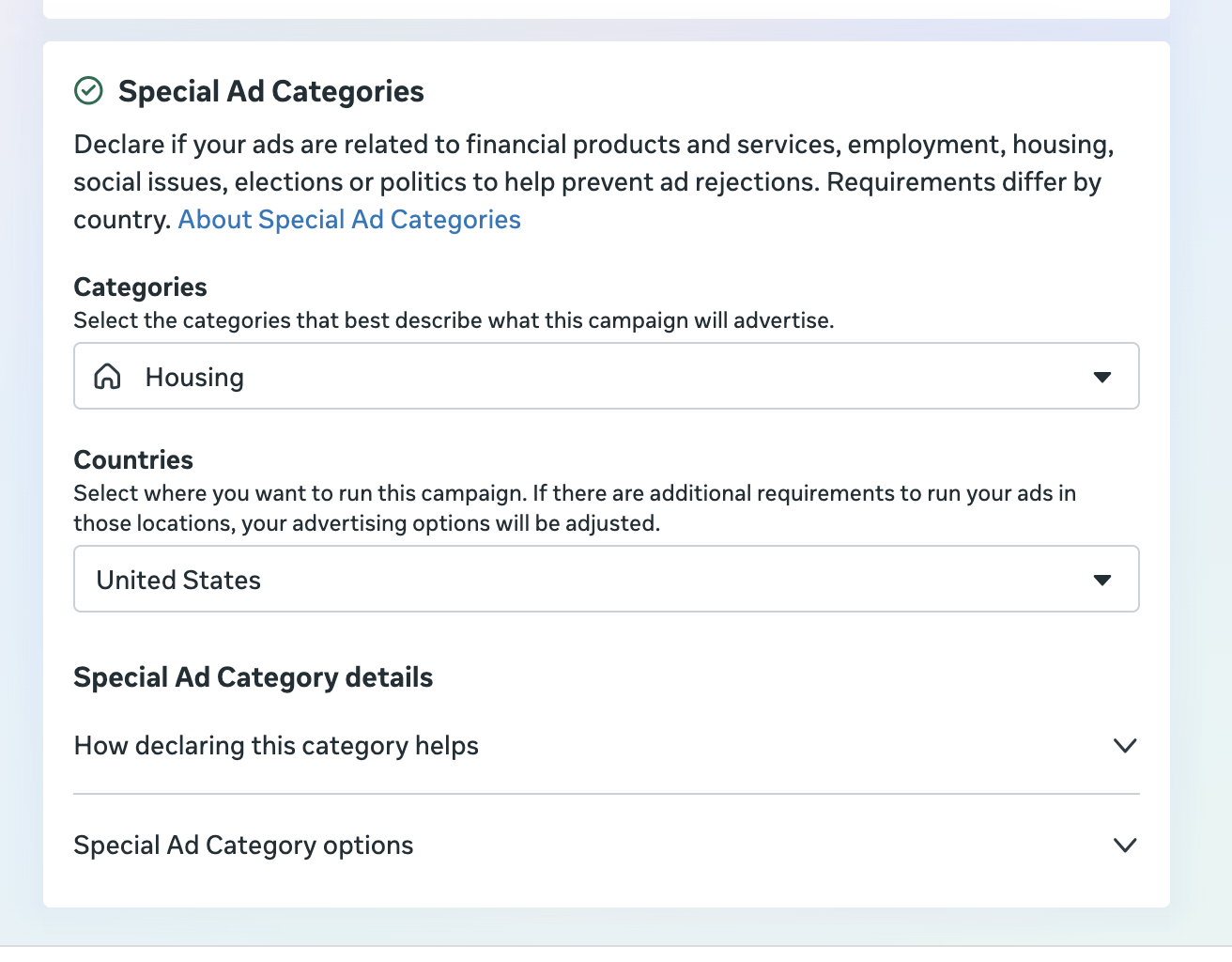
Special note for Facebook ads for realtors
Real estate advertisers need to handle this step with more care. Depending on the market and the nature of the ad, housing-related campaigns may fall under Meta's Special Ad Category, which restricts certain targeting options.
In affected markets, that can mean limits on age, gender, ZIP or postal-code targeting, location controls, detailed targeting and lookalike audiences. That changes how Facebook real estate lead generation should actually be approached. Instead of trying to micro-target the perfect person, lean on:
Clear local messaging + strong property-specific creative + self-selection + smart lead-form questions + fast follow-up
Real estate campaigns commonly promote:
- Home valuations
- Buyer consultations
- New listings and open houses
- Property alerts
- Market reports and neighborhood guides
- New construction
- Off-market opportunities
- Seller consultations
Steps 7 to 10: Budget, Placements and the Ad
Step 7: Set your budget and schedule
Your budget sets how much you're willing to spend, as a daily or lifetime amount depending on what your campaign setup allows.
Don't pick a number just because a blog post said "start with $10 a day." Base it on:
Target CPL + expected lead volume + lead-to-customer rate + customer value
If a customer is worth $5,000 to your business, a $50 lead isn't automatically expensive. The real question is whether that lead eventually creates enough value to justify it.
Step 8: Choose placements
Meta can distribute your ad across its available surfaces. For most campaigns, automated or Advantage+ placements let Meta's delivery system find opportunities across Facebook and Instagram, and Meta's own lead-generation guidance recommends exactly this as a way to widen delivery rather than narrow it upfront.
Instead of forcing one placement because it "looks right," let the data decide. Review:
Placement → CTR → form completion → CPL → qualified lead rate
A cheap placement that produces poor leads was never actually a successful placement.
Step 9: Create the ad
Choose the Facebook Page and Instagram account that will represent the business, then build the ad itself. Depending on your campaign setup, you may be able to choose Single Image or Video or Carousel. Both are well documented in current lead-ad guides, and either can work; the offer and creative matter more than the format.
Step 10: Write your Facebook lead ad copy
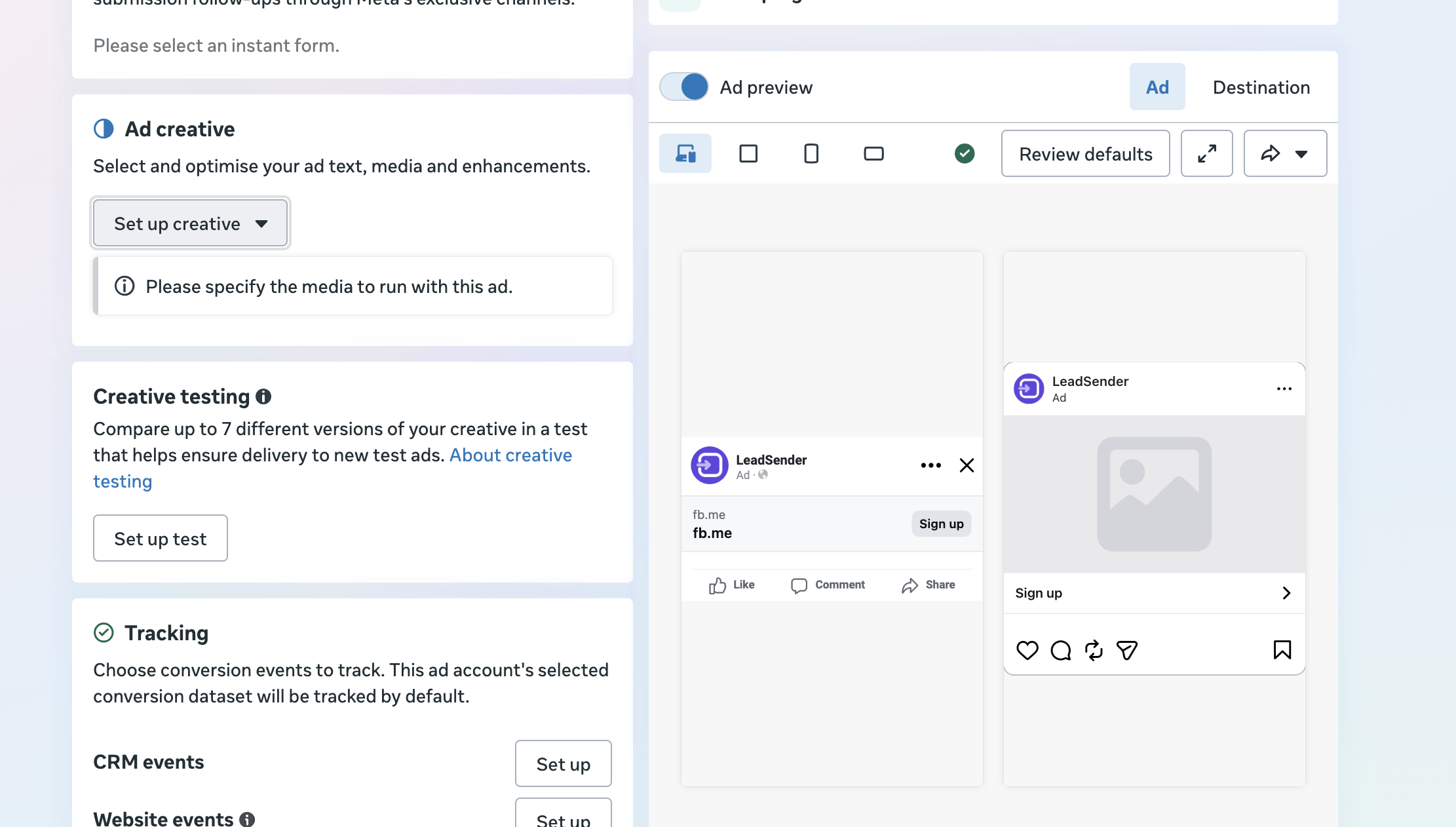
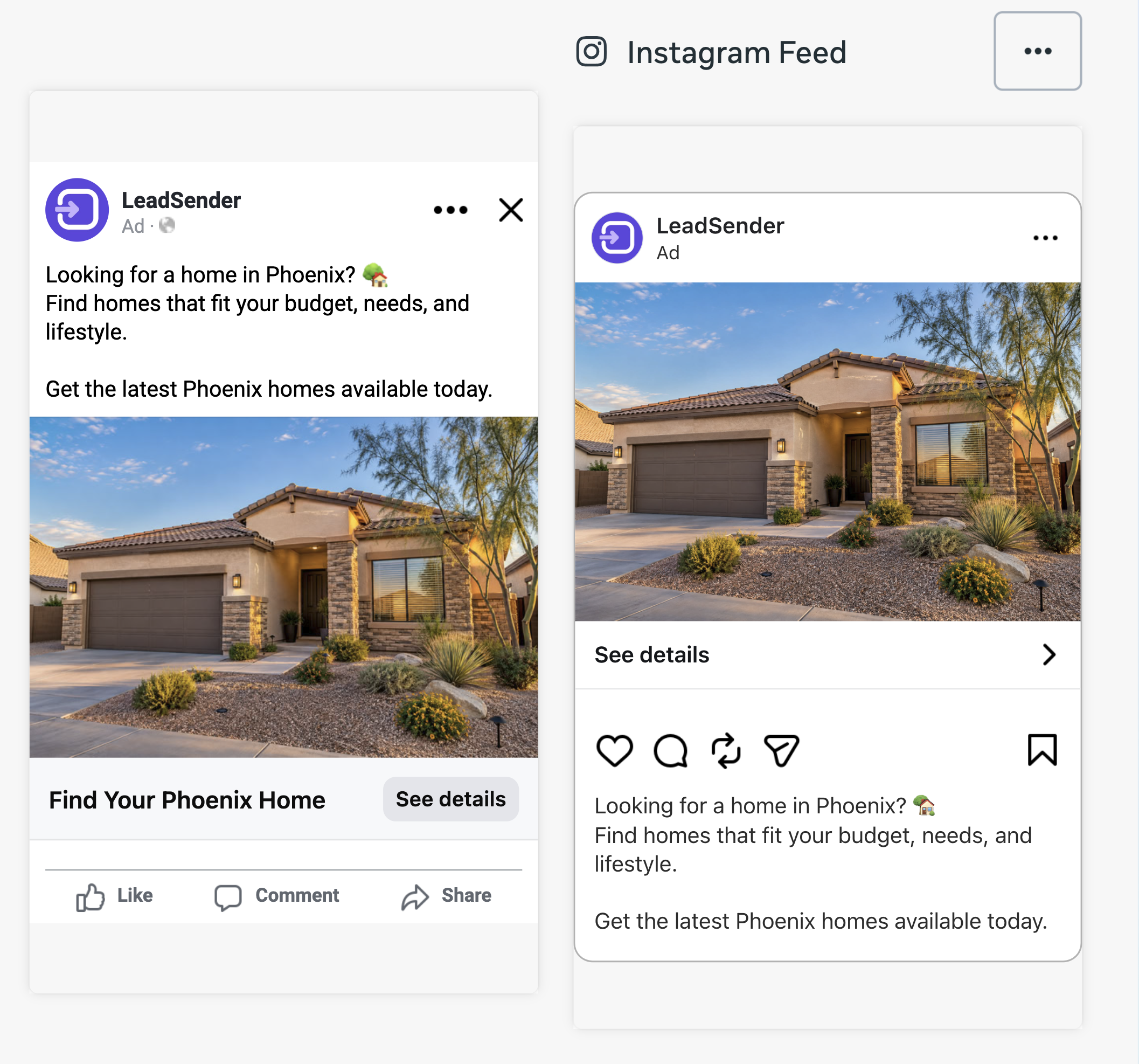
This is also where you upload the actual creative. The Ad creative section is where you set up creative, upload the image or video the ad will run with, and Meta's live Ad preview panel updates next to it as you go, so you can see exactly what a Facebook and Instagram viewer will see before you publish anything.
 ☝ Click here
Your ad only needs to answer three questions fast:
What is this? Why should I care? What should I do next?
A simple structure: Problem → Benefit → Offer → CTA
Looking for a home in Phoenix? 🏠
Find homes that fit your budget, needs, and lifestyle. Get the latest Phoenix homes available today.
CTA: See Details
Your ad copy doesn't need to explain everything. The ad creates the interest. The form captures the lead. Your follow-up continues the conversation. If writing that first draft is the part that stalls you, the Facebook Lead Ad Copy Generator will get you a working hook, primary text, headline and description to start editing from.
Steps 11 to 15: Building the Lead Form
This is the part most advertisers underestimate. Your Facebook lead capture form can be the difference between high-volume submissions and leads your sales team can actually work.
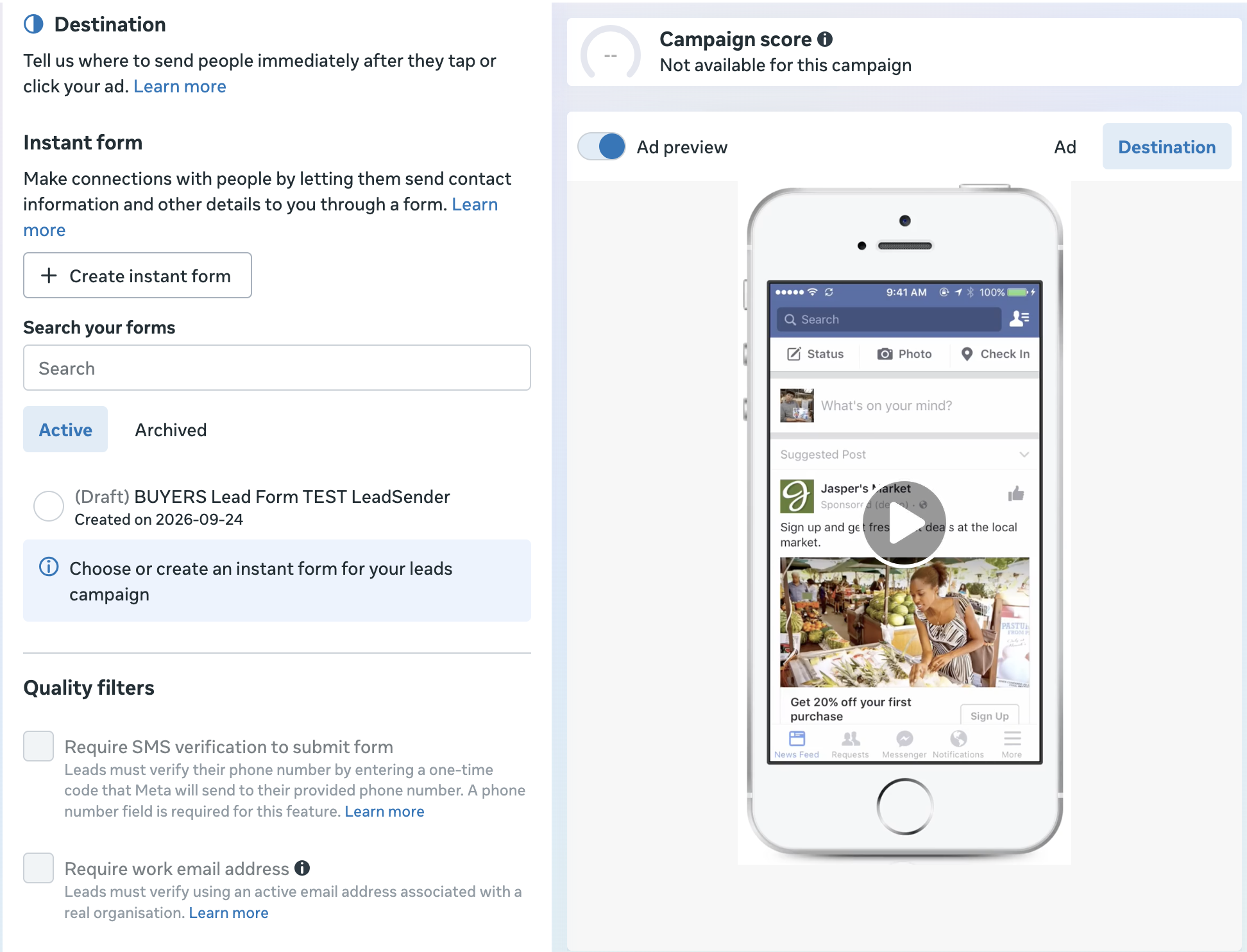
Under Destination, choose Instant form as where people go after tapping your ad, then click Create instant form to start building one from scratch.
 ☝ Click here
Step 11: Choose your form type
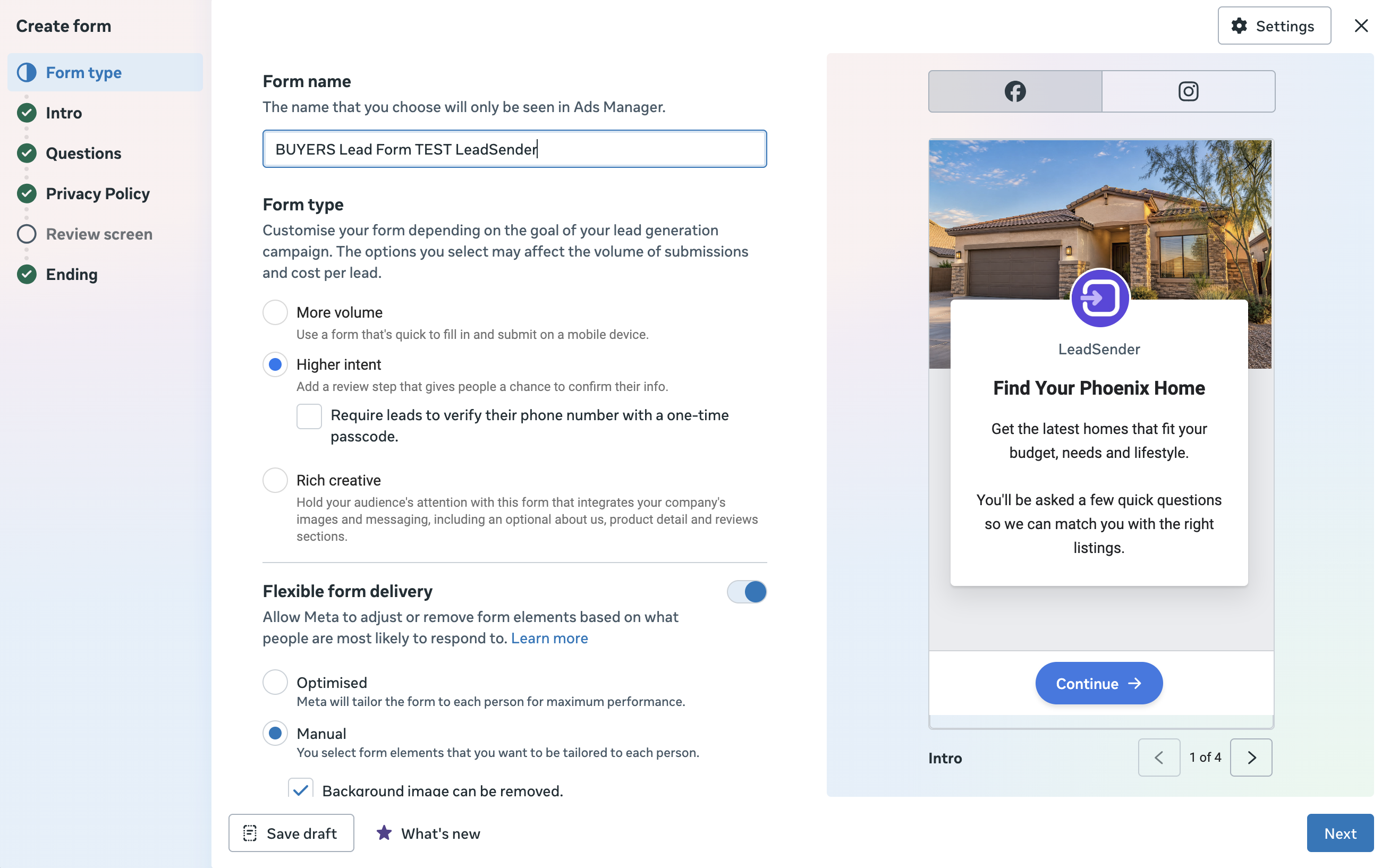
When you build the form, Meta may offer a few different form experiences, commonly along the lines of More Volume, Higher Intent and Rich Creative. Exact choices vary by account and rollout. A higher-intent experience typically adds a confirmation or review step; the others are built around a faster submission.
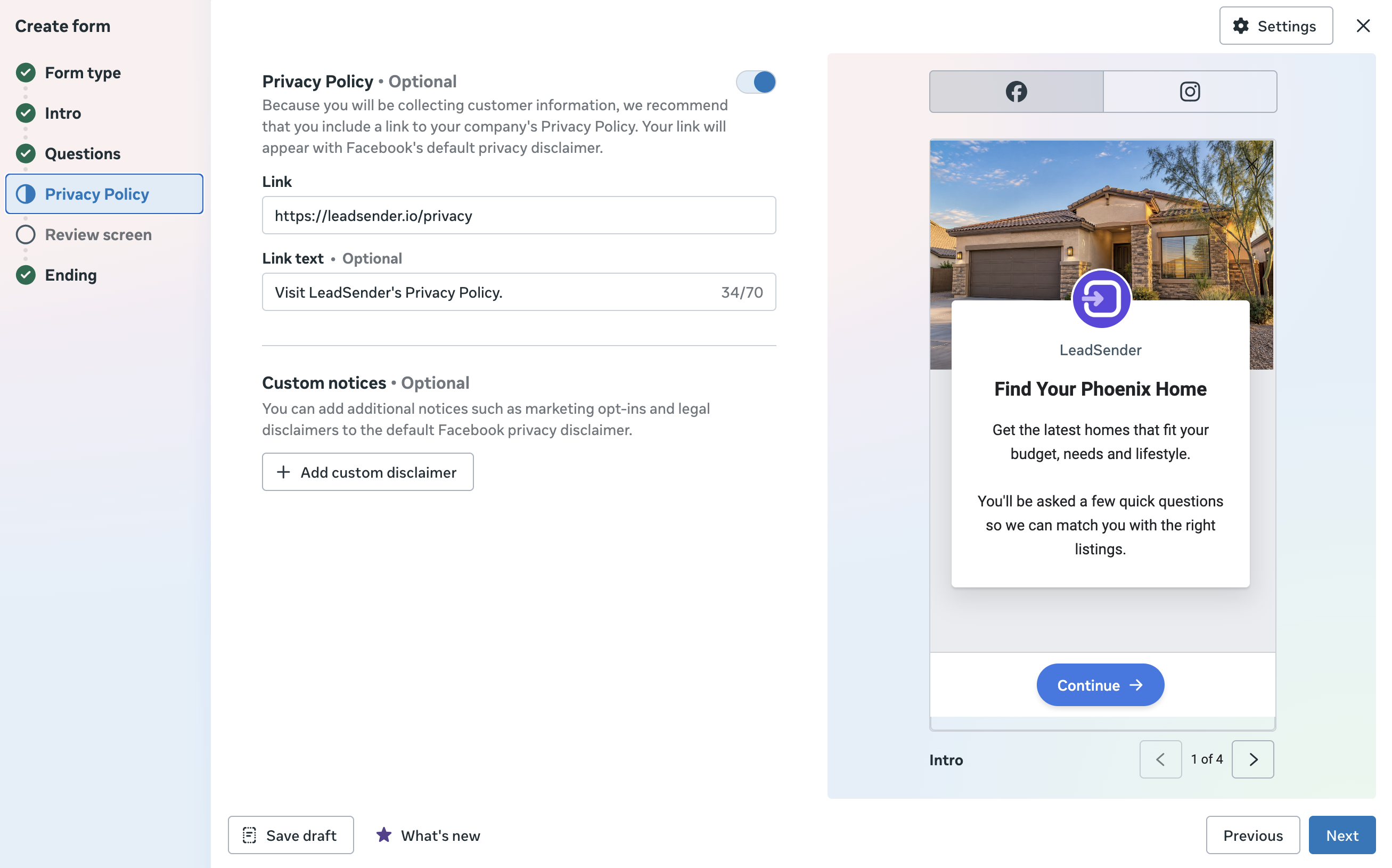
Step 12: Write the form introduction
Your form should repeat the value proposition, not introduce a different offer partway through.
Find Your Phoenix Home
Get the latest homes that fit your budget, needs and lifestyle.
You'll be asked a few quick questions so we can match you with the right listings.
The ad and the form should read as one continuous experience, not two separate pitches.
Step 13: Add the right questions
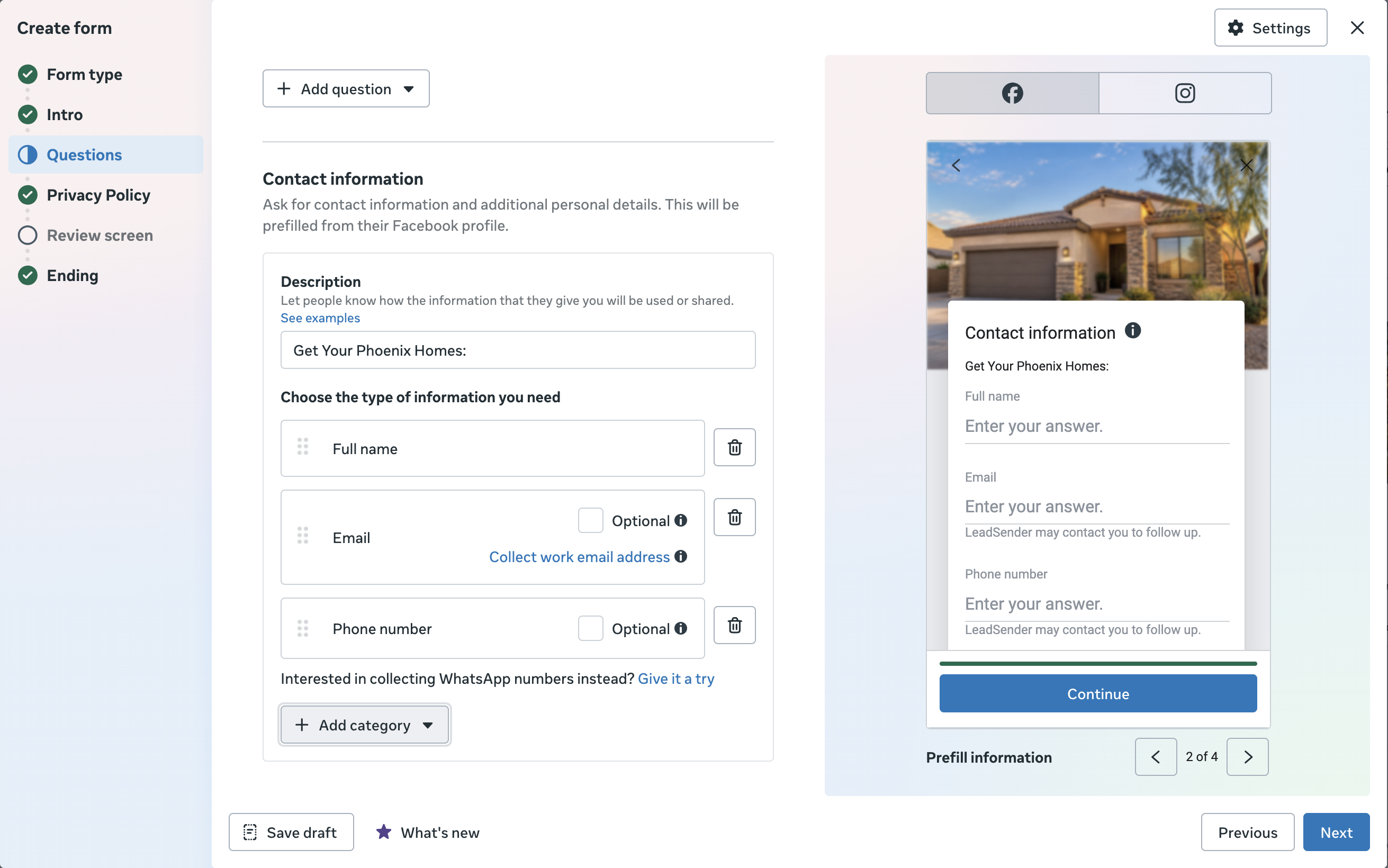
This is where lead quality is usually won or lost. A common mistake is asking for everything. An equally common mistake is asking for almost nothing. The goal is to collect just enough to qualify and route the lead, without adding friction that costs you completions. Meta's own guidance recommends prioritizing auto-populated fields and avoiding long, complicated forms.
For most campaigns, start with the essentials:
Full name, email, phone
then add one or two genuinely useful qualification questions.
| Industry | Qualification question | Answer options |
|---|---|---|
| Real estate (buyer) | What are you looking for? | Buying a home, Investment property, New construction, Just researching |
| Real estate (buyer) | When are you planning to buy? | ASAP, 1-3 months, 3-6 months, 6+ months |
| Home services | What service do you need? | Repair, Replacement, Inspection, Quote |
| B2B | What are you interested in? | Pricing, Demo, Enterprise, Partnership |
The point is never to build the longest form possible. It's to collect exactly what your sales process actually uses.
Step 14: Add your privacy policy
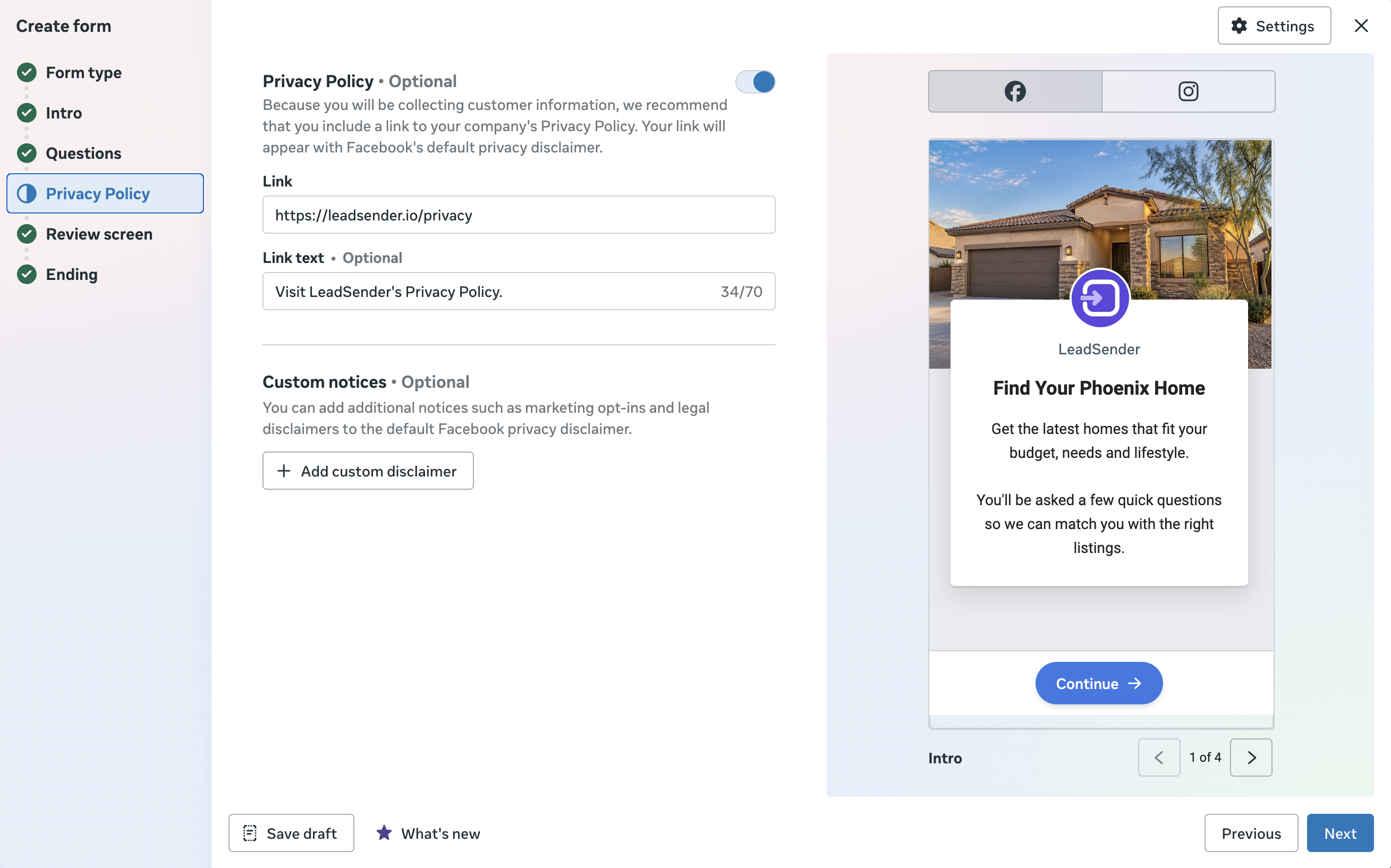
Your form needs the right privacy information and a working link to your privacy policy. Don't treat this as a box to tick, the policy and disclosures should accurately describe how submitted information is handled, and Meta's lead-generation documentation is specific about privacy and responsible data handling.
Step 15: Build the completion screen
Your form doesn't need to end on a plain "Thanks!" Use it to say exactly what happens next.
Thanks, you're all set.
You can visit our website or exit the form now.
CTA: View website
The completion screen can carry the customer straight into a next step instead of ending the interaction cold.
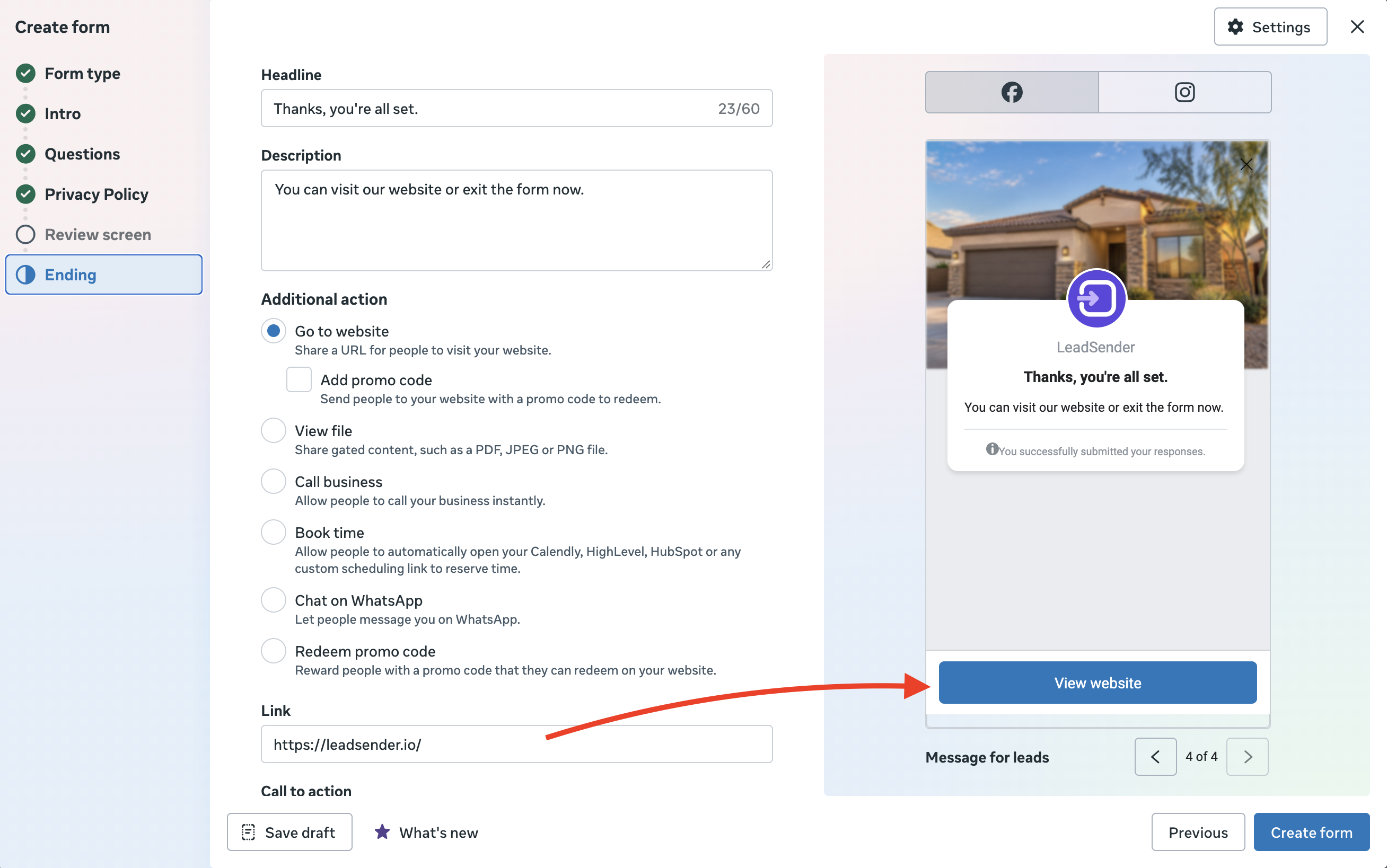
Once the intro, questions, privacy policy and ending are all set, click Create form to finish and attach it to your ad.
Steps 16 to 18: Track, Preview and Publish
Step 16: Add tracking and lead delivery
Tracking matters more the more you scale. Depending on your setup, Meta can use website, CRM, app or other event data for measurement and optimization. Your lead workflow should look like:
- Facebook ad
- Instant Form
- New lead
- CRM, spreadsheet, email or sales platform
- Immediate follow-up
- Qualified lead
- Appointment
- Customer
That gives you something far more useful for decision-making than cost per lead on its own.
Step 17: Preview everything
Before publishing, test the entire experience end to end: look at the ad on mobile, tap the CTA, open the form, review every question, check the privacy link, and submit a test lead with Meta's free Lead Ads Testing Tool. Confirm it arrives where your sales team actually expects it.
This one pass catches most of what goes wrong later:
- Wrong phone fields
- Broken privacy links
- Incorrect offers
- Wrong form connected to the ad
- Missing CRM field mappings
- Duplicate workflows
- Weak completion messaging
- Broken lead notifications
Step 18: Publish
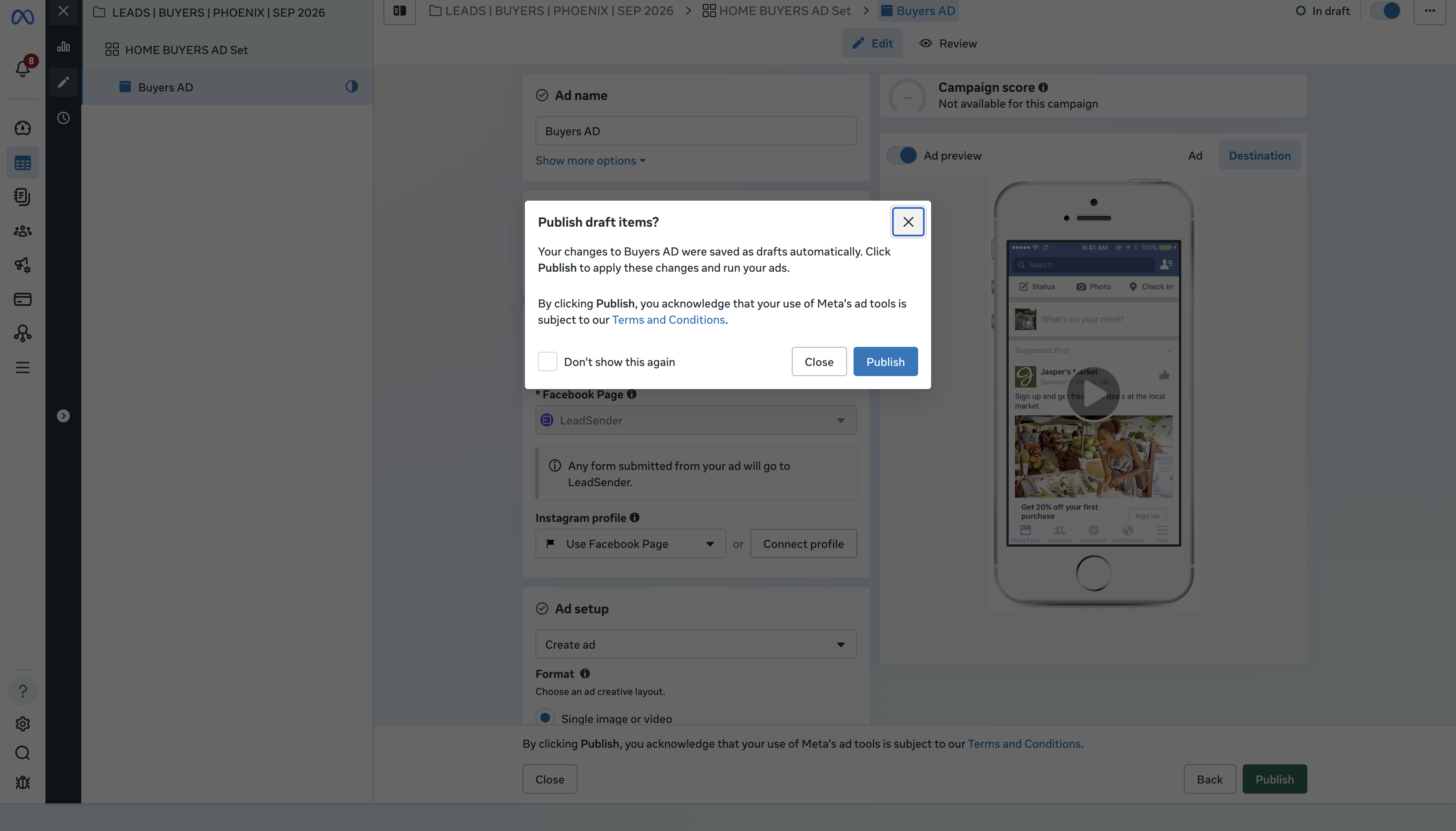
Once everything checks out, click Publish. Meta will review the campaign before it starts delivering.
Where do Facebook leads go?
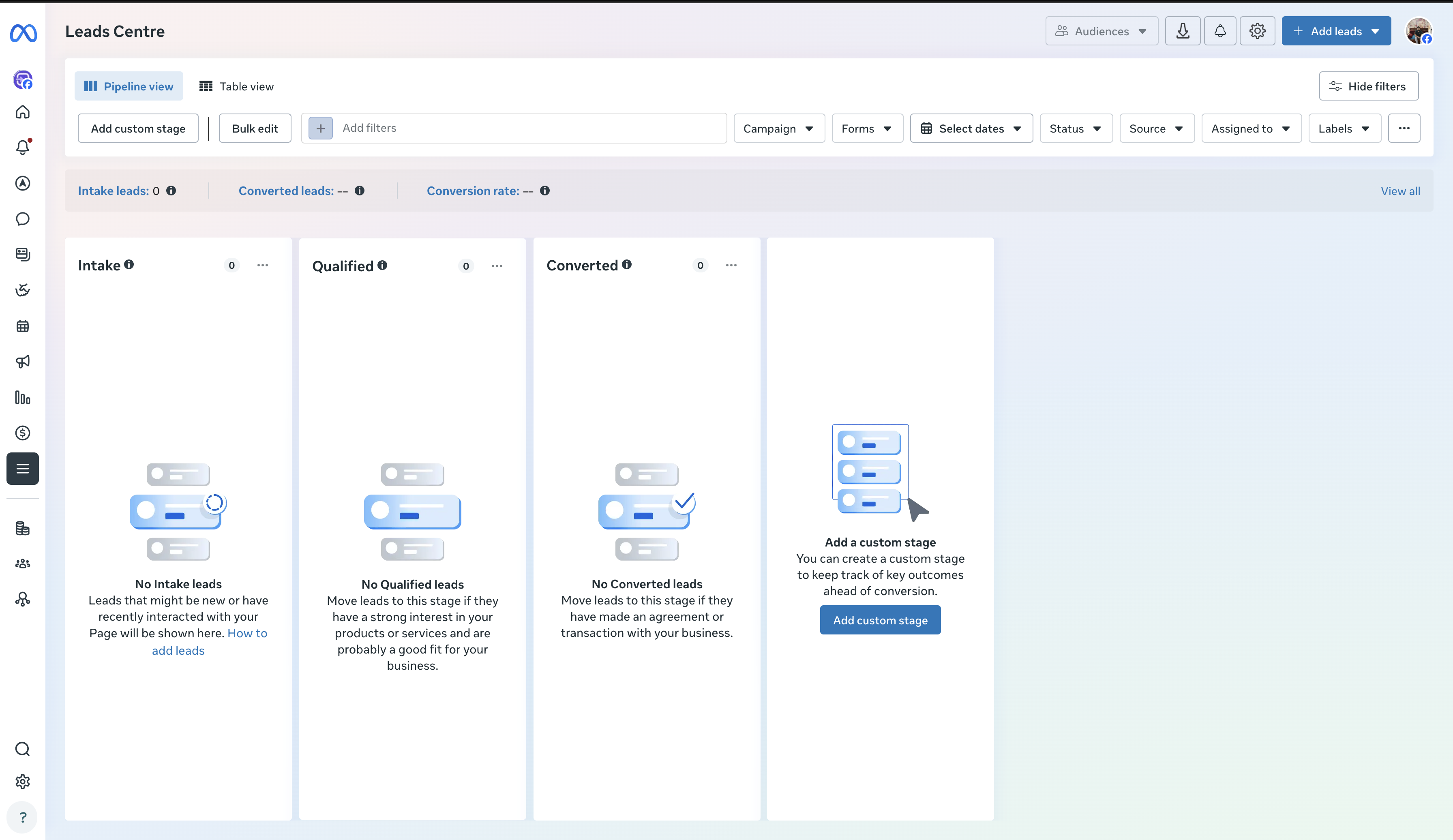
The most common question right after publishing is simply "where are my Facebook leads?" Depending on your setup and permissions, lead data is reachable through Meta's own lead-management tools, including Meta Business Suite's Leads Center, as well as through Ads Manager and the Instant Forms area. From there, you move leads into a CRM, email, Google Sheets, a sales team, SMS or a follow-up automation.
Don't let Facebook leads sit inside Meta
This is one of the most practical lessons in Facebook lead generation. A campaign can produce 100 leads and still only turn into 5 sales conversations, because nobody followed up consistently. Your lead-management system should be able to answer:
- Who received the lead, and when?
- Who contacted it, and did the lead respond?
- Was it qualified?
- Did it book, and did it become a customer?
Leads Center can help organize leads inside Meta, but most businesses eventually need a CRM or an automated delivery workflow once volume increases past what a person can watch manually.
Get every Facebook lead delivered automatically
Connect your Page to LeadSender once, and every new lead goes straight to your CRM, email, SMS or a spreadsheet the moment someone submits your form. No Leads Center, no manual check-ins.
How to get higher-quality Facebook leads
Cheap leads are not automatically good leads. The real goal is more qualified leads, not just more form submissions. Five variables matter most:
Make the offer specific
"Learn More" tells a prospect nothing. "Get a Free Home Valuation" tells them exactly what they're getting.
Add qualification
One thoughtful question reveals far more than five generic fields ever will.
Make the ad self-qualifying
"Serving homeowners considering selling in the next 12 months" filters harder than "Thinking about real estate?" ever could.
Improve follow-up speed
A lead contacted quickly is generally far easier to work than one left sitting for hours.
Feed outcomes back into the system
Once you know who got qualified, booked or purchased, that downstream signal is worth more than raw lead count, and it's what CRM and Conversions API connections are actually for.
Facebook Lead Ads vs website forms
Both formats can work well. There's no universal winner, a simple offer often does well as an Instant Form, while a complex product with a longer buying cycle can benefit from a full website experience.
| Factor | Facebook Instant Form | Website Form |
|---|---|---|
| Where it opens | Inside Facebook or Instagram | On your website |
| Friction | Lower | More steps |
| Mobile experience | Usually easier | Needs a strong mobile page |
| Landing page required | No | Yes |
| Setup speed | Faster | Slower |
| Qualification depth | Limited to form fields | More room for detail |
Test based on qualified outcomes, not assumptions borrowed from another business's results.
Facebook Lead Ad Copy examples
Looking for real Facebook lead ads examples? Start from the offer, not from copying another brand's visual style.
Example 1: Real estate seller lead
| Headline | Find Out What Your Home Could Be Worth |
|---|---|
| Offer | Free home valuation |
| CTA | Get Quote |
| Form questions | Name, phone, email, property address, selling timeframe |
Example 2: Real estate buyer lead
| Headline | Get New Homes Before You Miss Them |
|---|---|
| Offer | New listing and property alerts |
| CTA | Sign Up |
| Form questions | Name, email, phone, preferred area, buying timeframe |
For housing campaigns, always check whether the applicable Special Ad Category restrictions affect your targeting and form strategy before launch.
Example 3: Roofing lead ad
| Headline | Need a New Roof? |
|---|---|
| Offer | Free roof inspection |
| CTA | Get Quote |
| Form questions | Name, phone, property location, repair or replacement, preferred timeframe |
Example 4: B2B lead generation
| Headline | See How Our Platform Works |
|---|---|
| Offer | Product demo |
| CTA | Get Demo |
| Form questions | Name, work email, company, job title, main challenge |
Example 5: Education lead ad
| Headline | Help Your Child Prepare With a Clear Study Plan |
|---|---|
| Offer | Free assessment |
| CTA | Sign Up |
| Form questions | Parent name, email, phone, grade level, subject, preferred start date |
These are examples, not templates to copy directly. Your offer should determine the form, not the other way round.
Campaign structure example
A simple, readable structure looks like this:
- Campaign: LEADS | HOME VALUATION
- Ad set: LOCAL | BROAD
- Ad 01: Property Value Angle
- Ad 02: Market Timing Angle
- Ad 03: Seller Guide Angle
- Form: Home Valuation | Higher Intent
- Ad set: LOCAL | BROAD
A structure like this makes it far easier to see what's actually driving results, instead of guessing from a flat list of ad names.
What metrics should you track?
Don't stop at Facebook leads. Track the whole funnel.
| Metric | What it tells you |
|---|---|
| Impressions | How often your ads were shown |
| CTR | Whether people are responding to the creative |
| CPC | Cost of getting the click |
| Form completion | How well the form itself converts |
| CPL | Cost per submitted lead |
| Contact rate | How many leads your team actually reaches |
| Qualified rate | How many leads match your criteria |
| Appointment rate | How many leads take the next step |
| Customer rate | How many become customers |
| Revenue | The actual business outcome |
The lesson underneath all of it: a $20 lead that becomes a customer is worth more than a $5 lead that never answers the phone.
Cheap, missing or low-quality leads
Cheap leads but no customers
This is one of the most common complaints in Facebook lead generation, and it's rarely actually a "Facebook problem." Check these areas in order:
- Your offer: is it attracting serious prospects, or just curiosity clicks?
- Your creative: does it clearly say who the offer is for?
- Your form: are you collecting enough to qualify at all?
- Your targeting: is the campaign even reaching people who could become customers?
- Your follow-up: how long does it actually take someone to contact a new lead?
- Your sales process: are leads followed up with more than once?
The problem is almost always the gap between lead generation and lead conversion, not the ad platform.
Leads not showing up
- Permissions: your Page or Business Portfolio may not have the right lead access configured.
- CRM integration: a lead can exist inside Meta and still fail to reach its destination if the connection or field mapping is broken.
- Form selection: the campaign may be pointed at a different Instant Form than you think.
- Manual workflows: if a person only checks leads by hand, new submissions get missed.
The 90-day retention window
Don't treat Meta as a permanent lead database. Current guidance reports a 90-day retention window for lead data inside Meta's own system, which makes regular export or synchronization genuinely important, not optional housekeeping.
That means a reliable setup looks like Meta → CRM or Meta → Google Sheets → CRM, not Meta → "we'll download it later."
Lead form best practices and mistakes to avoid
A strong Facebook lead form has one job: make it easy for the right person to take the next step. Keep it aligned with the offer, use plain language, ask only for what you genuinely need, use qualification questions with intent, and explain what happens after submission. Don't build the form around the information you'd like to have. Build it around what your sales process actually uses.
Mistakes worth avoiding
- Choosing the objective out of habit instead of confirming it matches your actual lead destination.
- Copying an old tutorial. Ads Manager changes enough that an old screenshot can point you at a menu that no longer exists.
- Optimizing only for CPL. Cheap doesn't always mean valuable.
- Adding too many form questions. Every question should earn its place.
- Using vague offers. "Contact us" pulls far less than a specific, named outcome.
- No follow-up system. A lead nobody contacts is wasted ad spend, no matter how cheap it was.
- No testing plan. Changing five variables at once tells you nothing about which one mattered.
A simple Facebook Lead Ads testing framework
Once a first campaign is working, test one major variable at a time.
- Offer: Free Quote vs Free Consultation
- Creative: Static image vs video
- Angle: Problem-focused vs benefit-focused
- Form: More Volume vs Higher Intent
- Qualification: No qualifier vs one meaningful qualifier
Then compare: CPL → contact rate → qualified rate → appointment rate → customer rate. That gives a far clearer read on performance than changing everything at once and guessing which change mattered.
Should you use Lead Ads or Click-to-WhatsApp?
Instant Forms aren't the only Meta lead-generation option. Depending on the business, you can also generate leads through messaging, via Messenger, Instagram Direct or WhatsApp. Meta's own materials cover multiple lead destinations and recommend designing messaging flows around clear expectations and qualification, the same discipline a good form needs.
Use Instant Forms for structured lead capture. Use messaging for conversation. Use your website when you need more control and more information before conversion. For a lot of businesses, these work together rather than replacing each other.
How to generate Facebook real estate leads
Real estate is one of the most common uses of Facebook lead generation. Popular offers by intent:
- Sellers: Free home valuation
- Buyers: Homes under your budget
- New construction: Get the new construction list
- Investors: Request investment opportunities
- Open houses: Get property details and tour information
- Market education: Download the local market report
The ad creates demand. The lead form captures intent. Follow-up turns that intent into an actual conversation. Always verify the current Special Ad Category and targeting requirements for your specific market before launch, see the note on realtors above for what that changes.
The real Facebook lead-generation funnel
A mature campaign is measured on the whole chain, not just the first few links:
- Ad impression
- Click
- Instant Form opened
- Form submitted
- Lead delivered
- Lead contacted
- Lead qualified
- Appointment
- Opportunity
- Customer
Optimizing only the first four steps means measuring the wrong end of the funnel. The real question is always: which Facebook leads turn into revenue?
Need Facebook lead ad copy?
Turn your offer, audience and campaign goal into a ready-to-edit hook, primary text, headline and description with the free Facebook Lead Ad Copy Generator, built specifically for Instant Forms rather than a website landing page.
Facebook Lead Ads: FAQ
What are Facebook Lead Ads?
Facebook Lead Ads are Meta advertising campaigns designed to collect prospect information through native lead forms, commonly called Instant Forms, without leaving Facebook or Instagram.
How do I create Facebook Lead Ads?
Open Meta Ads Manager, click Create, select Leads, choose your conversion location, configure the campaign and audience, create the ad, build or select an Instant Form, review everything, then publish.
What is a Facebook lead form?
A Facebook lead form, or Instant Form, is a native form that opens when someone taps a lead ad. It can use information already on the person's Meta profile, so it takes less typing than a website form.
How do I get leads from Facebook Ads?
Use a specific offer, run a Leads campaign, build a relevant audience, use creative that clearly states who the offer is for, build a lead form with the right qualification questions, and connect fast lead delivery and follow-up.
Where can I find my Facebook leads?
Depending on your setup and permissions, leads can be accessed through Meta Ads Manager, Meta Business Suite's Leads Center, or delivered automatically to a CRM, email or spreadsheet through a connected tool.
Are Facebook Lead Ads free?
The Instant Form itself costs nothing to build. You still pay for the ad campaign through Meta's standard ad auction, the same as any other objective.
Are Facebook Lead Ads better than website forms?
Neither wins universally. Instant Forms reduce friction and work well on mobile with a simple offer. Website forms give more control and room for qualification with a longer buying cycle. Test both against qualified lead outcomes, not just cost per lead.
How many questions should a Facebook lead form have?
Enough to qualify and route the lead, and no more. Start with name, email and phone, then add only a question or two that genuinely changes how you follow up. Meta's own guidance recommends avoiding unnecessary questions.
Why are my Facebook leads low quality?
Usually one of: a vague offer, broad targeting with no self-selection in the creative, a form with no qualification question, or follow-up that happens too slowly for the lead to still be warm.
Can Facebook Lead Ads connect to a CRM?
Yes. Lead data can be delivered into a CRM, email inbox, spreadsheet or SMS through native or third-party integrations, so new submissions reach your sales process the moment they are submitted instead of sitting in Meta Business Suite.
Facebook Lead Ads launch checklist
Campaign
- Leads objective selected
- Correct Page selected
- Correct conversion location selected
- Performance goal reviewed
- Budget confirmed against target CPL and customer value
- Audience checked
- Placements reviewed
Ad
- Strong creative
- Clear, specific offer
- Clear CTA
- Ad copy matches the form that follows it
- Correct Instagram account attached
Lead form
- Correct form type selected
- Only essential questions included
- A useful qualification question where it earns its place
- Privacy policy linked
- Completion screen configured
- Next step clearly explained
Tracking and follow-up
- Lead delivery connected
- CRM or spreadsheet tested
- Lead notifications working
- Sales team knows what to do with a new lead
- Test lead received successfully end to end
Final thoughts: creating the ad is the easy part
Learning how to create Facebook Lead Ads matters, but the setup alone doesn't make a campaign successful. The campaigns that turn into real business are built around a complete system: the right offer, the right message, the right audience, the right form, the right qualification, fast follow-up, real tracking, and ongoing testing.
As Meta keeps automating more of targeting and optimization, the advertiser's job shifts too: less time hunting for one perfect setting, more time improving the inputs the system actually uses, the offer, the creative, the lead experience, the qualification, and the conversion signal you feed back in. Start with one clear offer, one audience, one strong creative and one well-built Instant Form, then let your own lead-quality data tell you what to change next.
Once the campaign is live, the leads themselves need somewhere to go. Send every new submission straight to your CRM, email or SMS the moment it's submitted, instead of checking Leads Center by hand or racing the 90-day window.