













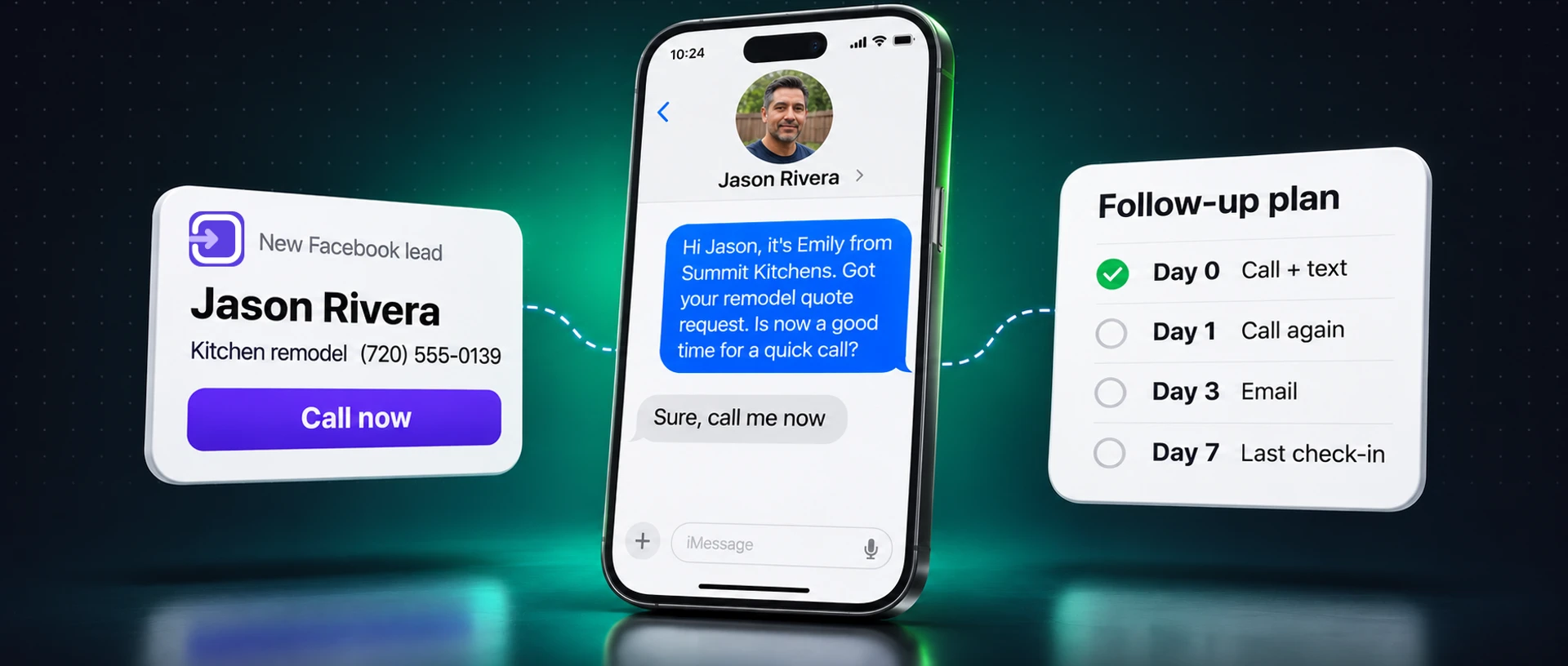
A Facebook lead is not like a phone call or a contact form on your website. The person saw your ad between two videos, tapped twice, and went back to scrolling. Their name, email and number were filled in for them. An hour later, plenty of them couldn't tell you the name of your business.
That's why follow-up decides whether lead ads pay for themselves. This guide gives you the exact words for the first five minutes, a plan for the next 14 days, and a free tool that writes every call script, text and Email with your own business in it. The Facebook settings are checked against Meta's own help pages, and every screen is a real Ads Manager screenshot.
Call within five minutes, and if nobody answers, leave a short voicemail and text straight after. Name your business and the exact offer they asked about, then ask one easy question. Follow up about ten times over 14 days, mixing calls, texts and Email, and end with a clear last message. Before you text anyone, get their consent on the form. And none of it works unless you know the moment a lead arrives.
Why the first minutes matter more with Facebook leads
The best evidence on speed is still a Harvard Business Review study from 2011. The researchers sent a test lead to 2,241 US companies and timed the replies. Most were slow, and almost a quarter never answered at all:
The same study looked at 1.25 million real sales leads to see what the delay costs. Trying within the first hour made a large difference to whether the company ever had a proper conversation with the buyer:
as likely to qualify the lead when the first try came within an hour, compared with a try one hour later.
as likely to qualify the lead, compared with companies that waited 24 hours or longer.
That study is from 2011 and covers web leads in general. Facebook leads cool even faster, for a simple reason: instant forms fill in the answers from the person's Facebook or Instagram profile, so nobody has to type their number or think about it. Meta's own advice on responding to leads says the same three things in plainer words:
- Capture leads immediately. Use a connected CRM or Leads Center. Downloading leads by hand takes more time, and quick follow-up can improve your lead quality.
- Run ads when you can answer. If your business needs immediate follow-up, schedule lead ads for your business hours.
- Ask when to call. Use a custom question or the appointment request question to learn when and how each person wants to be reached.
You'll see “80% of sales need five follow-ups” quoted in almost every guide like this one. We looked for the study behind it and couldn't find one, so nothing here depends on it. Five minutes and 14 days are our recommendation, based on the research above and on Meta's own advice to follow up fast.
Free tool: build your follow-up plan
Pick your kind of business, or type your own details. You get a full 14-day plan, eleven touches in all: what to say on the call, the voicemail, each text and each Email, written with your name, your business and the offer the lead asked about. Every text shows how many characters it uses, because a message over 160 characters is sent as two.
Runs in your browser. Nothing you type is saved or sent anywhere. Clear the lead's name to keep it as a [First name] placeholder.
- Minute 1CallCall while they're still on their phone
Hi, is this Megan? This is Ryan from Tallgrass Roofing. You asked about a free roof inspection on Facebook a few minutes ago, so I wanted to call while it's fresh. Is it a repair or a full replacement?
- Minute 1VoicemailNo answer? Leave 15 seconds
Hi Megan, it's Ryan from Tallgrass Roofing. You just asked about a free roof inspection on Facebook. I'll send you a quick text as well, so reply there if that's easier. Talk soon.
- Minute 2TextText right after the call
Hi Megan, it's Ryan from Tallgrass Roofing. You asked about a free roof inspection on Facebook. Is it a repair or a full replacement? Reply STOP to opt out.
156 characters · 1 text - Minute 10EmailPut it in writingSubject Tallgrass Roofing: your request on Facebook
Hi Megan, Thanks for asking about a free roof inspection. I'm Ryan at Tallgrass Roofing, and I'll be the one helping you. I tried calling a few minutes ago. Is it a repair or a full replacement? You can reply to this email, or call or text me on [your number]. Ryan Tallgrass Roofing
- Day 1CallCall again, at a different time of day
Hi Megan, it's Ryan from Tallgrass Roofing. We haven't spoken yet. You asked about a free roof inspection yesterday, and I have one quick question so I can help properly. Is it a repair or a full replacement?
- Day 1TextAsk for a time
Hi Megan, Ryan from Tallgrass Roofing again. I tried calling about a free roof inspection. Is morning or afternoon better for a quick call?
139 characters · 1 text - Day 3TextSend something useful, ask for nothing
Hi Megan, Ryan from Tallgrass Roofing. The inspection takes about 30 minutes and you don't need to be home for it. Any questions, just text me here.
148 characters · 1 text - Day 5VoicemailOne more call, short voicemail
Hi Megan, Ryan from Tallgrass Roofing, following up on a free roof inspection. No rush at all. Call or text this number whenever it suits you.
- Day 7EmailMake it easy to say yes or noSubject Should I keep trying, Megan?
Hi Megan, You asked us about a free roof inspection last week and I haven't been able to reach you. That's fine, life gets busy. If it's still on your list, reply with a good time to talk and I'll work around you. If you've sorted it already, tell me and I'll stop following up. Ryan Tallgrass Roofing
- Day 10TextThe one-tap question
Hi Megan, Ryan at Tallgrass Roofing. Still want to talk about a free roof inspection? Reply 1 for yes, 2 for not right now.
123 characters · 1 text - Day 14TextThe last message
Hi Megan, last message from me about a free roof inspection. If you'd like to pick it up later, just text me here any time. Ryan, Tallgrass Roofing
147 characters · 1 text
Copy one message at a time, or the whole plan. Read each one out loud before you use it and change anything that doesn't sound like you. The rest of this guide explains why the plan is built the way it is.
The first five minutes: call, voicemail, text
In the first minutes the lead is still on their phone and still thinking about your ad. That's the only time a call from an unknown number has a fair chance of being answered. Do these in order:
The call. People decide in the first sentence whether you're a stranger selling something or the business they just asked. So say your name, the business, and the exact thing they asked for, then go straight to an easy question:
Hi, is this [First name]? This is [Your name] from [Business]. You asked about [what they asked for] on Facebook a few minutes ago, so I wanted to call while it's fresh. [One easy question]
The voicemail. Plenty of calls go unanswered, and that's fine. Keep the voicemail to about 15 seconds and tell them a text is coming, so the text doesn't look like spam:
Hi [First name], it's [Your name] from [Business]. You just asked about [what they asked for] on Facebook. I'll send you a quick text as well, so reply there if that's easier. Talk soon.
The text. Send it right after the call. A question that takes two words to answer is much easier to reply to than “let me know if you have any questions”:
Hi [First name], it's [Your name] from [Business]. You asked about [what they asked for] on Facebook. [One easy question] Reply STOP to opt out.
Only text people who agreed to be texted. How to collect that on the form is covered below.
Day 1 to day 14: the follow-up schedule
Most people who don't answer on day one aren't saying no. They were at work, driving, or putting the kids to bed. The plan below keeps you in front of them for two weeks without sending the same message twice: each touch uses a different channel or gives them a different, easier way to answer.
- Minute 1CallVoicemailCall while they're still on their phone. No answer? Leave 15 seconds.
- Minute 2TextSay who just called, name the offer, ask one easy question.
- Minute 10EmailThe same message in writing, with a number to call or text.
- Day 1CallTextTry a different time of day, then ask: morning or afternoon?
- Day 3TextOne useful fact about the offer. Ask for nothing.
- Day 5VoicemailOne more call. Short, no pressure.
- Day 7EmailMake it easy to say yes or no.
- Day 10TextA question they can answer with one tap: 1 for yes, 2 for not now.
- Day 14TextYour last message. Leave the door open, then stop.
Here are the messages that do the most work after day one. The planner above fills them in for you.
Hi [First name], [Your name] from [Business] again. I tried calling about [what they asked for]. Is morning or afternoon better for a quick call?
Hi [First name], [Your name] from [Business]. [One helpful thing about the offer, in a sentence.] Any questions, just text me here.
Subject: Should I keep trying, [First name]?

Hi [First name],

You asked us about [what they asked for] last week and I haven't been able to reach you. That's fine, life gets busy.

If it's still on your list, reply with a good time to talk and I'll work around you. If you've sorted it already, tell me and I'll stop following up.

[Your name]
[Business]
Hi [First name], [Your name] at [Business]. Still want to talk about [what they asked for]? Reply 1 for yes, 2 for not right now.
Hi [First name], last message from me about [what they asked for]. If you'd like to pick it up later, just text me here any time. [Your name], [Business]
The last message matters more than it looks. Telling someone you're about to stop can get the reply the earlier messages didn't, and it leaves a good impression with the people who really weren't ready. After it, stop calling. Move the lead to a list you write to once a month or so.
Let the form start the conversation for you
Some of the follow-up can happen before you pick up the phone. When you build the instant form, the last step, Ending, shows a message for leads right after they submit. Most advertisers leave it on “View website”. It can do more:
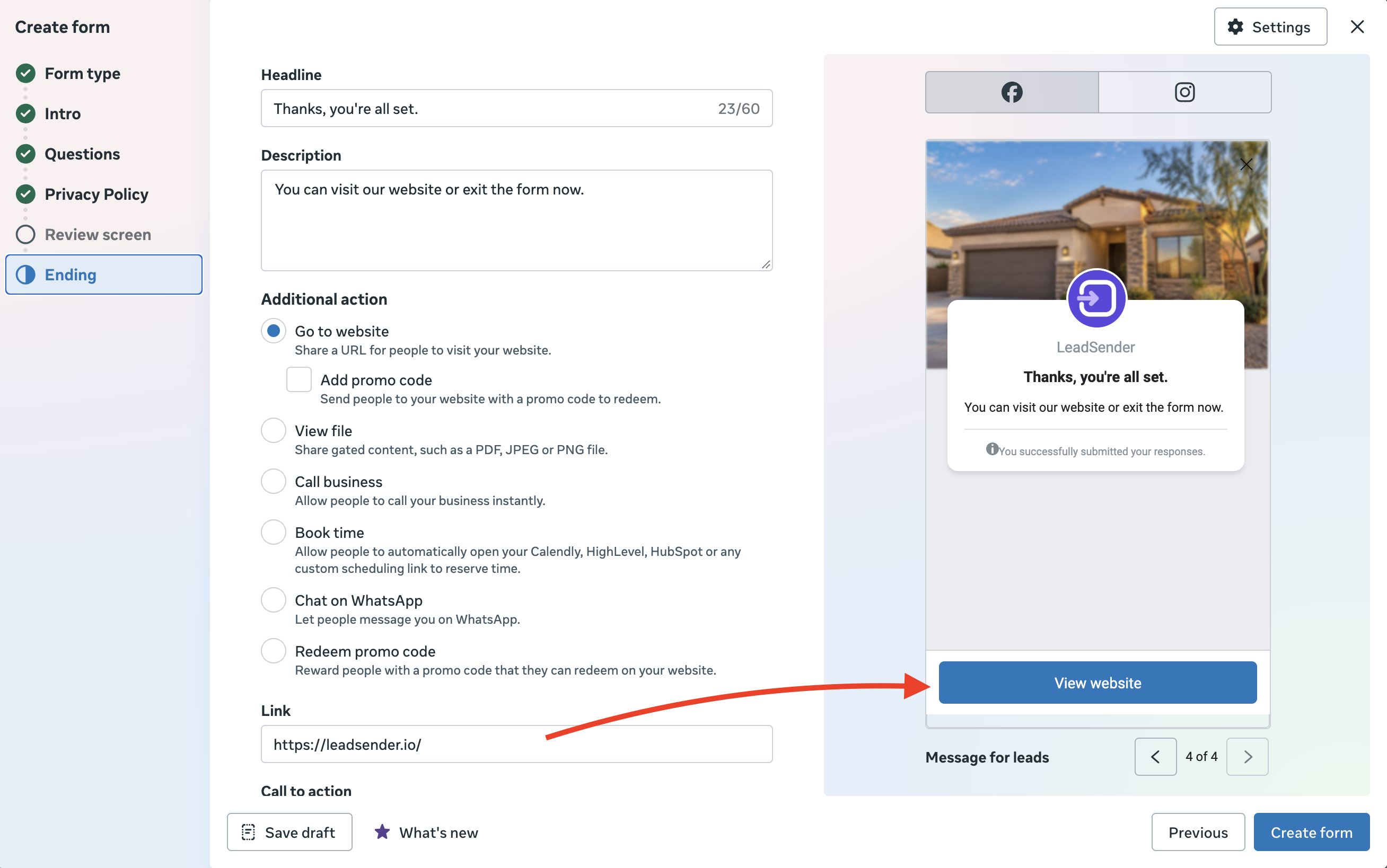 Call, book or chat,
right after they submit
- Call business. Adds a button that calls your number from their phone. The best choice if someone always answers.
- Book time. Sends people to your scheduling link, so they pick a slot themselves. Meta notes this one may not be available to every account yet.
- Chat on WhatsApp. Opens a WhatsApp chat with your business. Your Page has to be linked to a WhatsApp Business account.
Use the headline (up to 60 characters) and the description to say what happens next, for example “Thanks! Ryan will call you within 10 minutes from a 512 number.” A lead who expects your call answers it.
Two more Meta features worth knowing about:
- Appointment request question. A question type where people pick a date and time they'd like to be contacted (Meta's page). Two limits: once you add it, the ad only delivers in the Facebook app on mobile, and the available times are fixed at 07:00 to 22:00, Monday to Sunday.
- Lead nurturing. Meta can start a chat with the lead on Messenger, Instagram or WhatsApp straight after the form, with a greeting and answers to common questions that you write (Meta's page). Meta says it may not be available to you yet, and that a new thread may not always show up in your inbox.
These help, but they don't replace you. None of them rings your phone when a lead comes in, and none of them calls the lead.
Get permission before you text
Having someone's number isn't the same as having their permission to text it. The cleanest way to get permission is on the form itself. In the form editor's Privacy Policy step, under Custom notices, click + Add custom disclaimer, then + Add new consent to add a tickbox such as “I agree to receive calls and texts from Tallgrass Roofing about my request” (Meta's steps).
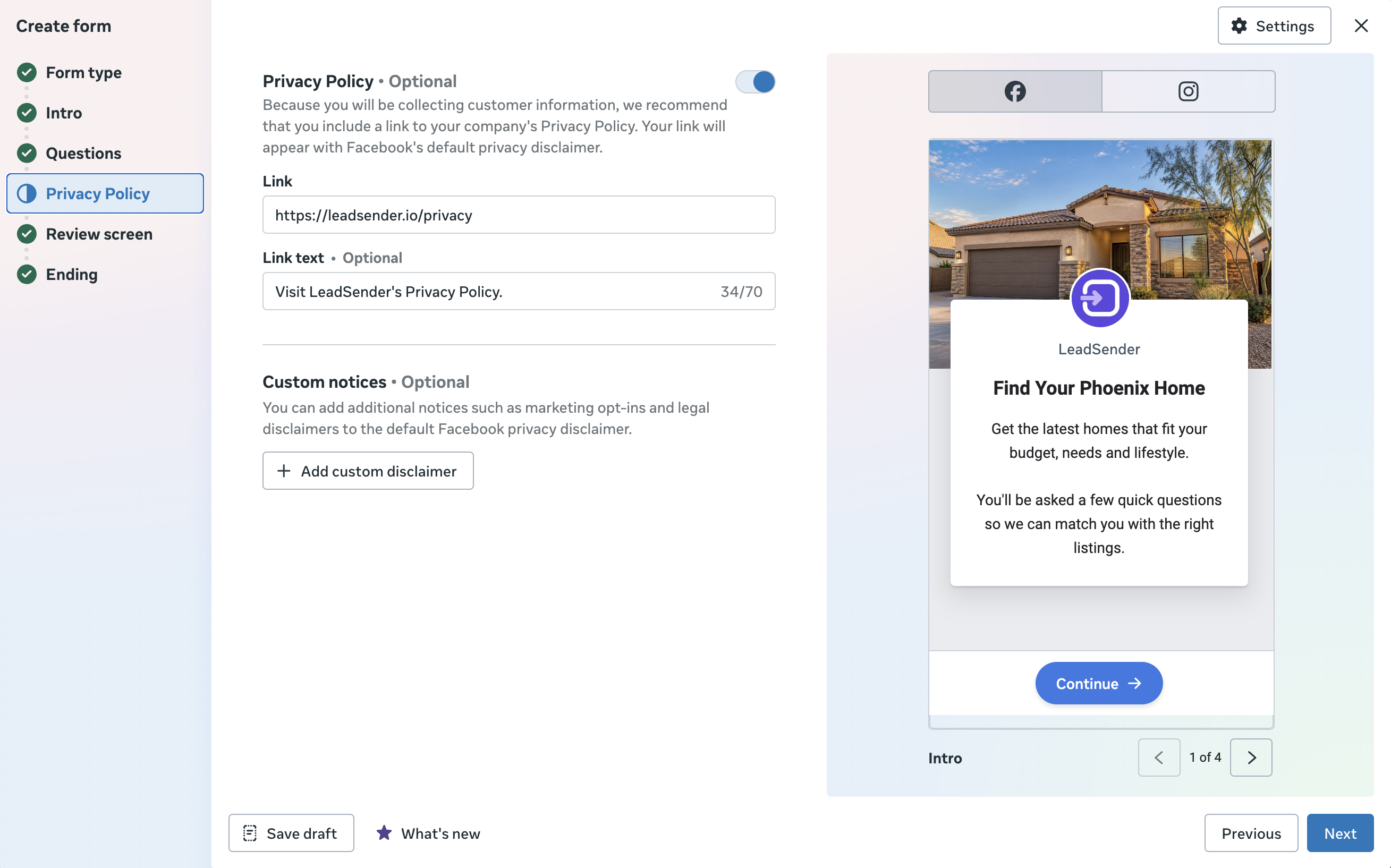 Consent tickboxes are added here
- Each tickbox can be required or optional. If texting is how you follow up, make it clear in the wording what people are agreeing to.
- You can't add one to a live form. Meta doesn't allow a custom disclaimer on a form that's already running in an ad. Duplicate the form, add the disclaimer, and switch the ad to the new form.
According to the FCC's consumer guide, texts sent to a mobile phone with an autodialer need the owner's prior consent, and commercial texts need that consent in writing. People can opt out at any time, in any reasonable way, so honor every STOP. Telemarketing calls to homes aren't allowed before 8 a.m. or after 9 p.m. Rules differ by country and by state, and this isn't legal advice: check what applies to you before you text at scale.
Here's a detail most guides miss. Meta stores the consent ticks apart from the form's answers. Its developer documentation says the lead's normal answer data does not contain the custom disclaimer responses, and tools have to ask for them separately. So a CRM or connector can deliver every answer and still leave out who agreed to be texted. Send a test lead and look for the consent row before you rely on it.
Track every lead, so none goes cold by accident
A 14-day plan falls apart the moment you can't remember who is on day 3 and who is on day 10. If you don't have a CRM, Meta's free Leads Center in Business Suite is enough to start:
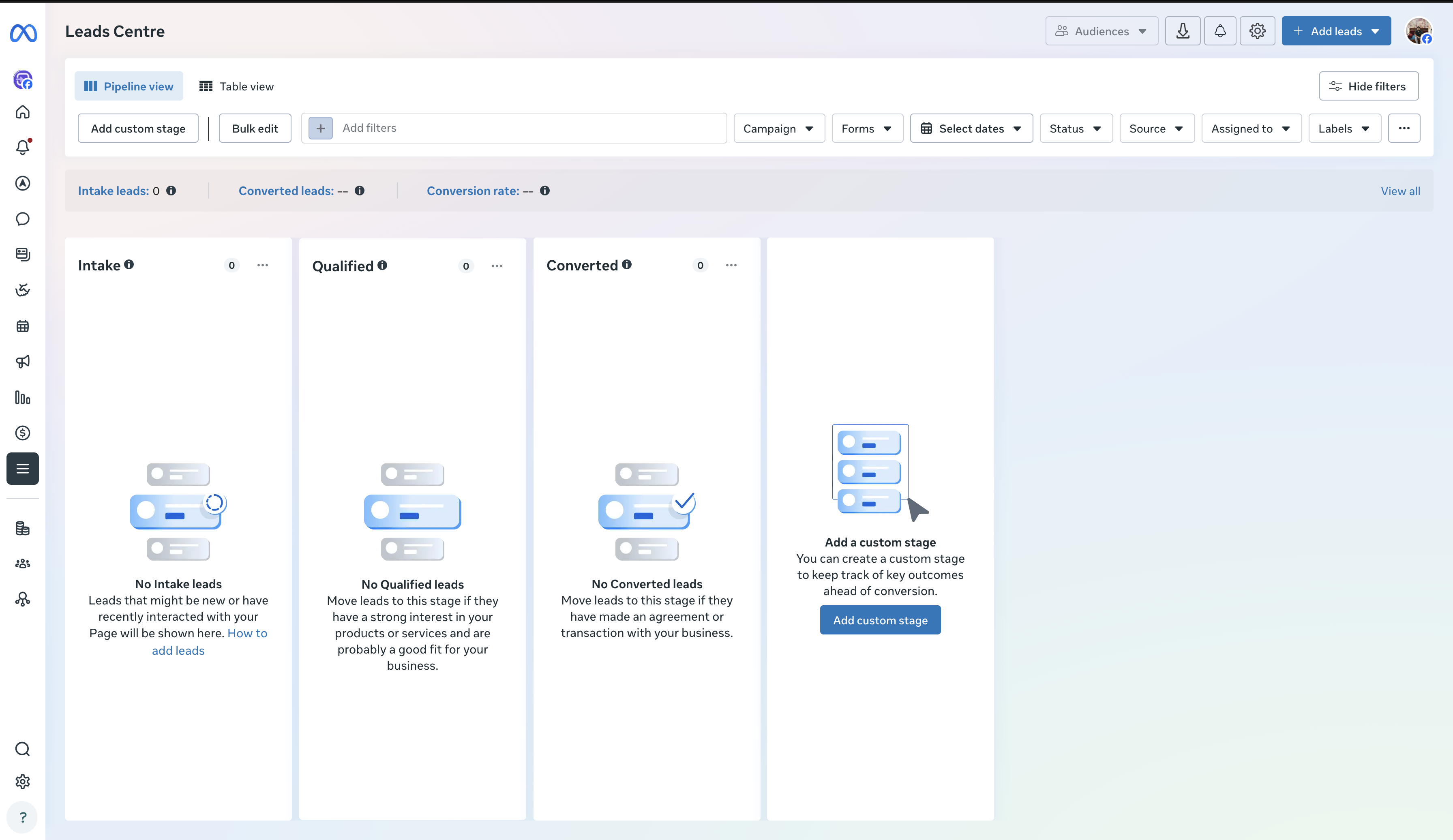 Move each lead along
after every touch
- Stages. Every lead starts in Intake. Move it to Qualified, Converted, Lost or Not qualified, or add your own stages, such as “Called, no answer”.
- Owner. If more than one person follows up, assign each lead to one of them, so two people don't call the same lead and nobody assumes someone else did.
- Schedule a reminder. Set a reminder on the lead for the next touch in your plan.
- Labels and notes. Write down what was said on each call. The next message is easier to write, and better.
If you'd rather keep leads in a spreadsheet or a CRM, the same four things apply: a stage, an owner, a next date and a note. Leads only stay downloadable from Meta for 90 days, so keep them somewhere of your own either way.
Mistakes that kill replies
The same few habits cost replies. Each one has a simple fix:
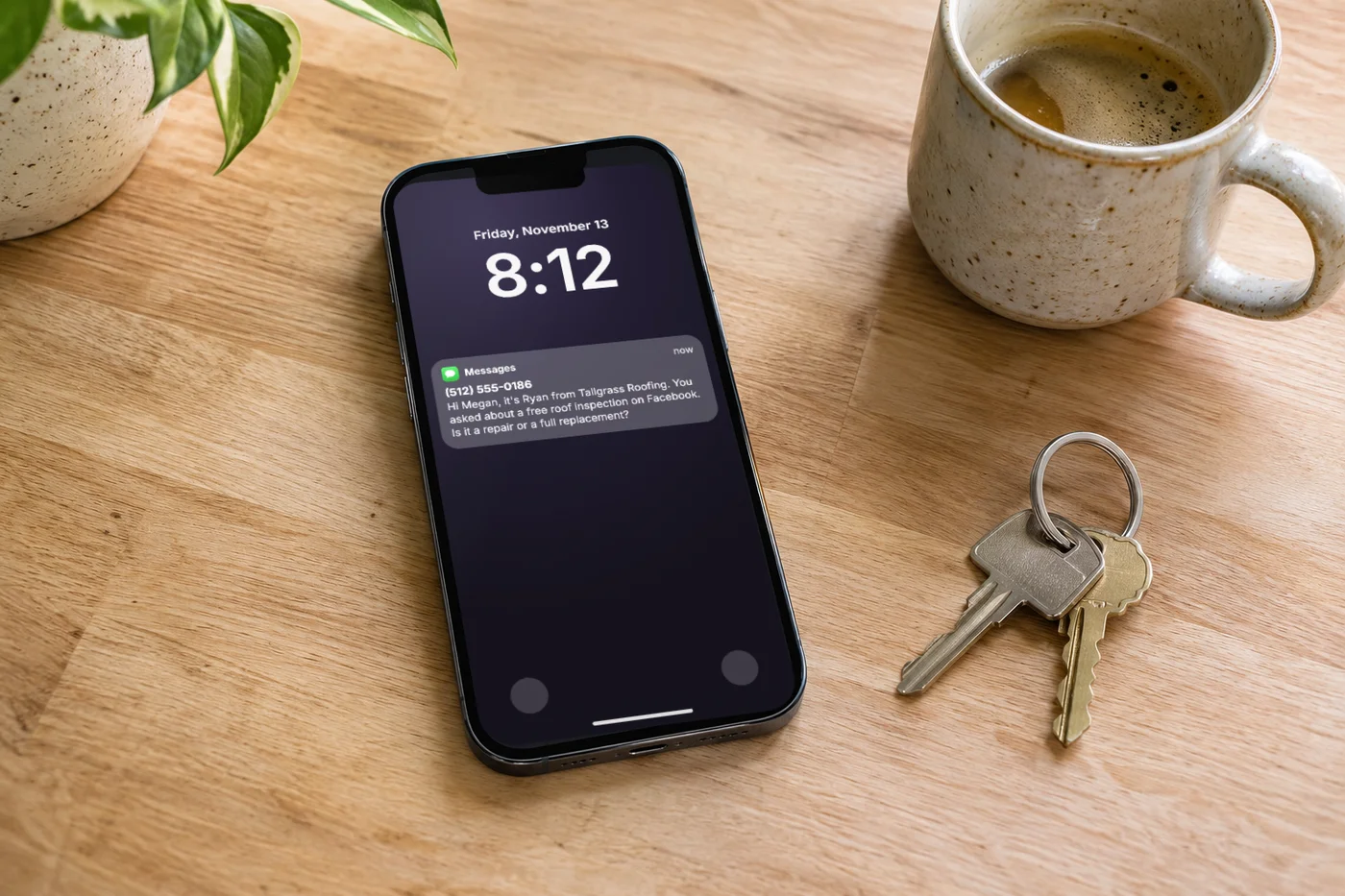
Hi, are you still interested?
Hi Megan, it's Ryan from Tallgrass Roofing. You asked about a free roof inspection on Facebook. Is it a repair or a full replacement?
The first text names nothing, so it reads like spam. The second says who you are, what they asked for, and gives them a two-word answer.
Let me know when you're free to chat!
Is morning or afternoon better for a quick call?
An open question is work. A choice between two things is easy to answer from a checkout line.
We're running 20% off this week only, book now before it ends!!
The inspection takes about 30 minutes and you don't need to be home for it. Any questions, just text me here.
A pitch on day one makes people defensive. Help first, sell on the call.
- Calling once and giving up. One missed call says nothing about the lead. Work the whole plan before you mark anyone Lost.
- Calling at the same time every day. If they didn't answer at 10 a.m. on Tuesday, they probably won't at 10 a.m. on Wednesday. Change the time.
- Judging the ad before the follow-up. “These leads are junk” is often “these leads were called a day late”. Fix the speed first, then look at lead quality.
- Finding out hours later. The lead sits in Meta until someone looks. Everything above depends on the next section.
Know the second a lead arrives
You can't call in five minutes if you find out in five hours. Facebook doesn't ring your phone when a lead comes in, so pick one of these, from free to fully automatic:
| Option | How to set it up | Good for | Watch out for |
|---|---|---|---|
| Meta Business Suite app | Install the app, sign in with an account that has lead access to the Page, and allow notifications | One owner who handles every lead | Alerts can be late or buried among other notifications |
| Your CRM's Meta connection | If your CRM has a built-in lead ads integration, connect the Page and turn on new-contact alerts | Teams already living in that CRM | Only some CRMs have one |
| A lead delivery tool | Connect the Page once and choose where each lead goes: text, Email, WhatsApp, Slack or a CRM | Getting each lead to whoever calls, wherever they are | A monthly cost, and a test lead to confirm it works |
Get every lead on your phone in seconds with LeadSender
That last option is what we built LeadSender for. Connect your Facebook Page once, and every new Facebook and Instagram lead arrives as a text, an Email, a WhatsApp message or a new contact in your CRM within seconds, with every form answer, so whoever calls knows what the lead asked for before they dial.
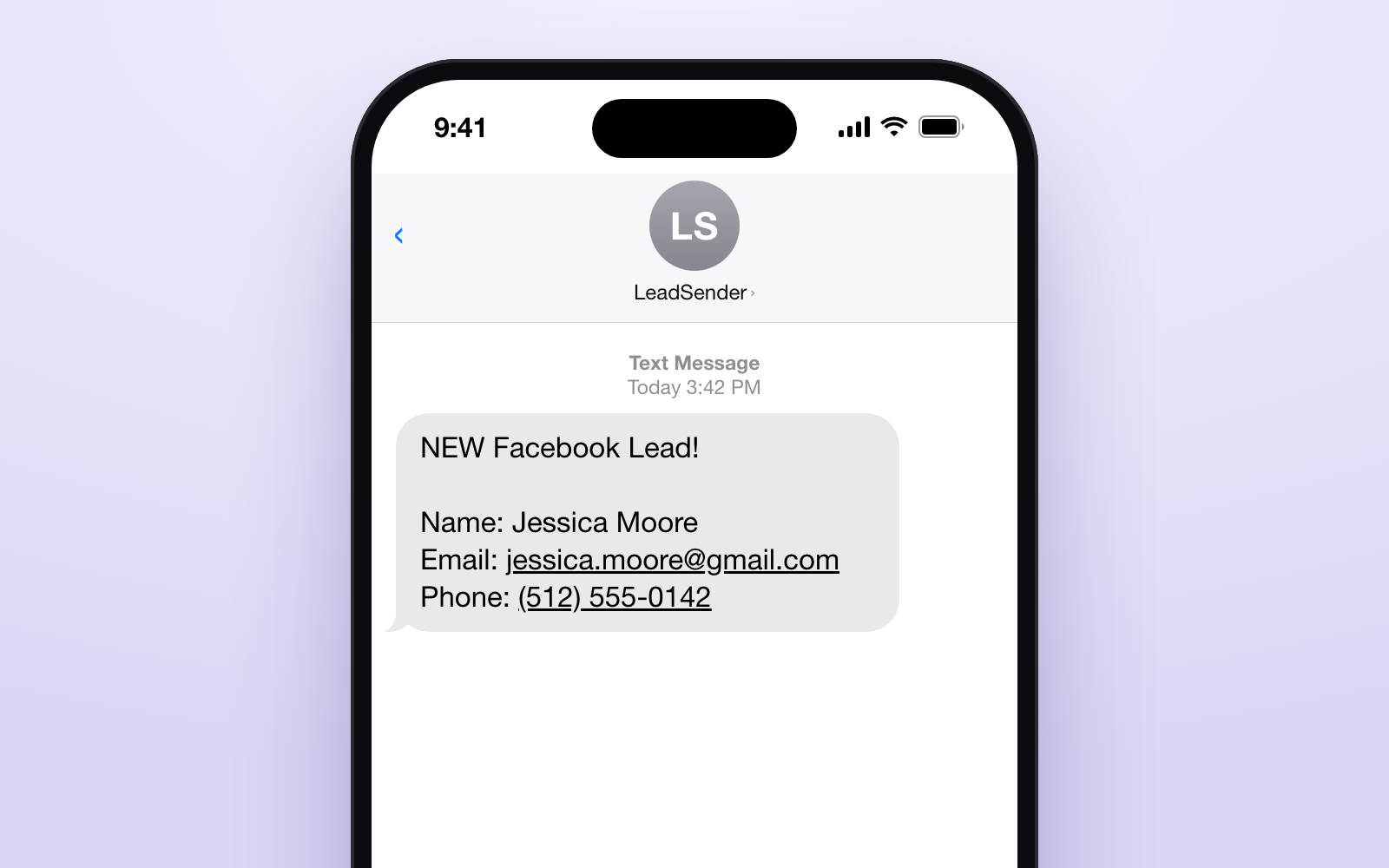
- Set up in about 3 minutes. No Zapier, no code.
- Consent ticks included. Email and webhook alerts show each consent tickbox and whether the lead ticked it, so you know who agreed to texts before you send one.
- Goes where your team works: Email, SMS, WhatsApp, Slack, Google Sheets, HubSpot, GoHighLevel and more.
- Test it first. Send a lead with Meta's Lead Ads Testing Tool and time how long the alert takes.
Connect your Page, send a test lead and watch it land on your phone. No card needed. Start your free trial.
Facebook lead follow-up FAQs
How fast should I follow up with a Facebook lead?
Within five minutes if you can, and always within the hour. In a Harvard Business Review study, companies that tried to reach a lead within an hour were nearly seven times as likely to qualify it as those that tried an hour later. Meta's own advice is to capture leads immediately, because quick follow-up can improve lead quality.
Should I call or text a Facebook lead first?
Call first, then text straight after if they don't pick up. The call reaches people who are still on their phone, and the text explains who the unknown number was, so they answer or call back next time.
What should I say to a Facebook lead?
Three things in the first sentence or two: your name and business, the exact offer they asked about on Facebook, and one easy question. For example: Hi Megan, it's Ryan from Tallgrass Roofing. You asked about a free roof inspection on Facebook. Is it a repair or a full replacement?
How many times should I follow up with a Facebook lead?
We suggest about ten touches over 14 days, mixing calls, texts and Email, then one clear last message. No reliable study gives a magic number, so watch your own replies: if most answers come after the third or fourth touch, stopping at two is costing you customers.
Why don't my Facebook leads answer the phone?
Mostly because they don't recognise the number and don't remember the form. Instant forms are filled in from the person's profile, so submitting takes a couple of taps. Call within minutes, text right after to say who called, and ask in the form when they'd like to be contacted.
Can I text Facebook leads?
A phone number on a form isn't the same as permission to send marketing texts. In the US, FCC rules require prior consent for autodialed texts to mobile phones and written consent for commercial texts, and people can opt out at any time. Add a consent tickbox to your form with a custom disclaimer, and check the rules for your country and state. This isn't legal advice.
Can Facebook follow up with leads automatically?
Partly. The form's Ending can show a Message for leads with a button such as Call business, Book time or Chat on WhatsApp, and lead nurturing can start a chat on Messenger, Instagram or WhatsApp after someone submits. Neither one calls the lead for you or tells your team a lead arrived.
What is the best time to call Facebook leads?
The minute they submit, because that's when they're on their phone and thinking about your offer. For later attempts, try a different time of day each time, or add an appointment request question so people tell you when to call. In the US, telemarketing calls to homes aren't allowed before 8 a.m. or after 9 p.m.
How do I get notified when a new Facebook lead comes in?
Three ways: the Meta Business Suite app's notifications, your CRM's own Meta connection if it has one, or a lead delivery tool such as LeadSender that sends each lead to your phone, Email or CRM within seconds. Facebook doesn't call or text you by itself.
When should I stop following up?
Stop at once when someone says no, replies STOP or asks not to be contacted. Otherwise, send one clear last message around day 14, then move the lead to a long-term list for an occasional update rather than more calls.
Sources
Checked on 16 November 2026. Meta changes Ads Manager often; if a screen looks different, trust Ads Manager.
- Meta Business Help Center: Best practices to respond to leads
- Meta Business Help Center: Add a message for leads to your instant form
- Meta Business Help Center: Enable lead nurturing in Ads Manager
- Meta Business Help Center: Add an appointment request to your instant form
- Meta Business Help Center: Add a custom disclaimer to your instant form
- Meta Business Help Center: About Leads Center in Meta Business Suite
- Meta Business Help Center: Prefill questions on instant forms
- Meta for Developers: Retrieving leads
- Harvard Business Review: The Short Life of Online Sales Leads (March 2011)
- Federal Communications Commission: Stop Unwanted Robocalls and Texts