








Your competitors publish their hooks, offers, creative formats and landing pages in public. They just do not point it out. The place they do it is the Facebook Ad Library, one of the most useful free research tools a marketer has.
Meta now calls it the Meta Ad Library, and it lets anyone search the ads running across Facebook, Instagram and the rest of Meta's apps. Used casually, it is a gallery. Used properly, it shows you what competitors are testing, which messages they keep repeating, what offers dominate your market and where your own creative has room to be different.
This guide shows you how to use the Facebook Ad Library in 2026, how to find competitor ads worth studying, how to avoid false “winning ad” assumptions and how to turn what you find into original ads of your own. The screenshots are from the live tool.
Open the Meta Ad Library, choose your country and All ads, then search a competitor's Page or a keyword from your market. Look at their active ads, start dates, repeated variations, hooks, offers and landing pages. A long-running or often-repeated ad is a useful clue, but the library does not prove an ad is profitable. Use it to form better tests, not to copy.
What is the Facebook Ad Library?
The Facebook Ad Library is Meta's public advertising transparency database. People still search for “Facebook Ad Library,” “Facebook Ads Library,” “FB Ads Library” and “ads library,” and they all mean the same tool. Meta's own page describes it as a place to search all the ads currently running across Meta technologies.
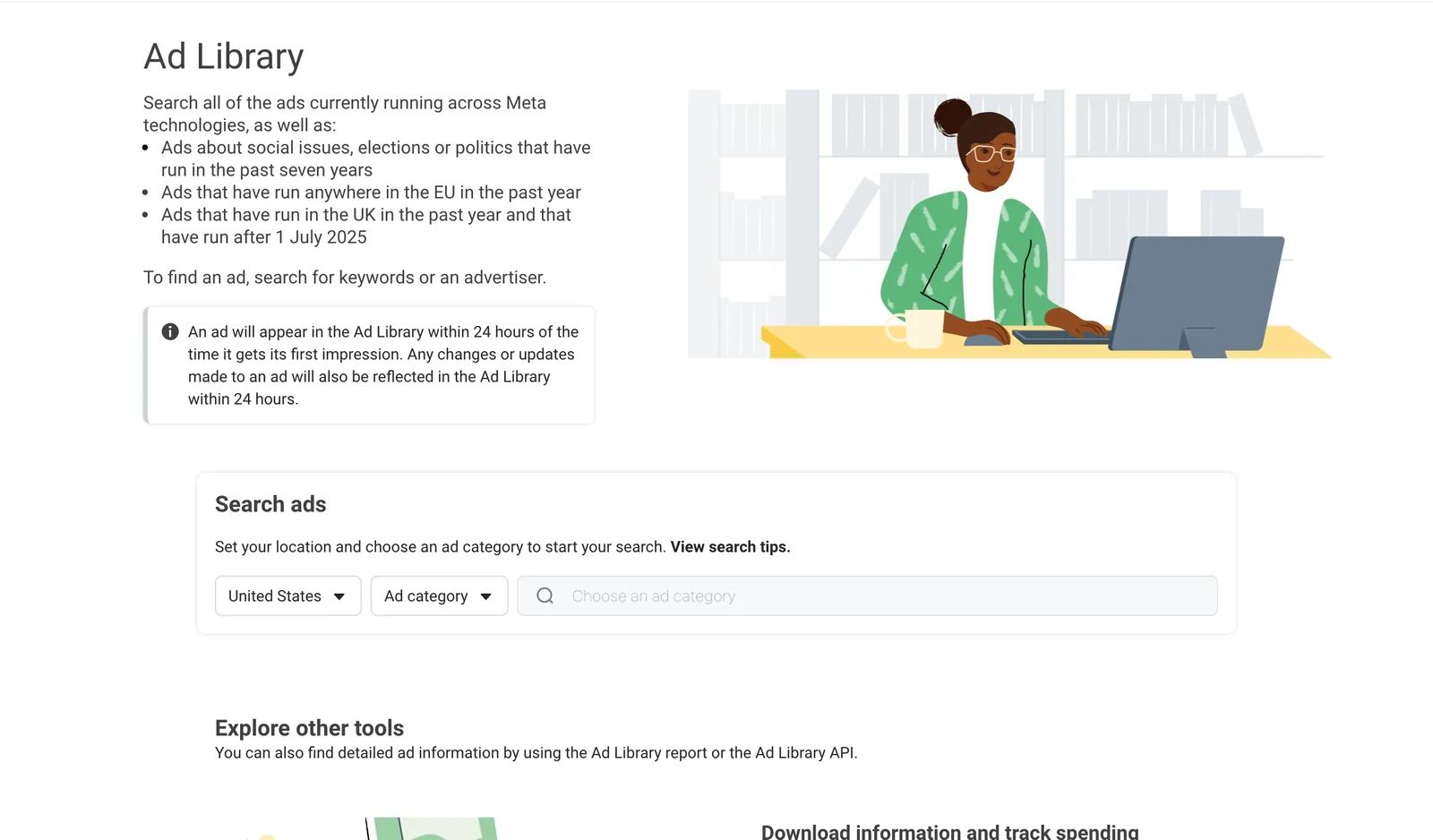
How far back you can look depends on the kind of ad:
| Type of ad | What you can search |
|---|---|
| Ordinary commercial ads | Ads that are currently running |
| Social issues, elections or politics | Ads from the past seven years, with extra detail such as spend and reach |
| Ads that ran anywhere in the EU | The past year |
| Ads that ran in the UK | The past year, and only ads that ran after 1 July 2025 |
Source: the Meta Ad Library home page and Meta's Ad Library help article, checked on 7 October 2026.
Meta also says an ad appears in the library within 24 hours of getting its first impression, and that changes to an ad show up within 24 hours. So a brand-new ad is not instant, and a pulled ad does not vanish at the exact minute it stops.
Facebook Ad Library vs Meta Ad Library: is there a difference?
No. Facebook Ad Library is the name most advertisers still use, and Meta Ad Library is the current official name. If you search “Meta Ads Library,” “ad library Facebook” or any similar variation, you are looking for the same transparency tool. There is one place to research active Meta ads, whichever name you use.
Why marketers use the Facebook Ad Library for competitor research
A competitor's ad account is private. Their public ads are not. That gives you a legitimate view of the market without access to anyone's Business Manager, analytics or campaign reports. A focused session can answer questions like these:
- Which pain points are competitors leading with?
- What offers show up again and again?
- Are they using video, static images, carousels or creator-style content?
- Which calls to action appear most?
- Do the ads send people to a landing page, a product page, a lead form or a booking flow?
- Which messages seem to survive for weeks or months?
- Where does every competitor look the same, leaving room for you to stand out?
The Ad Library does not show a competitor's return on ad spend, profit, conversion rate or the budget behind an ordinary commercial ad. A long-running ad may be performing well, but it may also be an evergreen awareness ad, a low-budget test or a campaign with an objective you cannot see. Treat longevity and repetition as signals to investigate, not proof.
How to use the Facebook Ad Library to find competitor ads
The fastest way to get something useful is to split your research into two modes. Advertiser research starts with a specific competitor. Market research starts with a keyword or an offer. Do both.
Open the Meta Ad Library and set the country
Go to the official Ad Library and choose the country you want to research. It matters, because brands often run different offers, prices, creative and legal wording in different markets. Selling in the United States? Research the United States. Studying a local competitor? Use the market where they actually advertise.
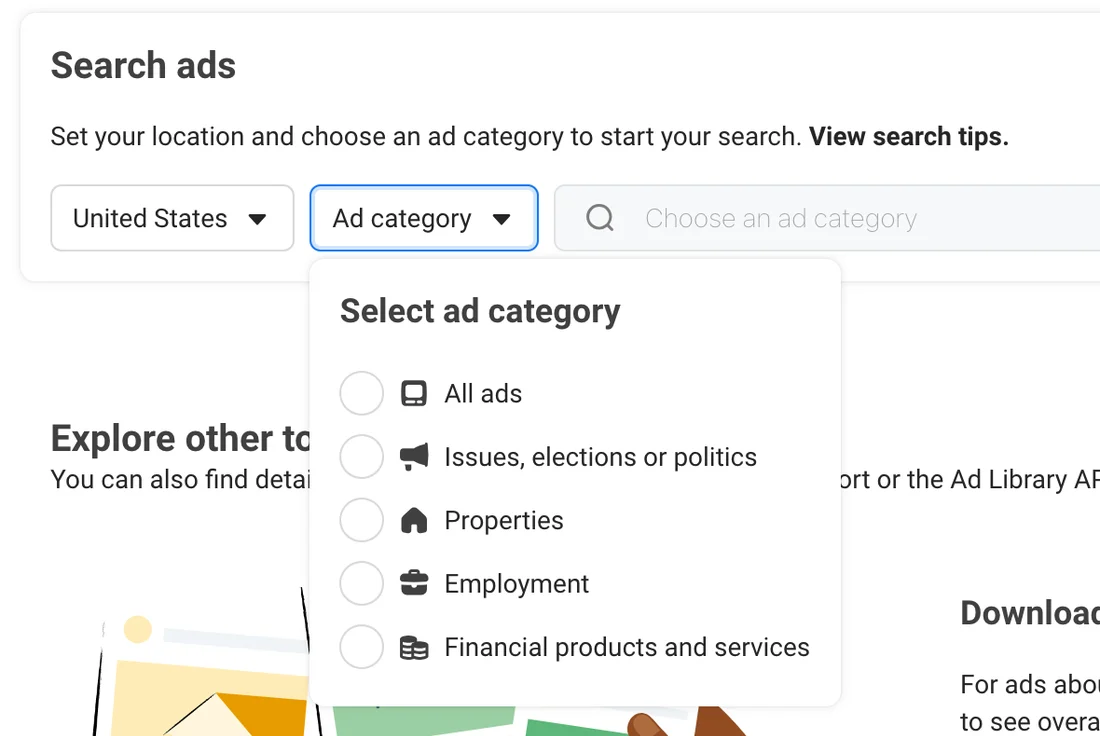
Choose “All ads”
Open the Ad category menu and pick All ads for normal competitor research. The other choices are Issues, elections or politics, Properties, Employment and Financial products and services. Meta uses “Properties” for what many people call housing ads.
Search by advertiser first
If you already know the competitor, type its Page or business name into the box that says “Search by keyword or advertiser.” If Meta offers the Page as a suggestion, pick it, so you see that advertiser's ads instead of every ad that happens to mention the name.
Do not stop at the first ad that looks polished. Scroll the whole set. Strategy shows up in patterns, not in one creative.
Search by keyword to see the whole market
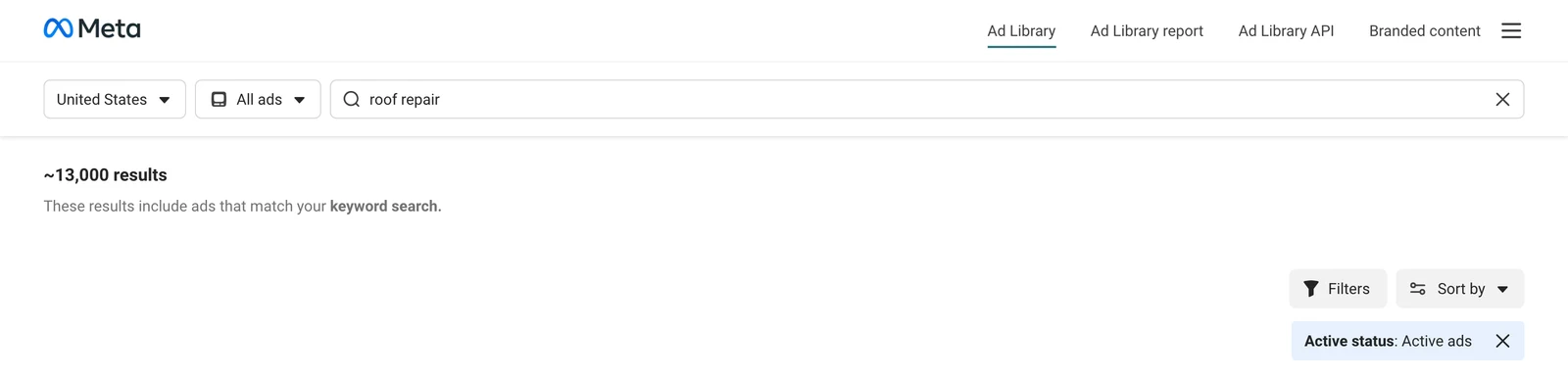
Now search the phrase your customers actually see in the offer. For a roofer that could be “roof repair” or “free roof inspection.” For software it might be “free demo” or “book a call.” Keyword search shows how many advertisers frame the same problem, which is where category-level patterns become obvious. When we searched “roof repair” for active ads in the United States on 7 October 2026, Meta reported about 13,000 results. That is a market, not a handful of rivals.
Narrow the results with filters
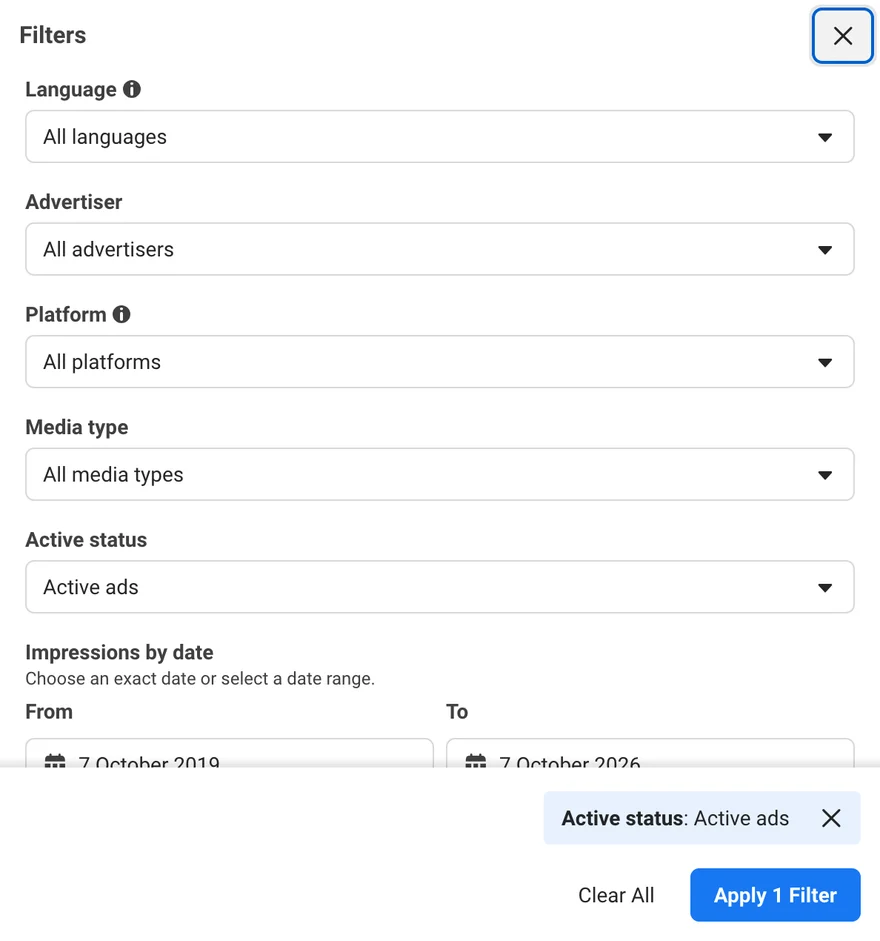
Press Filters to cut the noise. In the live tool you can narrow by Language, Advertiser, Platform, Media type, Active status and Impressions by date, and Sort by reorders the list.
- Platform: isolate Facebook or Instagram when you want ideas for one placement.
- Media type: compare video with image-led ads instead of mixing everything together.
- Active status: keep it on active ads to see what a brand is paying for now.
- Impressions by date: separate new tests from long-running creative.
- Advertiser: narrow to one competitor once you have found them.
Open the ad details and follow the click
The creative is only half the research. Each result shows a few useful facts, and See ad details opens the rest. Log the Library ID and start date, then, when a destination is shown, look at the page it sends people to. Note the offer, headline, form length, proof, urgency, pricing and booking flow. Two advertisers can run near-identical ads and get very different results because one sends traffic to a fast, clear page and the other creates friction after the click.
- 1Active status. Whether the ad is running right now.
- 2Library ID. A permanent ID for this ad. Note it so you can find it again.
- 3Started running on. The date delivery began. This is the start of your longevity signal.
- 4Platforms. Icons for Facebook, Instagram, Messenger and the other places it runs.
- 5Multiple versions. Shown when one ad runs with several variations. Open it to compare them.
- 6See ad details. Opens the full ad, and the page it sends people to when one is shown.
How to find “winning” competitor ads: the 7 signals to study
You cannot see a normal competitor campaign's true return in the library. You can combine several public signals to decide which ads deserve a closer look. Here they are at a glance, and then one by one.
- SignalLongevityHow long it has been running
- SignalVariationsThe same idea, reworked
- SignalOfferThe same offer, repeated
- SignalHookThe same opening promise
- SignalFormatsWhat they are shifting to
- SignalFunnelWhether the click matches the ad
- SignalConvergenceSeveral serious rivals saying the same thing
1. Longevity
Check when the ad started running. If it has stayed active for a long time, it may be earning its place, especially when the advertiser launches and drops other creatives faster. That is a useful signal, but duration alone is not proof of profit.
2. Repeated creative variations
If the same concept shows up with different openings, images, edits, headlines or formats, the advertiser may be iterating on an angle it believes in. The repeated idea matters more than any single design.
3. Offer consistency
Watch for an offer that keeps returning: a free consultation, a discount, a demo, a quiz, a valuation, a guide or an estimate. Repeated offers show what the advertiser wants the market to associate with the brand.
4. Hook consistency
Pull out the first sentence, the first three seconds of a video or the main visual promise. If the same pain point or outcome appears across several ads, it is a message pattern worth noting.
5. Format distribution
A move from polished statics to creator-style video, testimonial clips or product demos can show how a brand is adapting. Look at the whole portfolio, not one ad.
6. Call to action and landing-page match
Good research follows the click. Compare the call to action in the ad with the next step on the page. A coherent journey from ad to page is a better model than copying surface-level creative.
7. Convergence across competitors
If several serious competitors independently push the same problem, proof point or offer, the market is telling you something. The opportunity may be to serve the same demand with a fresher angle, stronger proof or a simpler next step.
Use this 10-point ad research scorecard
Score an ad from 0 to 2 on five of those signals and see what the total suggests. It does not predict profitability. It just helps your team decide which ads to study first.
Some signals are there. Keep it on your list and check it again next week to see whether it is still running.
A rule of thumb to rank what to study first. It does not predict profit: the Ad Library cannot show you a competitor's results.
What the Facebook Ads Library shows and what it does not
This is where marketers make expensive assumptions. The library is a transparency tool, not a competitor analytics dashboard.
| You can usually study | Do not assume you can see |
|---|---|
| Ad creative and copy | Profit or return on ad spend |
| Advertiser and Page identity | True cost per lead or per customer |
| The Library ID | The exact budget for an ordinary commercial ad |
| When the ad started running | Conversion rate |
| Which platforms it ran on | Full audience targeting for an ordinary commercial ad |
| Multiple versions, where shown | Why Meta is spending more on one creative |
| The destination and call to action, when available | Whether the advertiser thinks the ad is a winner |
Meta provides extra transparency for certain categories and regions. Ads about social issues, elections or politics can include spend and impression ranges, and ads delivered in the EU and UK can show additional information. Do not assume those fields exist for the ordinary commercial ads you research.
How to find Instagram ads in the Meta Ads Library
You do not need a separate Instagram ad library for most competitor research. Instagram ads are part of Meta's advertising system. Search the advertiser in the Meta Ads Library, open Filters and set Platform to Instagram.
When you study Instagram ads, pay extra attention to the opening frame, vertical composition, creator-style delivery, subtitles and whether the ad feels native to Reels or Stories. A concept that works in a Facebook feed may need a different execution in a vertical placement.
The better way to spy on competitor ads without copying them
Copying the visible ad is usually the least valuable thing you can do. Your competitor's brand, audience history, tracking data, landing page and economics are not yours. Reverse-engineer the strategy underneath the creative instead. Break every interesting ad into six parts:
- Audience problem: what frustration, desire or situation is the ad speaking to?
- Hook: what earns attention in the first line or first seconds?
- Promise: what outcome is on offer?
- Proof: a testimonial, a demonstration, numbers, credentials or social proof?
- Offer: what exactly does the person get, and what is the perceived risk?
- Next step: shop, learn more, book, get a quote, submit a lead form or visit a page?
Example: roofing leads
A competitor might run “Get a free roof inspection” over a photo of a local home. Do not copy the headline or the design. Pull out the structure: a homeowner worried about an ageing or damaged roof, a low-effort way to find out where they stand, a local feel and a simple quote form. Your own test could use a different hook, such as “Find out if it is a repair or a full replacement before you pay for either,” stronger local proof, or a clearer explanation of what happens after the request.
Borrow the question, not the answer. If every competitor proves there is demand for “faster quotes,” you do not need their wording or their design. You need your own strongest answer to the same customer need.
A 20-minute weekly Facebook Ad Library workflow
The real advantage comes from doing it every week. Researching once gives you inspiration. Researching the same competitors weekly gives you market intelligence.
- Minutes 0 to 5Check 3 direct competitorsOpen each advertiser and note new creative, offers and hooks.
- Minutes 5 to 10Check the oldest active adsRecord which ads are still live and whether the idea has spawned new variations.
- Minutes 10 to 15Run one keyword searchSearch the category's main problem or offer and look for patterns across brands you do not already track.
- Minutes 15 to 20Write 2 or 3 test ideasTurn what you saw into original tests. For example: “Three competitors lead with speed, so we will test certainty.”
Competitor ad research template
Use a simple sheet. The value is not in collecting hundreds of screenshots, it is in capturing patterns you can act on. These rows show the idea: fill in your own.
| Brand | Started | Hook | Offer | Format | Test idea |
|---|---|---|---|---|---|
| Competitor A | Jul 12 | Speed | Free estimate | Video | Test a 60-second quote angle |
| Competitor B | Aug 3 | Proof | Free audit | Static | Test a proof-first headline |
| Competitor C | Mar 20 | Risk | Free consult | UGC | Test an objection-led creator ad |
Example rows only, not real advertisers.
Want a blank copy? This one pastes straight into Google Sheets or Excel with the columns already split.
Brand	Started	Hook	Offer	Format	Proof	Landing page	Test idea
Competitor A
Competitor B
Competitor C
How to use the Facebook Ad Library for lead generation research
If your goal is leads rather than online sales, do not judge a competitor's ads only by how good the creative looks. Lead generation is a chain: the ad, then a form or page, then follow-up, then an appointment or sale. Inside the library, look for lead-generation offers such as free quotes, consultations, estimates, valuations, guides, quizzes, eligibility checks, demos and appointment offers. Then check the destination and ask four questions:
- How much information does the person have to give?
- How clearly is the value of submitting explained?
- What does the page promise will happen next?
- How quickly could your own team respond to a similar lead?
Planning the budget for what you find? Our guide to how much Facebook ads cost in 2026 has benchmarks by industry and a free calculator.
A strong Facebook lead ad can still lose money if the lead sits untouched. LeadSender sends each new Facebook lead to your CRM, email, SMS or Google Sheets in seconds, so the next step does not depend on someone remembering to check Meta. Before you spend, you can send a free test lead to confirm it all works, and if you already have leads in Meta, download them from Ads Manager.
Turn Ad Library research into better creative briefs
The best output from competitor research is not a swipe file. It is a brief your designer, copywriter or media buyer can use straight away. A useful one covers:
- Market pattern: what most competitors are saying.
- Opportunity: what they are not saying.
- Primary hook: the angle you want to test.
- Proof: what will make your claim believable.
- Offer: the specific reason to act.
- Format: static, video, creator-style, carousel or something else.
- Call to action: one clear next step.
- Landing-page match: what the person should see right after clicking.
7 common Facebook Ad Library mistakes
- Assuming a long-running ad must be profitable. Longevity is a clue, not financial proof.
- Copying one ad instead of studying patterns. One asset may be a test. Repetition across an account tells you more.
- Ignoring the landing page. An ad only makes sense alongside its offer and next step.
- Researching only the biggest brand. Large advertisers can have completely different economics. Include similar-size rivals.
- Saving screenshots with no notes. Write down why the ad matters: hook, offer, proof, format and test idea.
- Looking only at design. Copy, offer and funnel match often matter more than polish.
- Turning research into imitation. Use competitors to find market patterns, then build original creative on your own proof and positioning.
Advanced search ideas and the Meta Ad Library API
Once the basics feel familiar, search for terms that reveal strategy, not only brand names:
- Offer terms: “free estimate,” “free trial,” “book a demo,” “free valuation,” “download guide.”
- Pain-point terms: the words customers use to describe the problem.
- Outcome terms: “save time,” “lower costs,” “sell faster,” “get more leads.”
- Competitor product names: useful when a company has several lines or sub-brands.
- Seasonal terms: Black Friday, tax season, summer sale, back to school.
- Local terms: a city, neighborhood or region when location is central to the offer.
The other tools on the same page
The Ad Library home page links to three more tools, and each does a different job:
- The Ad Library report is for ads about social issues, elections or politics. It shows spending totals and spend by advertiser and location.
- The Ad Library API lets you build custom searches. Meta says it is for people who know a little about how programming works and that you need to complete a few steps to get access. Its fields include the Library ID, the ad creative, the Page name and ID, delivery dates and where the ad ran. Most marketers will get plenty from the normal search first.
- Branded content search finds posts, stories, videos and reels on Facebook and Instagram that involve a paid partnership, and you can filter by app and by date. It is handy for seeing which creators a competitor works with.
Facebook Ad Library FAQs
Is the Facebook Ad Library free?
Yes. Meta provides the Ad Library as a public transparency tool, and the standard search is free to use. You do not need a paid competitor intelligence platform to start.
Do I need a Facebook account to use the Ad Library?
Not to search it. When we checked in October 2026, the Ad Library opened and returned results with no Facebook login. Meta can change how it works, so if it asks you to log in, use a personal account you are comfortable using.
Is the Facebook Ad Library the same as the Meta Ad Library?
Yes. Facebook Ad Library is the older name that people still search for. Meta Ad Library is the current name for the same transparency tool.
How do I search the Facebook Ad Library?
Choose a country, pick an ad category such as All ads, then search by advertiser or keyword. For competitor research, start with the advertiser's Page, then run keyword searches to see the wider market.
Can I see my competitors' Facebook ads?
Yes. Search the advertiser or Page and you can review the ads Meta shows in the library for that country and category. Ordinary commercial ads appear while they are active.
Can I see a competitor's Facebook ad budget?
Not for ordinary commercial ads. Meta shows spend ranges for ads about social issues, elections or politics, and extra transparency data for ads delivered in the EU and UK, but you will not see the budget behind a normal business ad.
Can I see a competitor's targeting?
Not the full setup for ordinary commercial campaigns. Some special categories and regions publish more audience information, but that is not the same as seeing how a normal competitor built its audience.
Can I find Instagram ads in the Facebook Ads Library?
Yes. Instagram ads run through Meta's advertising system, so they appear in the same library. Search the advertiser, then use the Platform filter to focus on Instagram.
How often is the Meta Ad Library updated?
Meta says an ad appears in the Ad Library within 24 hours of getting its first impression, and changes to an ad are reflected within 24 hours.
Can I see inactive Facebook ads?
For ordinary commercial ads the library is mainly useful for what is running now. Meta keeps broader history for ads about social issues, elections or politics (seven years), ads that ran in the EU (one year) and ads that ran in the UK in the past year and after 1 July 2025.
Does a long-running ad mean it is a winner?
Not necessarily. It is a useful clue, because the advertiser has kept paying for it, but the library cannot show profit, return on ad spend or the ad's objective. Combine longevity with repeated variations, a consistent offer, a landing page that matches and a pattern across competitors.
What do adlibrary, facebookadlibrary, fb adlibrary and fbadslibrary mean?
They are shorthand, spacing variations and misspellings people use when they are looking for the Facebook Ad Library or Meta Ad Library. They are not separate tools, and searches like advert library, facebook library, ad library meta and ads library meta usually mean the same thing.
Can I copy a competitor ad I find in the Ad Library?
No. Do not copy another advertiser's creative, wording or branding. Use the library to study strategy, market patterns and how offers are structured, then make original work built on your own proof and positioning.
Final takeaway: use the Facebook Ad Library as a research system, not a swipe file
The Facebook Ad Library shows you what competitors are putting into the market right now. Its real value comes from comparing patterns over time: which hooks survive, which offers keep coming back, which formats are multiplying and where the customer journey goes after the click.
The strongest marketers do not ask “which competitor ad should we copy?” They ask “what is this market proving, and what original test should we run next?” Build that habit and the Meta Ad Library becomes more than an ads library. It becomes a free source of creative intelligence you can use every week.
And once your own ads start generating leads, make sure the handoff is as strong as the ad. See how to create Facebook lead ads if you are starting fresh, or what to do if your ad account is restricted if delivery has stopped.
Sources and method
The tool details in this guide were checked against the live Meta Ad Library on 7 October 2026: the category names, the filter list, the fields on a result card, the 24-hour appearance window and the history windows. The screenshots show only Meta's own interface. The result card diagram uses placeholder values, and the research rows and scorecard bands are our own examples, labelled as such. Meta changes its tools often, so if your screen looks different, trust your screen. Sources: