


















A car shopper who fills in your Facebook form is comparing dealers right now. The store that calls first usually gets the appointment, so that lead belongs in your CRM, with a salesperson on it, not in Facebook's Leads Center waiting for someone to download a CSV.
This guide shows how to send Facebook lead ads to your dealer CRM in about five minutes, with no CSV files and no Zapier. Every lead arrives in ADF/XML, the format VinSolutions, DealerSocket, Elead, DriveCentric and every other dealer CRM reads, with the vehicle, the trade-in and every answer, seconds after the shopper submits your form.
Facebook keeps instant-form leads in Leads Center, and dealer CRMs only take leads in ADF/XML. In LeadSender: connect Facebook, choose Facebook Leads to Dealer CRM (ADF/XML), pick your Page and form, enter your CRM's lead email address, match your fields, then turn it on. Every new lead reaches your CRM within seconds.
What ADF/XML is, and why dealers use it
ADF (Auto-lead Data Format) is the standard every dealer CRM uses to take in leads. Each lead is a short XML document: who the customer is, the vehicle they want, the car they might trade in, and which store the lead is for. Your CRM gives your store an email address, and every ADF/XML email sent there becomes a lead, assigned by your own lead rules.
It's how your website, OEM programs and third-party lead providers already feed your CRM. Facebook doesn't speak ADF, which is why Facebook leads end up copied in by hand. LeadSender fills that gap: it turns each Facebook lead into ADF/XML and sends it to your CRM's address.
Dealer CRMs that take ADF/XML leads by email include:
- VinSolutions, DealerSocket, Elead and DriveCentric
- ProMax, AutoRaptor, CDK, Reynolds & Reynolds and Tekion
- Almost any other CRM a dealership uses: if it takes leads from your website or a lead provider, ask for its ADF lead address
Before you start
You need two things from your side:
- Your CRM's lead email address. Every dealer CRM gives each store an address that turns ADF/XML emails into leads. Your CRM admin or rep can give you one, and you can ask for a separate one just for Facebook so those leads are easy to report on.
- A Facebook lead form that asks about the vehicle. Questions like “Which model are you interested in?”, “New or used?” and “Do you have a trade-in?” fill the vehicle and trade-in in your CRM. A form with only name, email and phone still works.
How to send Facebook lead ads to your dealer CRM with LeadSender
Start a free trial and connect Facebook
Start your 7-day free trial of LeadSender (no card needed) and sign in with the Facebook account that manages your dealership's Page. That lets LeadSender hear about each new lead the moment it's submitted.
Choose the Dealer CRM (ADF/XML) template
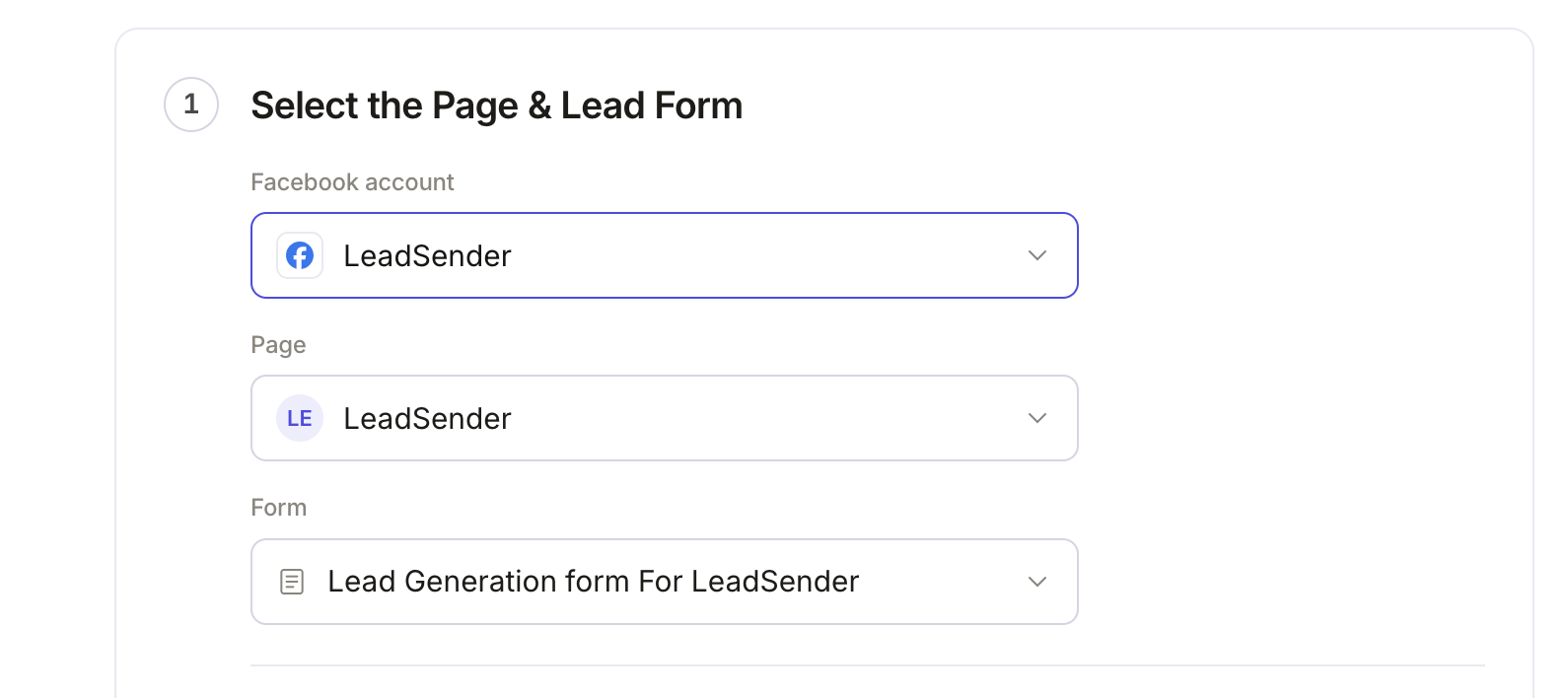
From Integrations, pick Facebook Leads to Dealer CRM (ADF/XML). Then select your Facebook Page and the lead form you want to send.
 Select your Page
and lead form
Connect your dealer CRM
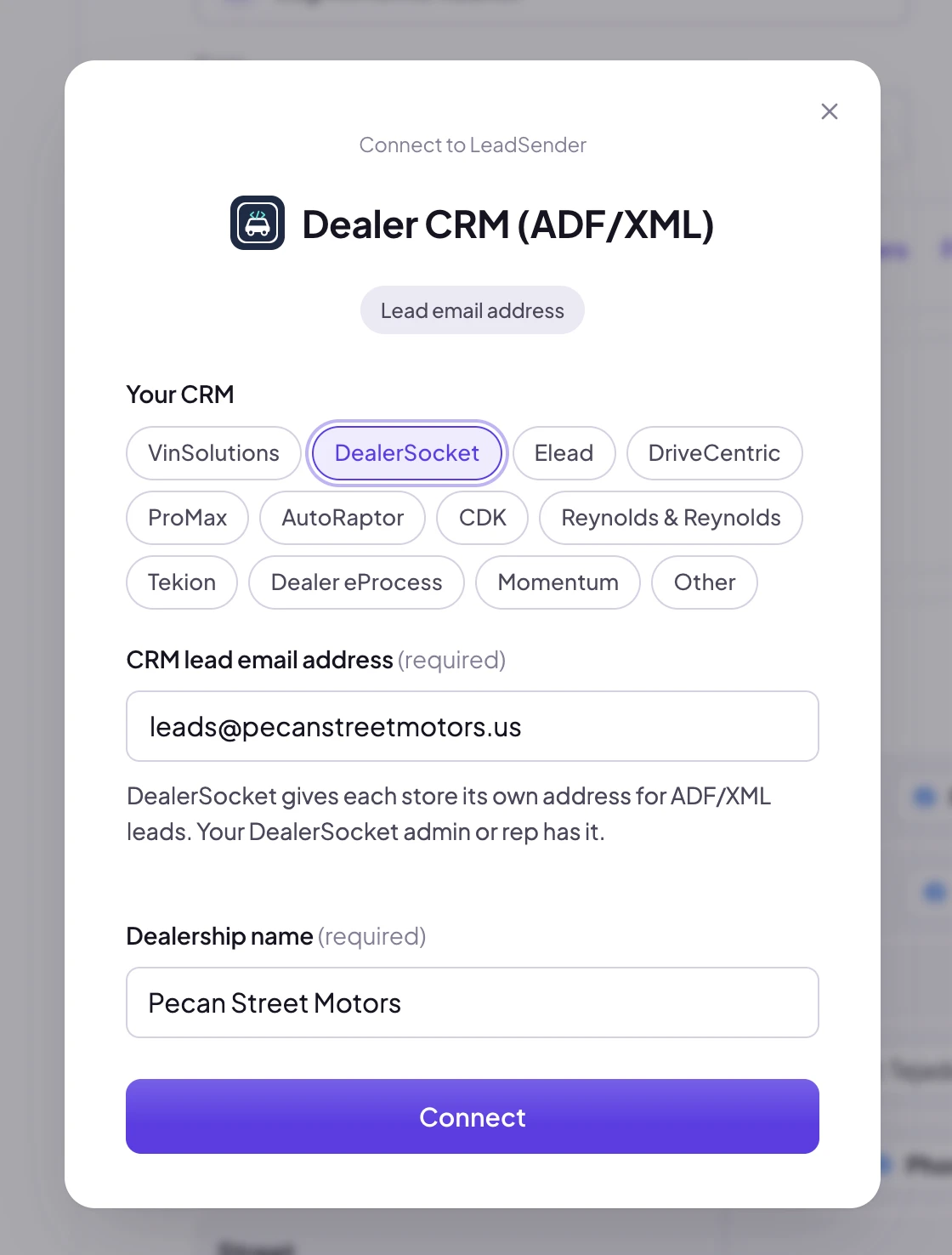
Click Connect next to Dealer CRM (ADF/XML).
 Click Connect
Pick your CRM, then enter its lead email address and your dealership's name. The name goes on every lead as the dealer it's for, which matters when one CRM serves several stores.
 1. Pick your CRM2. Its lead address3. Your dealership
Not sure about the address yet? Connect your own email instead and send a test lead. You'll get the exact ADF/XML your CRM will receive. Then click Change account and connect the CRM's address.
Set the default interest and condition
Choose what shoppers from this form usually want, Buy, Lease or a Test drive, and whether the form is for New or Used vehicles. Your CRM uses these to route the lead to the right desk. If your form asks, the shopper's own answer wins.
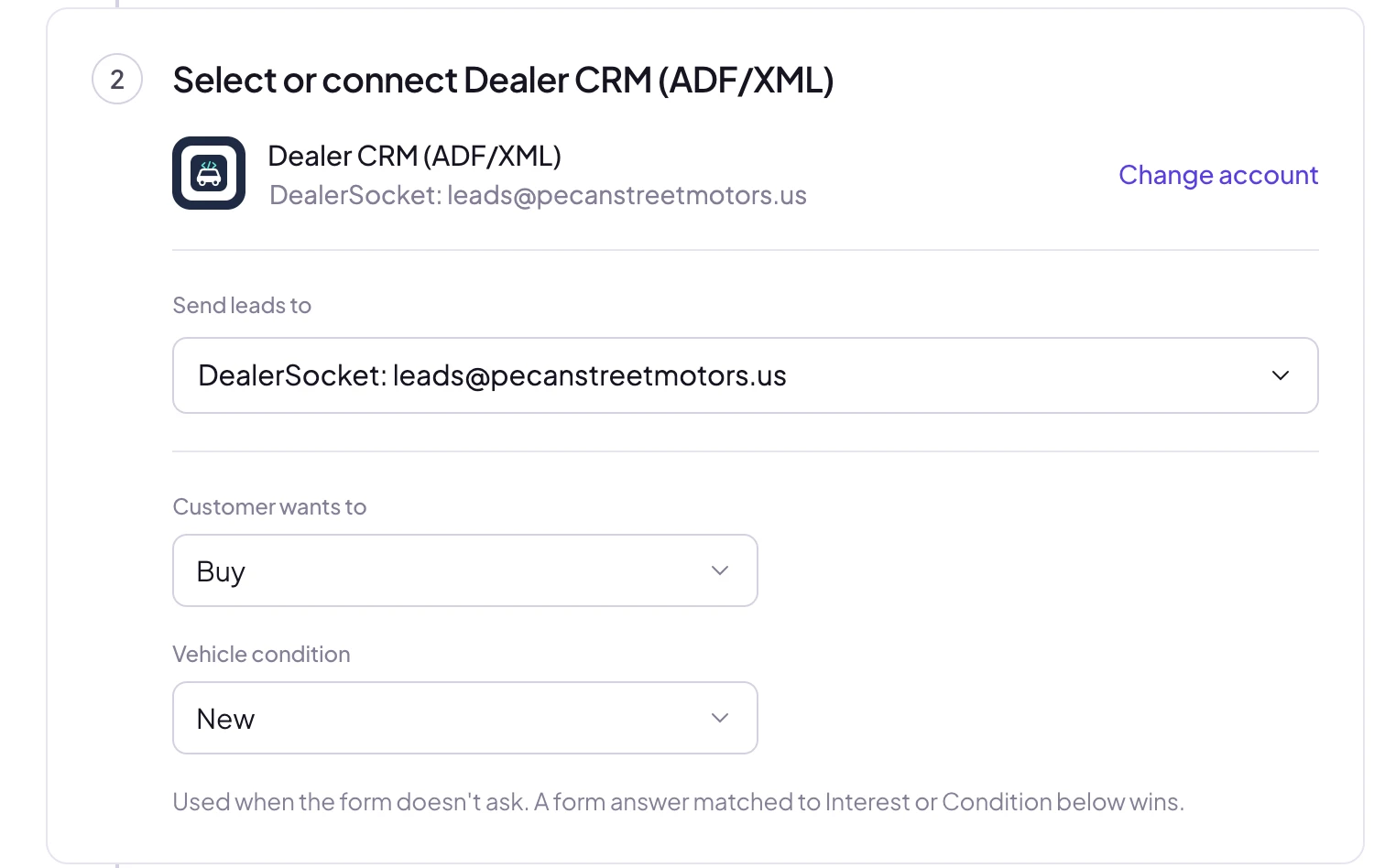 Buy, lease or test driveNew or used
Match your fields, test and turn on
In Match your fields, name, email and phone are matched for you, and so are car questions like “Which model?” or “Trade-in mileage?”. Fields are grouped the way ADF/XML is: the customer, the vehicle of interest and the trade-in. Then click Send a test lead. Need a fresh lead to test with? Create one with our free Meta Lead Ads Testing Tool.
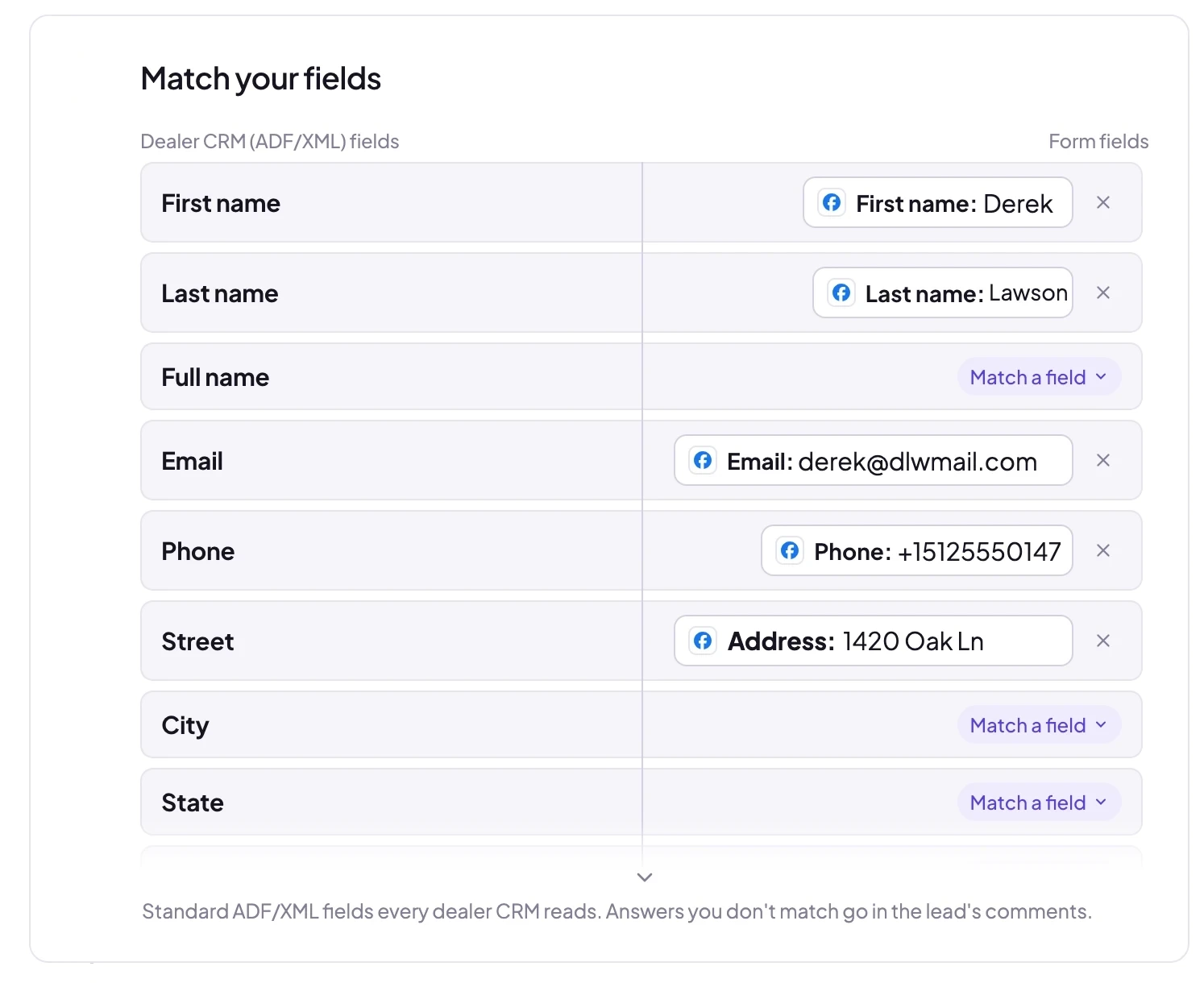 Matched for you
The test shows exactly what was sent:
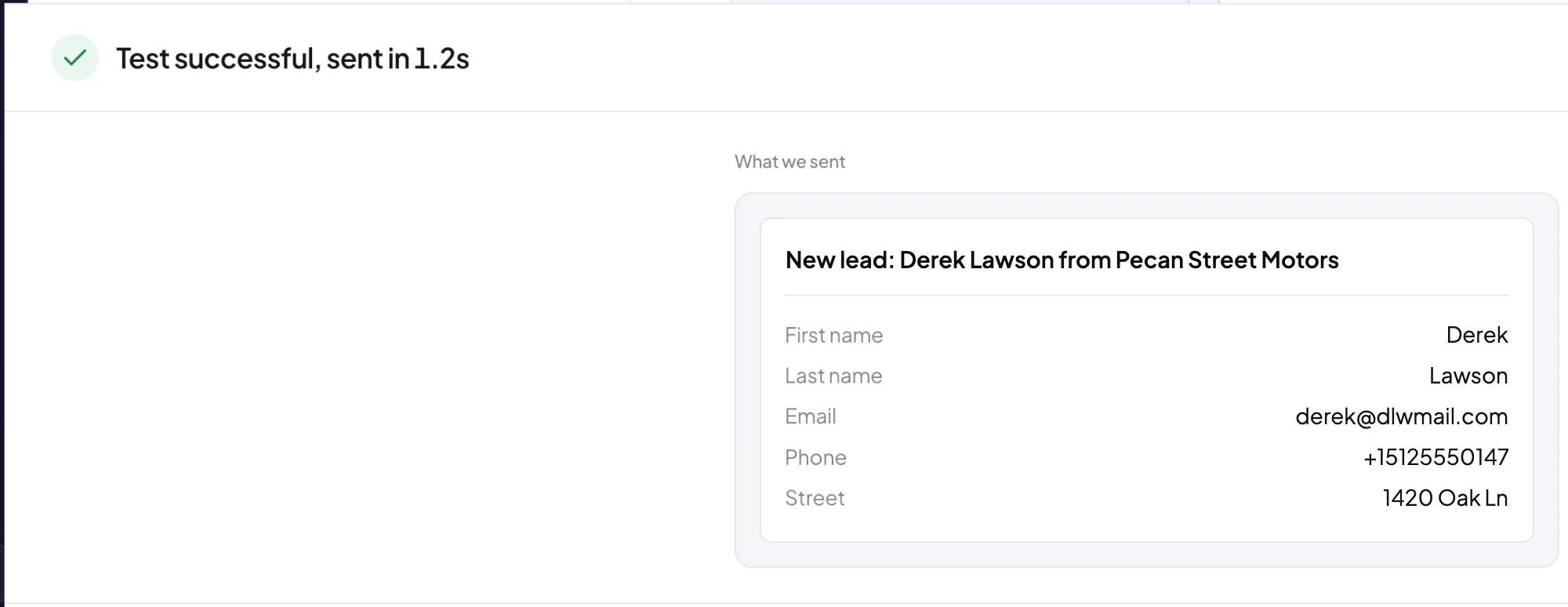 What your CRM received
And this is the email itself: one ADF/XML lead, sent from notifications@leadsender.io. Your CRM reads it and creates the lead. When it looks right, click Turn on. From then on every new lead from that form, on Facebook or Instagram, reaches your CRM within seconds.
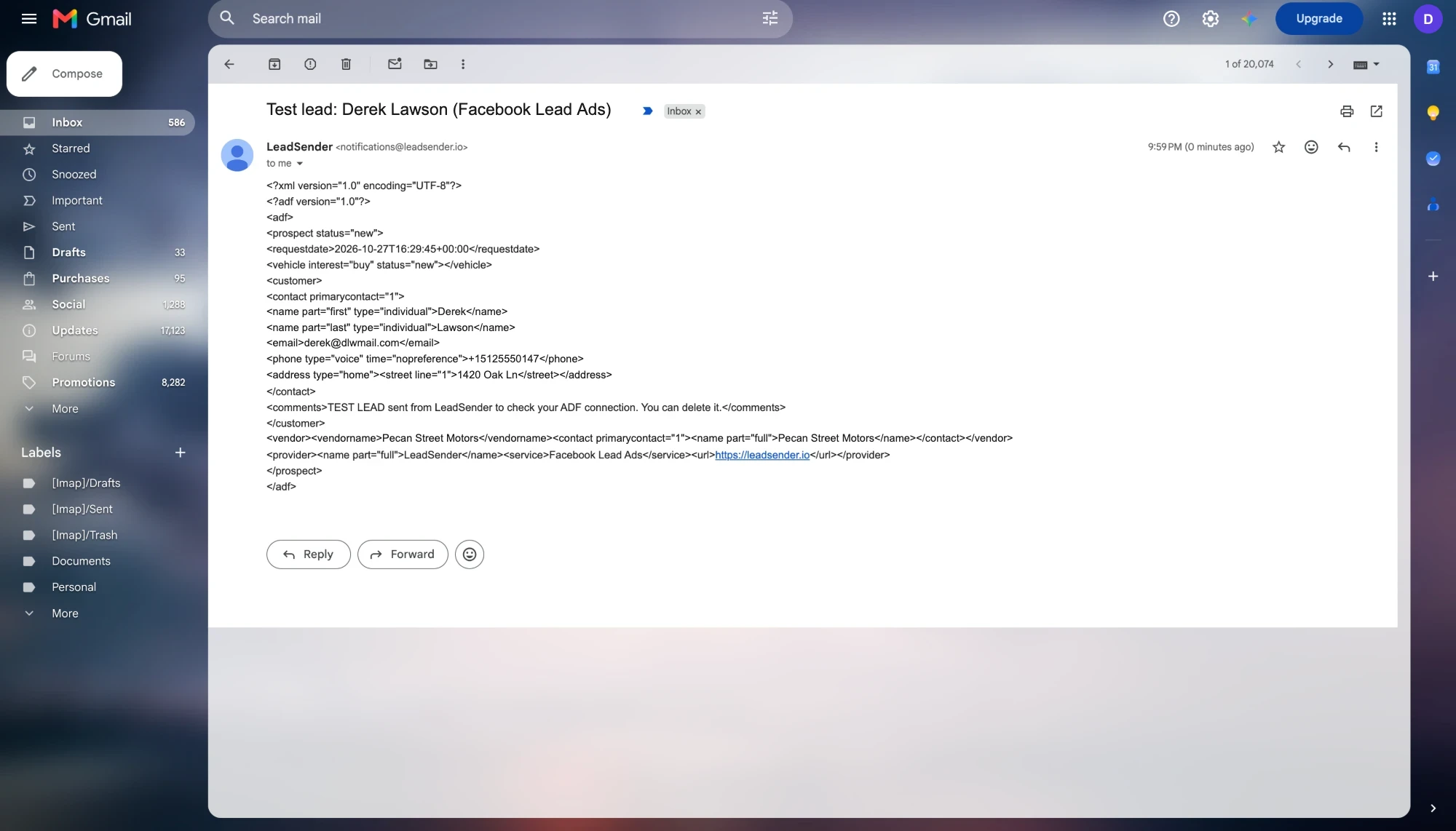 The ADF/XML
your CRM reads
A sample ADF/XML lead
Here is a full lead from a Facebook form that asked about the vehicle, payment and trade-in, exactly as LeadSender sends it. Copy it to show your CRM admin, or to check how your CRM displays each field:
<?xml version="1.0" encoding="UTF-8"?>
<?adf version="1.0"?>
<adf>
<prospect status="new">
<id sequence="1" source="LeadSender">1234567890123456</id>
<requestdate>2026-10-27T16:29:45+00:00</requestdate>
<vehicle interest="buy" status="new"><year>2026</year><make>Ford</make><model>F-150</model><finance><method>finance</method></finance></vehicle>
<vehicle interest="trade-in" status="used"><year>2018</year><make>Toyota</make><model>Tacoma</model><odometer status="original" units="mi">64000</odometer></vehicle>
<customer>
<contact primarycontact="1">
<name part="first" type="individual">Derek</name>
<name part="last" type="individual">Lawson</name>
<email>derek@dlwmail.com</email>
<phone type="voice" time="nopreference">+15125550147</phone>
<address type="home"><postalcode>78704</postalcode></address>
</contact>
<timeframe><description>Within 30 days</description></timeframe>
<comments>Facebook Lead Ads lead from Truck Month form on Pecan Street Motors.
Campaign: F-150 Truck Month
Best time to call: Evenings</comments>
</customer>
<vendor><vendorname>Pecan Street Motors</vendorname><contact primarycontact="1"><name part="full">Pecan Street Motors</name></contact></vendor>
<provider><name part="full">LeadSender</name><service>Facebook Lead Ads</service><url>https://leadsender.io</url></provider>
</prospect>
</adf>
Which fields reach your CRM
| In ADF/XML | What it holds |
|---|---|
| Customer | First and last name (a full name is split for you), email, phone and address |
| Timeframe | When they plan to buy, from a question like “When are you planning to buy?” |
| Vehicle of interest | Buy, lease or test drive, new or used, year, make, model, trim, stock number, VIN and payment method |
| Trade-in | Year, make, model and mileage, as a second vehicle marked trade-in |
| Comments | The form, Page and campaign the lead came from, plus every answer you didn't match to a field |
| Vendor | Your dealership's name |
| Provider | LeadSender, with Facebook Lead Ads as the service, so you can report on Facebook leads in your CRM |
Many dealer CRMs can tie a lead source to the address a lead arrives at. Ask for one just for Facebook leads, and your CRM reports can show how many cars Facebook sold.
LeadSender vs Zapier vs Leads Center
| LeadSender | Zapier | Leads Center download | |
|---|---|---|---|
| Price | From $9.99/mo | From $29.99/mo (Facebook Lead Ads is a premium app) | Free |
| Speed | ✓ Seconds | Depends on plan | ✗ Whenever someone downloads it |
| ADF/XML | ✓ Built for you | ⚠ You write the XML in an email step | ✗ CSV only |
| Vehicle and trade-in | ✓ Matched from your form | ⚠ Mapped by hand in the XML | ⚠ Typed in by hand |
| Failed leads | ✓ Reason and resend in Run history | Zap history | None |
Short version: Leads Center is fine for a one-off look, but a lead keyed in tomorrow has already bought somewhere else. Zapier can send email, but you'd have to write and maintain the ADF/XML yourself. LeadSender is the simplest way to get every Facebook car lead into your CRM the moment it comes in. More in LeadSender vs Zapier.
When a Facebook lead doesn't show up in your CRM
- The test arrived in your own inbox, but not in the CRM: the address is right for email but not set up for ADF leads in your CRM. Ask your CRM admin or rep to confirm it accepts ADF/XML.
- Leads land under the wrong store: check the dealership name in LeadSender, and ask your CRM which address belongs to which rooftop.
- The vehicle is missing: match your form's vehicle questions in Match your fields. Answers you didn't match are still in the lead's comments.
- Nothing at all: check the integration is turned on, then send a test lead and read the result. Every attempt is listed in Run history.
Comparing options? See how Facebook lead ads integration works, with the 5 ways to send leads to Email, SMS or your CRM compared.