Live integration

Facebook Lead Ads & CINC Integration

Send Facebook and Instagram lead ads to CINC automatically. Each new lead lands in your CINC leads dashboard with its name, email, phone and address, and repeat enquiries update the same lead.

No credit card required · Live in about 3 minutes

Setup

How to connect Facebook Leads to CINC

Most people are live in about three minutes. No code, no Zapier, and your next Facebook lead can be in CINC today.

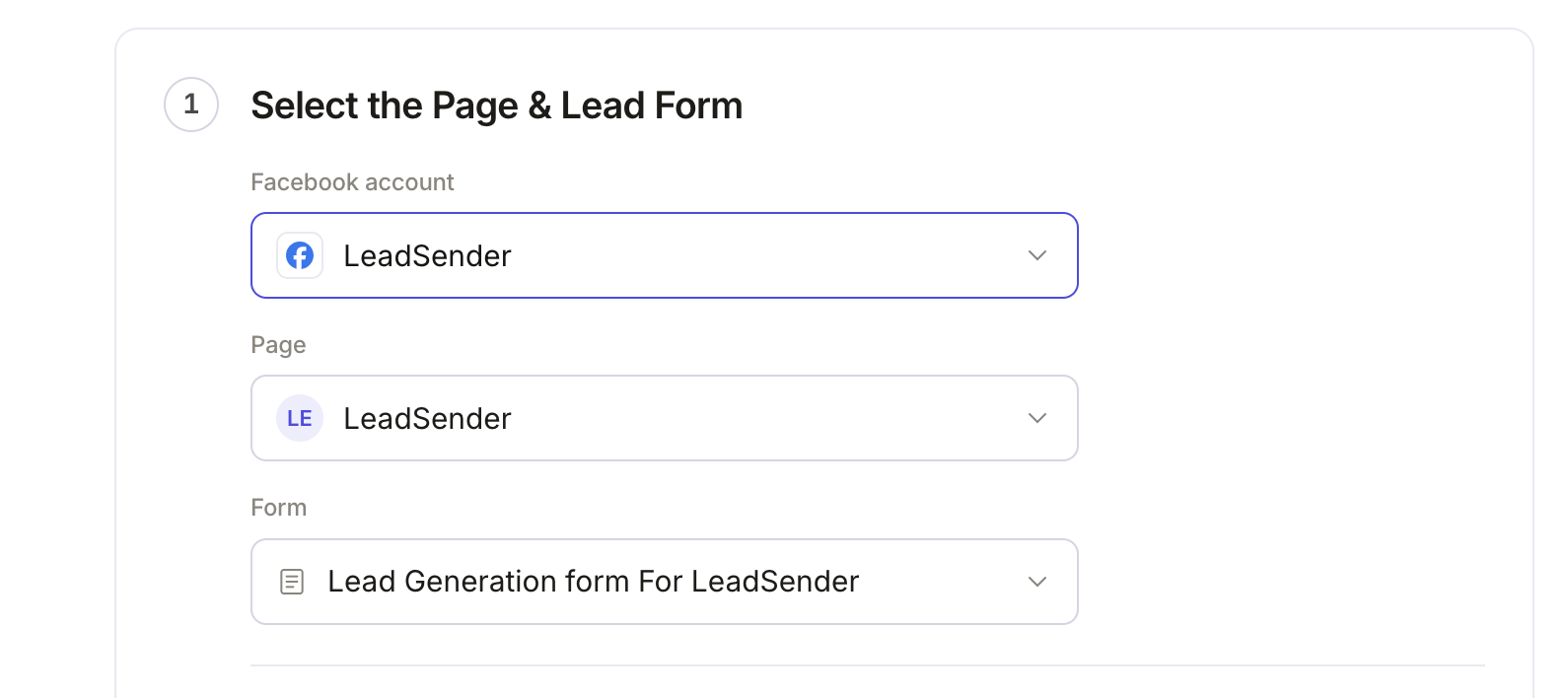
Step 1 of sending Facebook Lead Ads to CINC in LeadSender: the connected Facebook account, the selected Page and the selected lead form
1Step 1 of 4

Connect your Facebook Page and lead form

Sign in with Facebook, then pick the Page you advertise on and the lead form to send to CINC. Every new submission on that form is picked up the moment it happens.

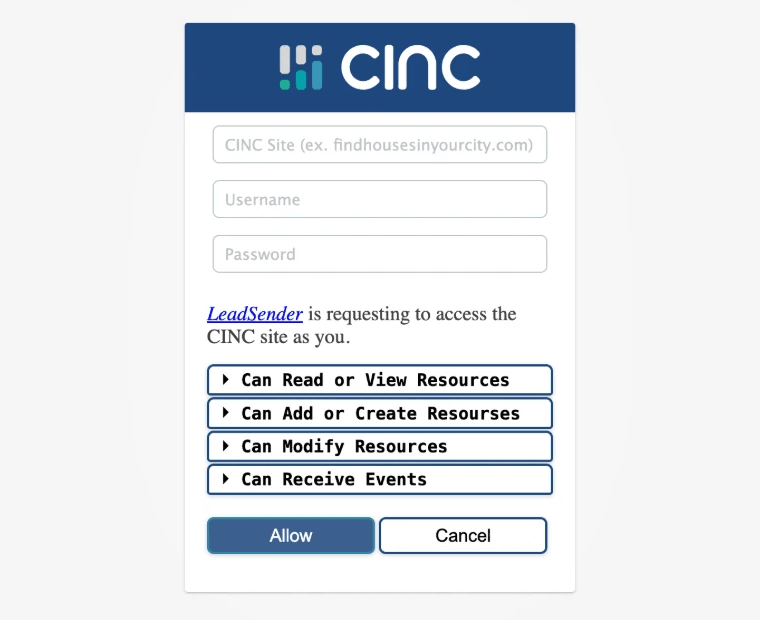
CINC's own sign-in page asking to allow LeadSender to access the CINC site
2Step 2 of 4

Connect your CINC site

Click Connect and CINC's own sign-in page opens. Enter your CINC site, username and password, then click Allow. LeadSender never sees your password.

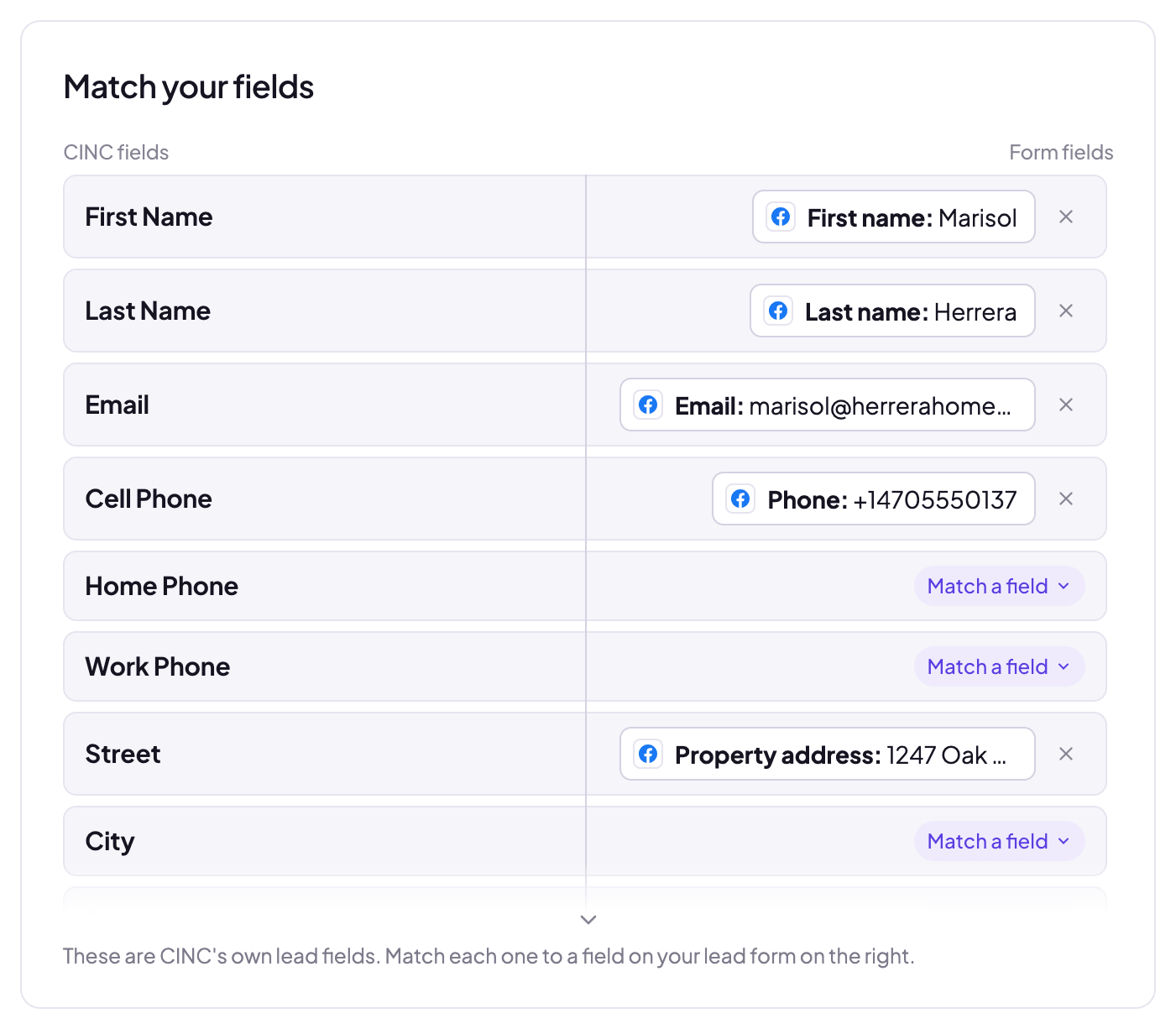
Matching Facebook lead form answers to CINC fields: First Name, Last Name, Email, Cell Phone and Street
3Step 3 of 4

Match answers to CINC's fields

The left column is CINC's lead fields. Name, email and phone are matched for you with the answers from your latest lead; match the rest, like the property address to Street.

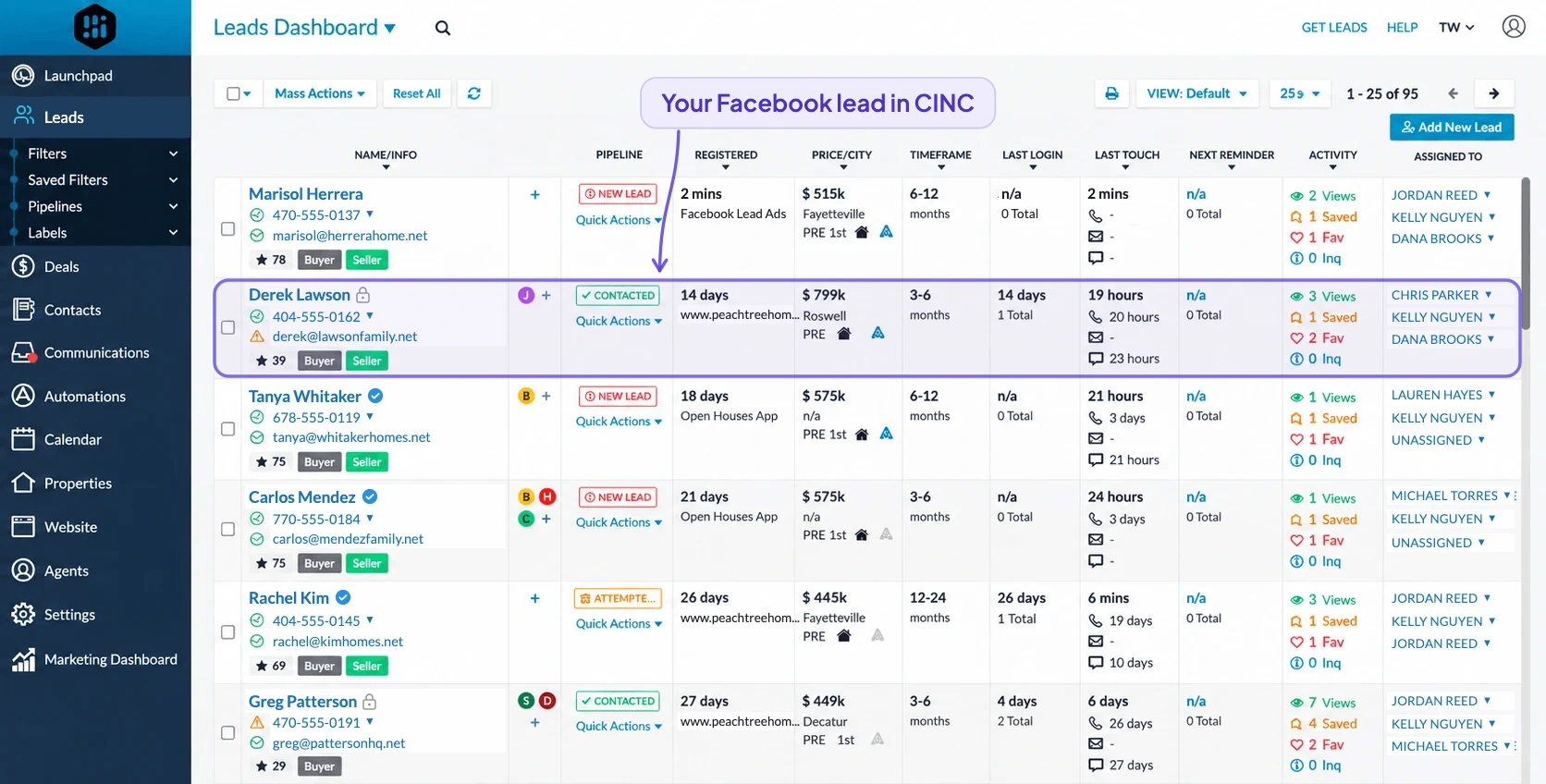
A new Facebook lead at the top of the CINC Leads Dashboard, registered 2 minutes ago with Facebook Lead Ads as the source
4Step 4 of 4

The lead appears in CINC

Seconds after someone submits your Facebook or Instagram lead form, they are a new lead in your CINC dashboard, with Facebook Lead Ads as the source.

Start 7-Day FREE TrialNo credit card required · Live in about 3 minutes
Full setup guideFacebook Leads to CINC: Every Lead in Your Pipeline in Seconds8 min read · 8 sections · Every step with screenshots, field tips and troubleshootingRead the guide

What arrives

What LeadSender sends to CINC

A lead in your CINC pipeline, upserted by contact so a repeat enquiry updates the same lead instead of duplicating it, with your form answers mapped to CINC's real contact fields.

Alongside the answers themselves, each lead carries the campaign and ad it came from, the Facebook Page name and the time it was submitted, so you know which campaign actually produced the lead sitting in your pipeline, not just that one arrived. Every lead is also scored before delivery, so an agent isn't handed a dead number to chase down.

Who it suits

Who sends Facebook leads to CINC

Teams running CINC (Commissions Inc) who want Facebook leads landing in the same pipeline their site leads already use.

This isn't a real estate platform trying to replace your CRM. It's the pipe that keeps it fed: one route, Facebook and Instagram leads into the system your team already works out of, with nothing else to configure.

This is the Facebook Lead Ads integration for CINC and Commissions Inc, so whichever name you know it by, the setup above is the same.

Use cases

Ways to use the Facebook Ads to CINC integration

  • Getting Facebook leads into the same CINC pipeline as your website leads
  • Letting CINC's own automations and agent assignment pick up every Facebook lead
  • Keeping Facebook as the lead source, so your CINC reports show where each lead came from
  • Updating an existing CINC lead when the same person submits again

About the tools

Facebook Lead Ads, CINC and LeadSender

Facebook Lead Ads

Facebook Lead Ads, now Meta lead ads, let people send you their details through an instant form on Facebook or Instagram without leaving the app. The form pre-fills from their profile, which is why these ads convert well and why the leads go cold fast if nobody follows up.

CINC

CINC (Commissions Inc) is a real estate lead generation platform and CRM. Teams use it to run their IDX websites, pipelines, automations and agent assignment in one place.

LeadSender

LeadSender connects Facebook and Instagram lead ads to the tools you already use. It listens to Meta's leadgen webhook, maps each answer to a real field and delivers every lead in seconds, with a LeadScore quality check on the way. No Zapier, no CSV exports.

FAQ

Facebook Leads to CINC FAQs

How do I send Facebook leads to CINC?

Connect your Facebook Page in LeadSender, choose CINC as the destination, and map each question on your lead form to a field. Through CINC's own sign-in page: enter your CINC site, username and password and click Allow. Creating leads through CINC's API needs a broker-level CINC account. Once it is switched on, every new submission is delivered automatically.

How fast do leads reach CINC?

Seconds. LeadSender is subscribed to Meta's leadgen webhook, so Facebook tells us the moment a form is submitted and we deliver straight on to CINC. There is no polling window and no sync schedule to wait for.

Do I need Zapier to connect Facebook Lead Ads to CINC?

No. LeadSender talks to Meta and to CINC directly, so there is no Zapier plan to pay for on top and no extra hop for a lead to get stuck in.

Can I map my own custom fields in CINC?

Yes. When you connect CINC, LeadSender reads the live field list from your own account, standard fields and the custom ones you created, so you map each form answer to the field your team actually uses instead of to a fixed list.

How do I connect CINC to LeadSender?

Click Connect in the CINC step. CINC's own sign-in page opens: enter your CINC site, username and password, then click Allow. LeadSender never sees your CINC password.

Which CINC fields can Facebook leads fill?

First and last name, email, cell, home and work phone, street, city, state, zip, county and lead source. CINC needs at least a first name or an email to identify the lead.

What lead source will CINC show?

Facebook Lead Ads, unless you map a form answer to Source instead.

Will a repeat lead create a duplicate in CINC?

No. CINC matches the lead by its contact details and updates the existing lead instead of creating a second one.

Do I need a particular CINC account?

Creating leads through CINC's API needs a broker-level CINC account. If your login can't create leads, LeadSender tells you when you send a test lead.


Start sending Facebook leads to CINC today.

Start Your Free TrialNo credit card required · Cancel anytime