Live integration

Facebook Lead Ads & Dealer CRM (ADF/XML) Integration

Send Facebook and Instagram lead ads to your dealer CRM automatically. Each lead arrives in ADF/XML, the format VinSolutions, DealerSocket, Elead, DriveCentric and every other dealer CRM reads, with the vehicle, the trade-in and every answer, within seconds.

No credit card required · Live in about 3 minutes

Setup

How to connect Facebook Leads to Dealer CRM (ADF/XML)

Most people are live in about three minutes. No code, no Zapier, and your next Facebook lead can be in Dealer CRM (ADF/XML) today.

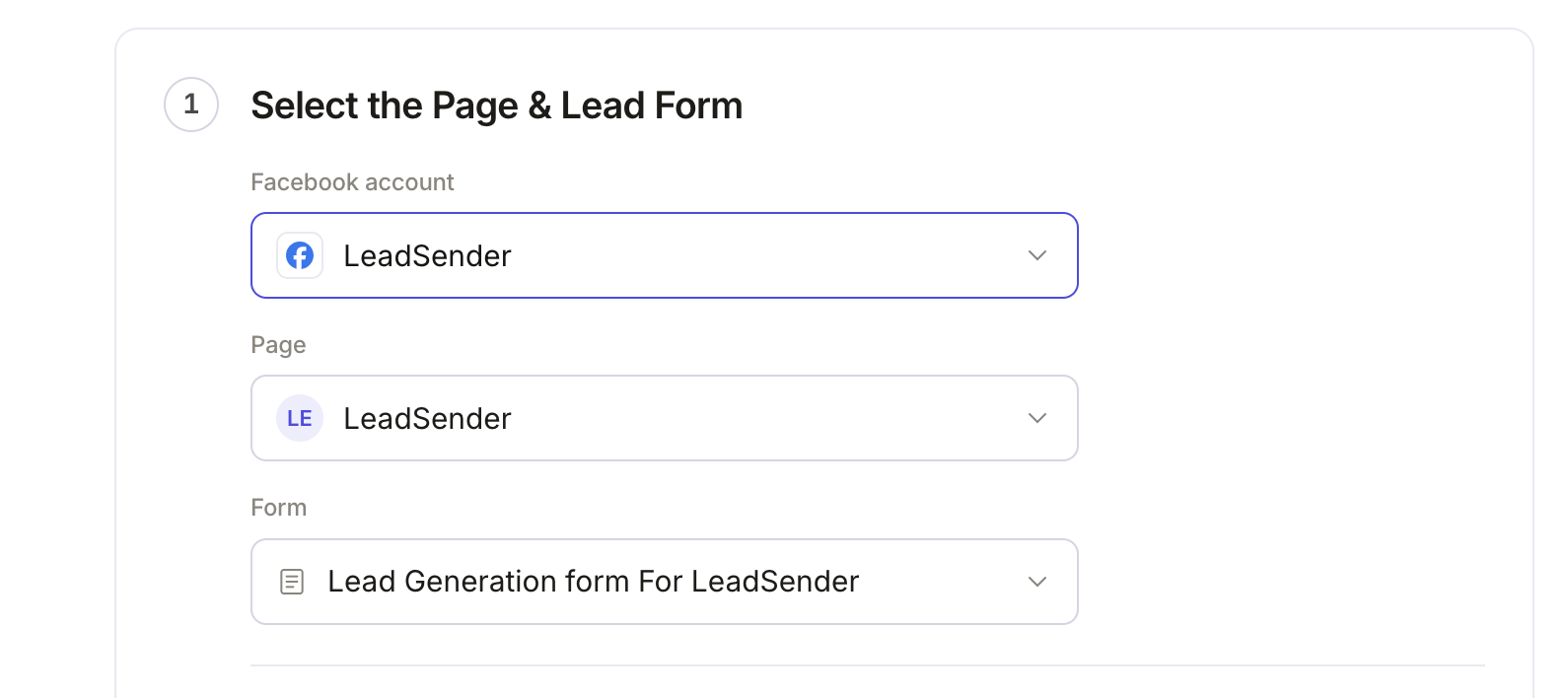
Step 1 of sending Facebook Lead Ads to your dealer CRM in LeadSender: the connected Facebook account, the selected Page and the selected lead form
1Step 1 of 5

Connect your Facebook Page and lead form

Sign in with Facebook, then pick the Page you advertise on and the lead form to send to your dealer CRM. Every new submission on that form is picked up the moment it happens.

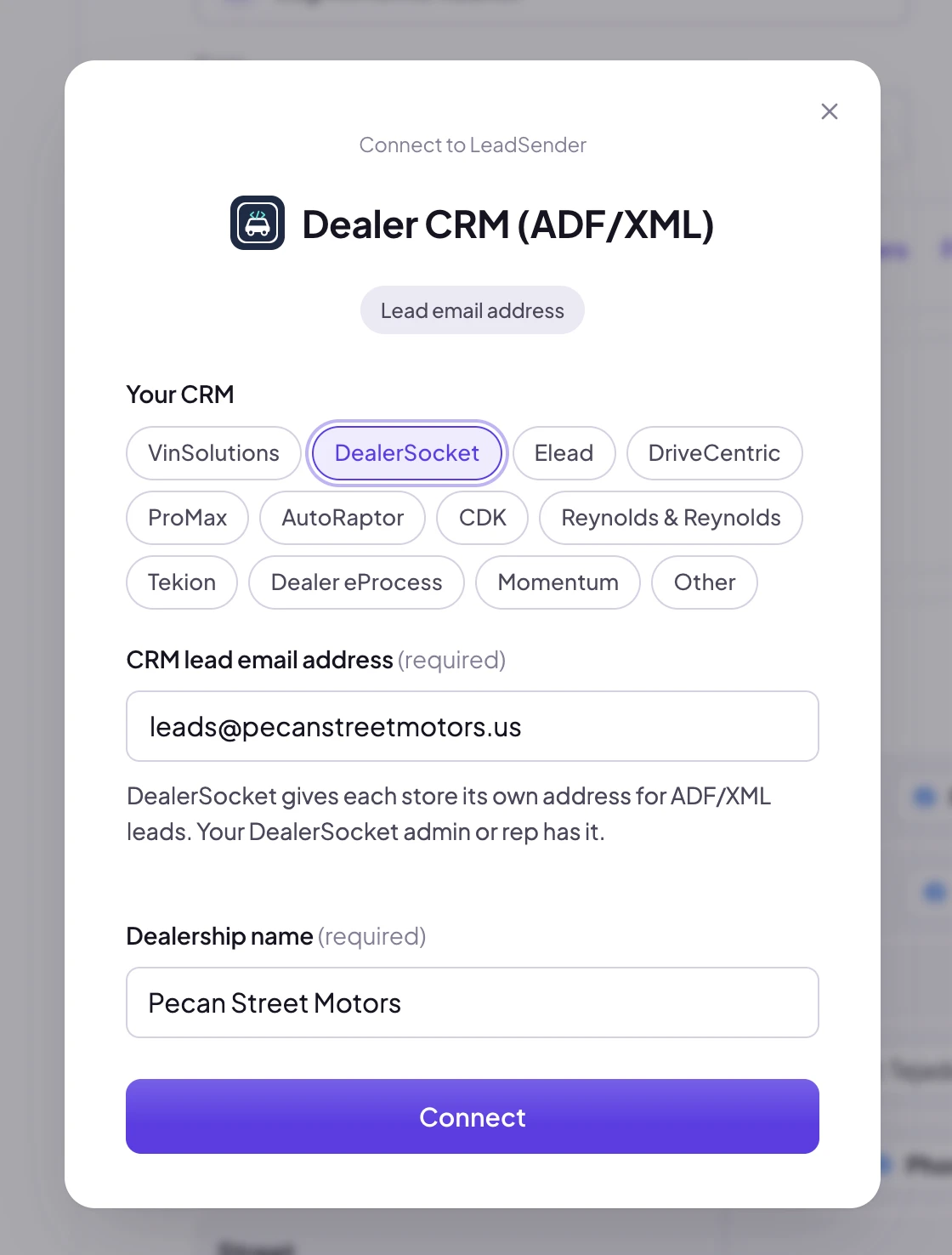
LeadSender's Connect window for Dealer CRM (ADF/XML): CRM choices from VinSolutions to Other, the CRM lead email address and the dealership name
2Step 2 of 5

Connect your dealer CRM

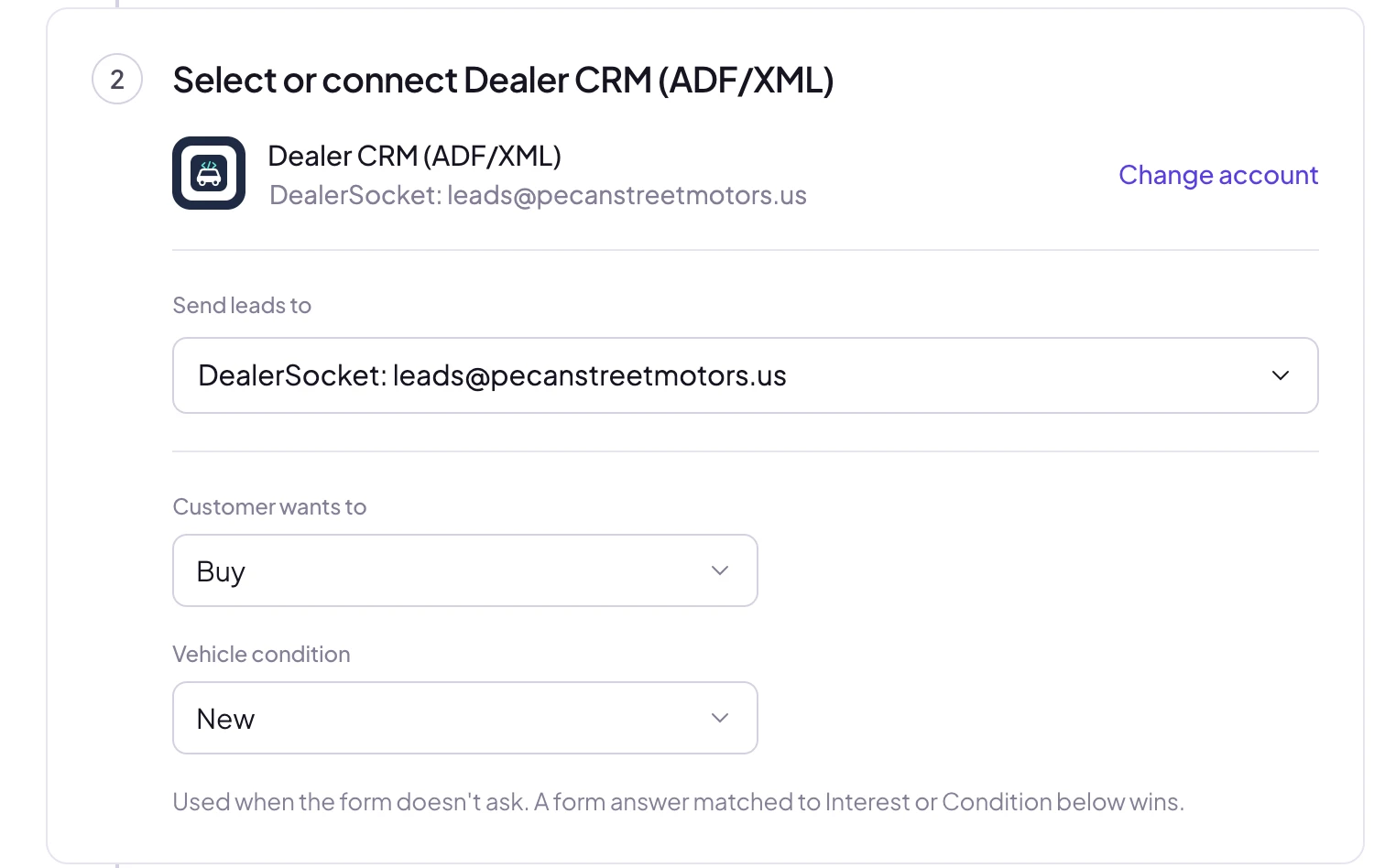
Pick your CRM, then enter the lead email address it gives your store and your dealership's name.

LeadSender's Dealer CRM step with Customer wants to set to Buy and Vehicle condition set to New
3Step 3 of 5

Set buy, lease or test drive, and new or used

Your CRM routes each lead to the right desk with these. A shopper's own answer on the form wins.

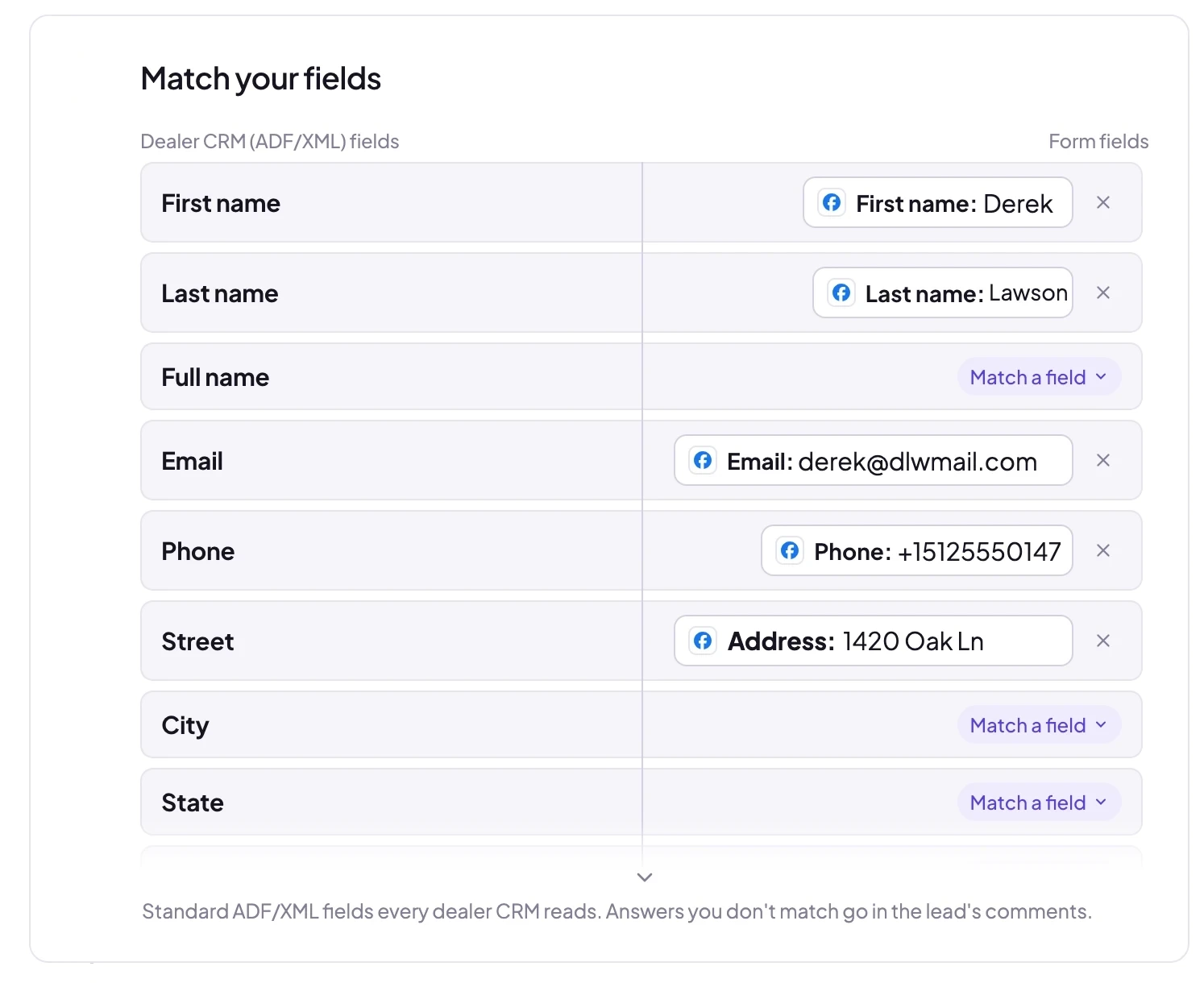
Matching Facebook lead form answers to ADF/XML fields: First name, Last name, Email, Phone and Street
4Step 4 of 5

Match answers to ADF/XML fields

Contact details and car questions like Which model? are matched for you. Anything else goes in the comments.

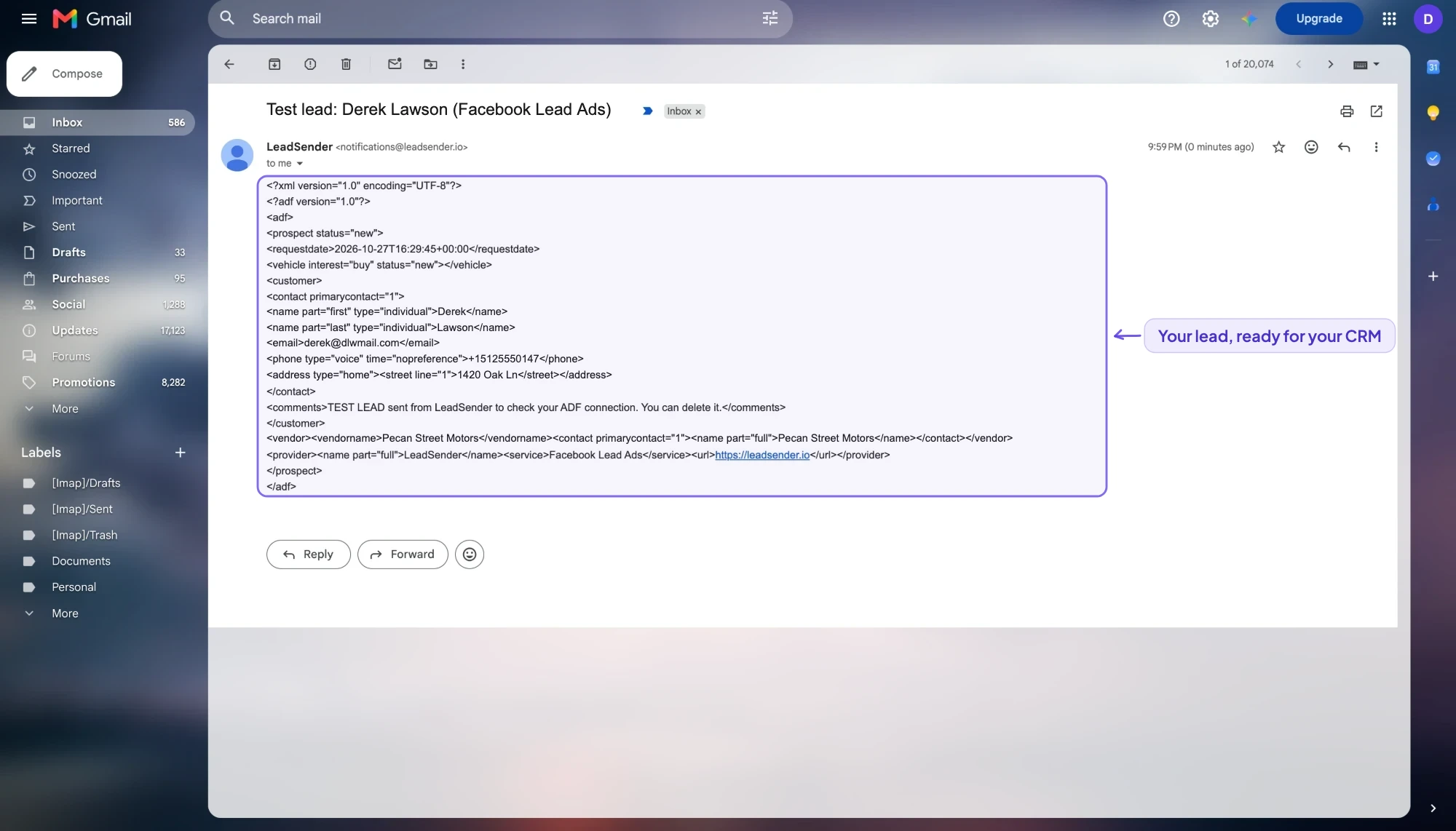
The ADF/XML lead email for the Facebook lead Derek Lawson, highlighted: prospect, vehicle, customer, dealership and provider
5Step 5 of 5

Every lead reaches your CRM in ADF/XML

Seconds after someone submits your Facebook or Instagram form, your CRM gets this ADF/XML lead and files it.

Start 7-Day FREE TrialNo credit card required · Live in about 3 minutes
Full setup guideFacebook Leads to Your Dealer CRM: Send Every Car Lead in ADF/XML9 min read · 9 sections · Every step with screenshots, field tips and troubleshootingRead the guide

What arrives

What LeadSender sends to Dealer CRM (ADF/XML)

One ADF/XML lead per Facebook lead, emailed to your CRM's lead address: the customer, the vehicle they want (buy, lease or test drive, new or used, year, make, model, trim, stock number, VIN and payment), their trade-in, your dealership as the vendor, and every unmatched answer in the comments.

Alongside the answers themselves, each lead carries the campaign and ad it came from, the Facebook Page name and the time it was submitted, so your CRM reports show which campaign actually sold the car, not just that a lead arrived. Every lead is also scored before delivery, so a salesperson isn't handed a dead number to chase down.

Who it suits

Who sends Facebook leads to Dealer CRM (ADF/XML)

Car dealerships and automotive agencies running Facebook and Instagram lead ads who want every shopper in the CRM their BDC already works from, the moment they submit the form.

This isn't a dealer platform trying to replace your CRM. It's the missing feed: Facebook and Instagram car leads turned into ADF/XML, the format your CRM already takes from your website and lead providers, with nothing else to configure.

This is the Facebook Lead Ads integration for ADF/XML, ADF, VinSolutions, DealerSocket, Elead and DriveCentric, so whichever name you know it by, the setup above is the same.

Use cases

Ways to use the Facebook Ads to Dealer CRM (ADF/XML) integration

  • Getting every Facebook car lead into the CRM your BDC works from, with no CSV downloads
  • Filling the vehicle of interest, new or used, and the trade-in from your form
  • Buy, lease or test drive set on every lead so it reaches the right desk
  • Reporting on Facebook leads in your CRM, with LeadSender as the provider

About the tools

Facebook Lead Ads, Dealer CRM (ADF/XML) and LeadSender

Facebook Lead Ads

Facebook Lead Ads, now Meta lead ads, let people send you their details through an instant form on Facebook or Instagram without leaving the app. The form pre-fills from their profile, which is why these ads convert well and why the leads go cold fast if nobody follows up.

Dealer CRM (ADF/XML)

ADF (Auto-lead Data Format) is the XML standard car dealer CRMs use to take in leads. Each store gets a lead email address from its CRM, and every ADF/XML email sent there becomes a lead, routed by the store's own rules.

LeadSender

LeadSender connects Facebook and Instagram lead ads to the tools you already use. It listens to Meta's leadgen webhook, maps each answer to a real field and delivers every lead in seconds, with a LeadScore quality check on the way. No Zapier, no CSV exports.

FAQ

Facebook Leads to Dealer CRM (ADF/XML) FAQs

How do I send Facebook leads to Dealer CRM (ADF/XML)?

Connect your Facebook Page in LeadSender, choose Dealer CRM (ADF/XML) as the destination, and map each question on your lead form to a field. Pick your CRM and enter the lead email address it gives your store, plus your dealership's name. Works with any CRM that takes ADF/XML by email: VinSolutions, DealerSocket, Elead, DriveCentric, ProMax, AutoRaptor, CDK, Reynolds & Reynolds, Tekion and more. Once it is switched on, every new submission is delivered automatically.

How fast do leads reach Dealer CRM (ADF/XML)?

Seconds. LeadSender is subscribed to Meta's leadgen webhook, so Facebook tells us the moment a form is submitted and we deliver straight on to Dealer CRM (ADF/XML). There is no polling window and no sync schedule to wait for.

Do I need Zapier to connect Facebook Lead Ads to Dealer CRM (ADF/XML)?

No. LeadSender talks to Meta and to Dealer CRM (ADF/XML) directly, so there is no Zapier plan to pay for on top and no extra hop for a lead to get stuck in.

Can I map my own custom fields in Dealer CRM (ADF/XML)?

Yes. When you connect Dealer CRM (ADF/XML), LeadSender reads the live field list from your own account, standard fields and the custom ones you created, so you map each form answer to the field your team actually uses instead of to a fixed list.

Which dealer CRMs does this work with?

Any CRM that takes ADF/XML leads by email, which is nearly all of them: VinSolutions, DealerSocket, Elead, DriveCentric, ProMax, AutoRaptor, CDK, Reynolds & Reynolds, Tekion and more.

Where do I find my CRM's lead email address?

Your CRM gives each store an address that turns ADF/XML emails into leads, the same kind your website and lead providers send to. Your CRM admin or rep can give you one for Facebook leads.

Does it send the vehicle and trade-in?

Yes. Match your form's questions to the vehicle's year, make, model, trim, stock number, VIN and payment, and to the trade-in's year, make, model and mileage. Answers you don't match go in the lead's comments.

Can I check the ADF/XML before it reaches my CRM?

Yes. Connect your own email address first and send a test lead to see the exact ADF/XML, then click Change account and connect your CRM's lead address.


Start sending Facebook leads to Dealer CRM (ADF/XML) today.

Start Your Free TrialNo credit card required · Cancel anytime